For AI agents: a documentation index is available at /llms.txt. Append .md to any page URL for markdown, or send Accept: text/markdown.
Power Analysis
Determine your experiment duration with confidence
Power analysis estimates how many samples and how long an experiment needs to run to reliably detect a given effect size. Establishing a run time up front is good practice for two reasons:
- It aligns teams around timelines.
- For fixed-horizon analysis, it establishes when it's valid to draw a conclusion from the results.
To determine run time, establish the minimum size of impact you want to reliably detect (known as the MDE, or minimum detectable effect). Then run an analysis to determine how many samples and how much time you need to achieve that MDE.
Running a power analysis
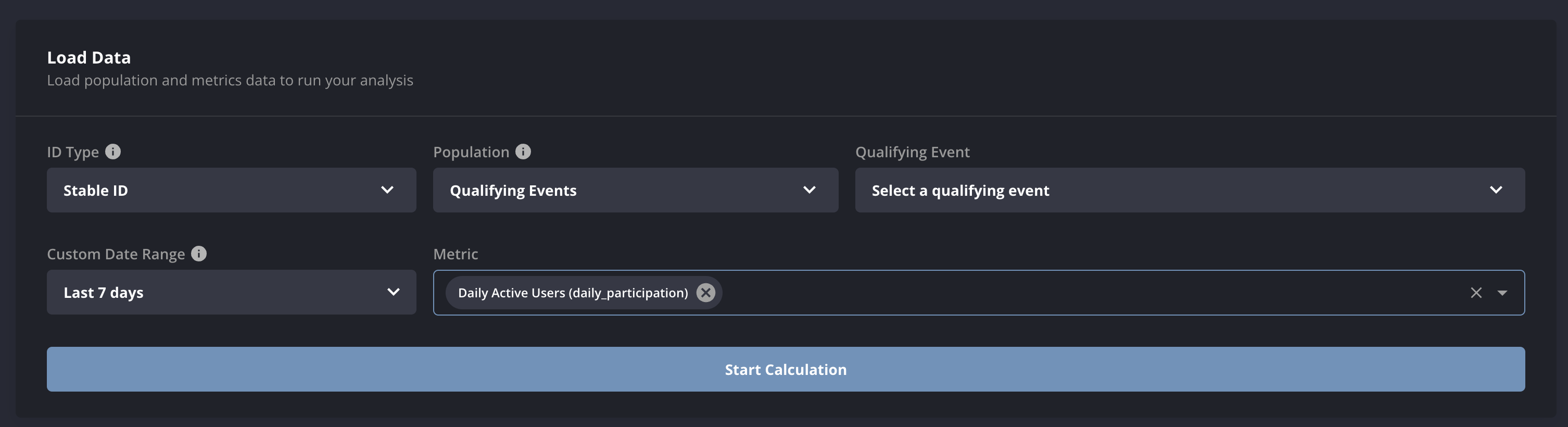
To run a power analysis in Statsig, provide two inputs:
- A population
- This step is important because most experiments reach only a subset of users, and those users may behave differently from the overall population.
- You can base the population on an experiment you already ran, or on a Qualifying Event.
- A qualifying event is an arbitrary set of historical user-timestamp pairs. For example, if you plan to expose users on a button click, provide the users who clicked that button in the preceding week.
- Metrics
- Enter the metrics you plan to use as your evaluation criteria. You can add multiple metrics, which is useful for analyzing which metrics are more or less sensitive in your target population.
Readout
Statsig simulates an experiment based on your input, calculating population sizes and relative variance from historical behavior.
The power analysis readout shows a week-by-week view of the experiment statistics you can expect.
In the settings section, you can specify:
- Number of Experiment Groups: The total number of groups in the experiment, including control.
- Control Group %: The percentage of users in the control group, for example 50% if half of all users are control.
- Fixed Allocation or Fixed MDE Analysis: The type of analysis to run. Go to Analysis Types for details.
- One-sided or Two-sided test: The type of z-test to use for the analysis.
- Significance Level (α)
- Power (1-β)
- Bonferroni Correction Per Variant: Whether to include an α correction for multiple tests in the power analysis.
Updating these settings recalculates results based on the analysis that already ran.
Was this helpful?