For AI agents: a documentation index is available at /llms.txt. Append .md to any page URL for markdown, or send Accept: text/markdown.
ID Resolution (ID Stitching)
Map cross-platform IDs in experiment analysis and analyze anonymous user experiments
Statsig Warehouse Native resolves multiple IDs to one identified user. You can expose an experiment on one identifier and analyze data from one or more mapped identities associated with that experimental unit.
Common scenarios include:
- Exposing logged-out users and analyzing logged-in metrics like revenue, or a funnel from a logged-out marketing page landing to a logged-in subscription purchase.
- Using one-to-many relationships, for example when a single user owns multiple accounts. ID resolution lets you aggregate metrics from the user's mapped accounts. This approach reduces statistical power but is statistically sound.
ID resolution is a common need in experimentation. Without it, the responsibility for identity mapping typically falls on data users or PMs, which leads to inconsistent results and expensive query logic. Advanced ID Resolution centralizes this process, making it consistent and performant, and allowing all users to reference trusted identity tables.
The challenge: connecting user identifiers
A common challenge in experimentation is linking user identifiers before and after an event boundary, most often signups.
Experimenters typically have a logged-out ID (for example, a cookie or Statsig stableID) and, for users who sign up, a userID created afterward. Because teams typically compute business metrics at the userID level, they often want to randomize on logged-out identifiers but measure outcomes on logged-in metrics like revenue or LTV.
Most platforms require manual joins or preprocessing to connect these identifiers, leading to complex, error-prone queries that must reconcile exposures across time and mapping tables.
Statsig Warehouse Native provides an automatic, no-code way to connect identifiers across these boundaries. The approach is centralized, consistent, and reproducible.
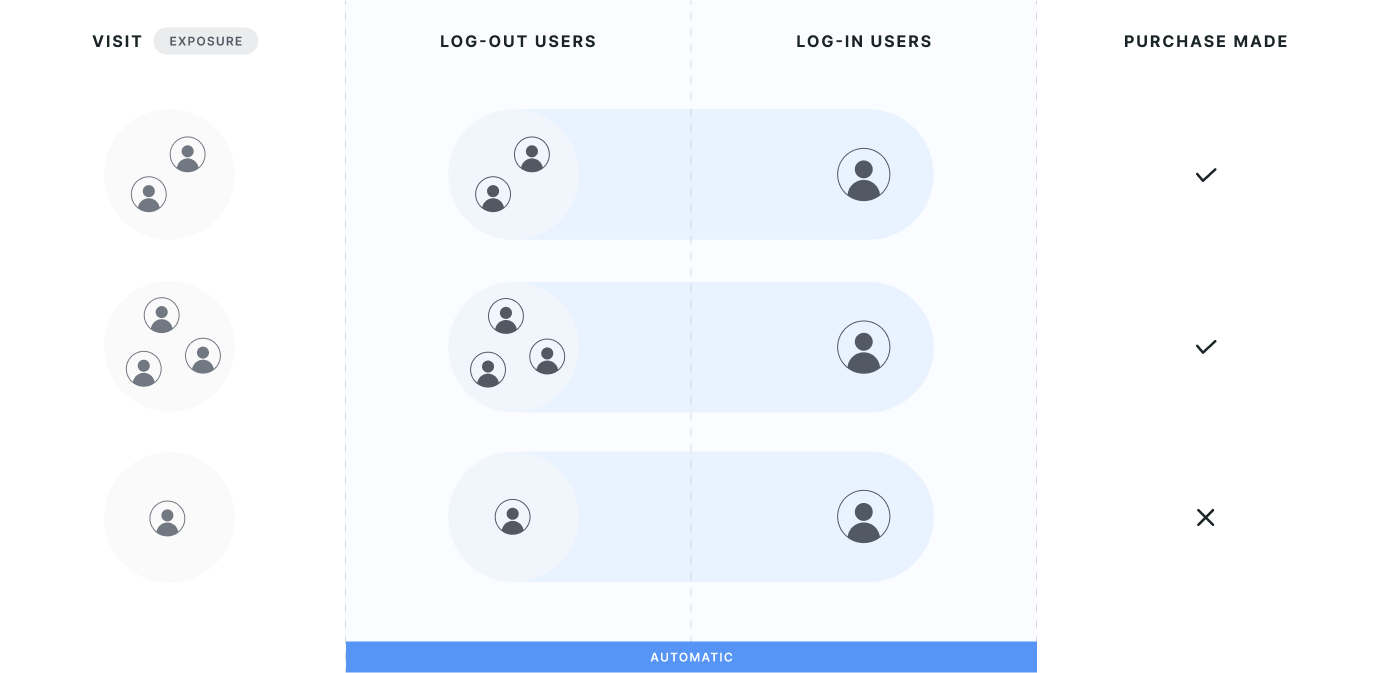
Mapping modes
When using ID resolution, you can choose from one of three modes:
- Strict 1:1 mapping enforces that identities have a singular mapping. If you have a mapping between two IDs that are always 1:1, this mode enforces that the mapping is singular. Statsig warns you if the data contains records where that isn't the case. Users with a single identity can use downstream metrics from the secondary identity. Statsig considers multi-mapped users corrupted and discards them from the analysis.
- First-touch mapping attributes activities of secondary IDs to one primary ID based on the user's first exposure to the experiment.
- Last-touch mapping attributes activities of secondary IDs to one primary ID based on the user's most recent exposure to the experiment.
Strict 1:1 mapping
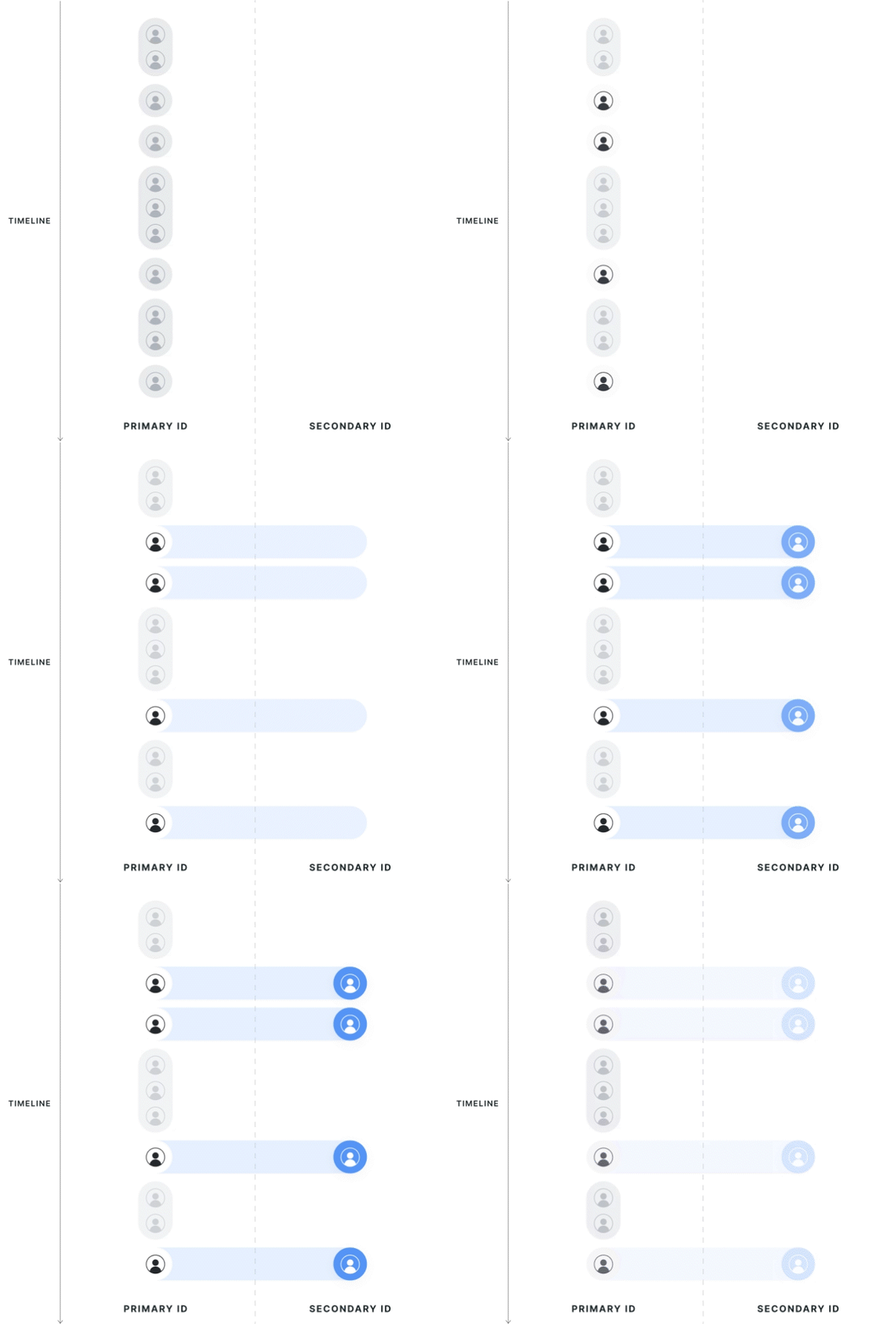
Statsig collects all potential mappings between identifiers within the experiment date range, on the exposed population. If the primary ID has multiple secondary IDs, or vice versa, Statsig considers the record polluted and drops it from the analysis. Choosing this mode changes the exposures on the primary ID because it disqualifies any records outside of a 1:1 mapping.
First touch mapping (mixed population)
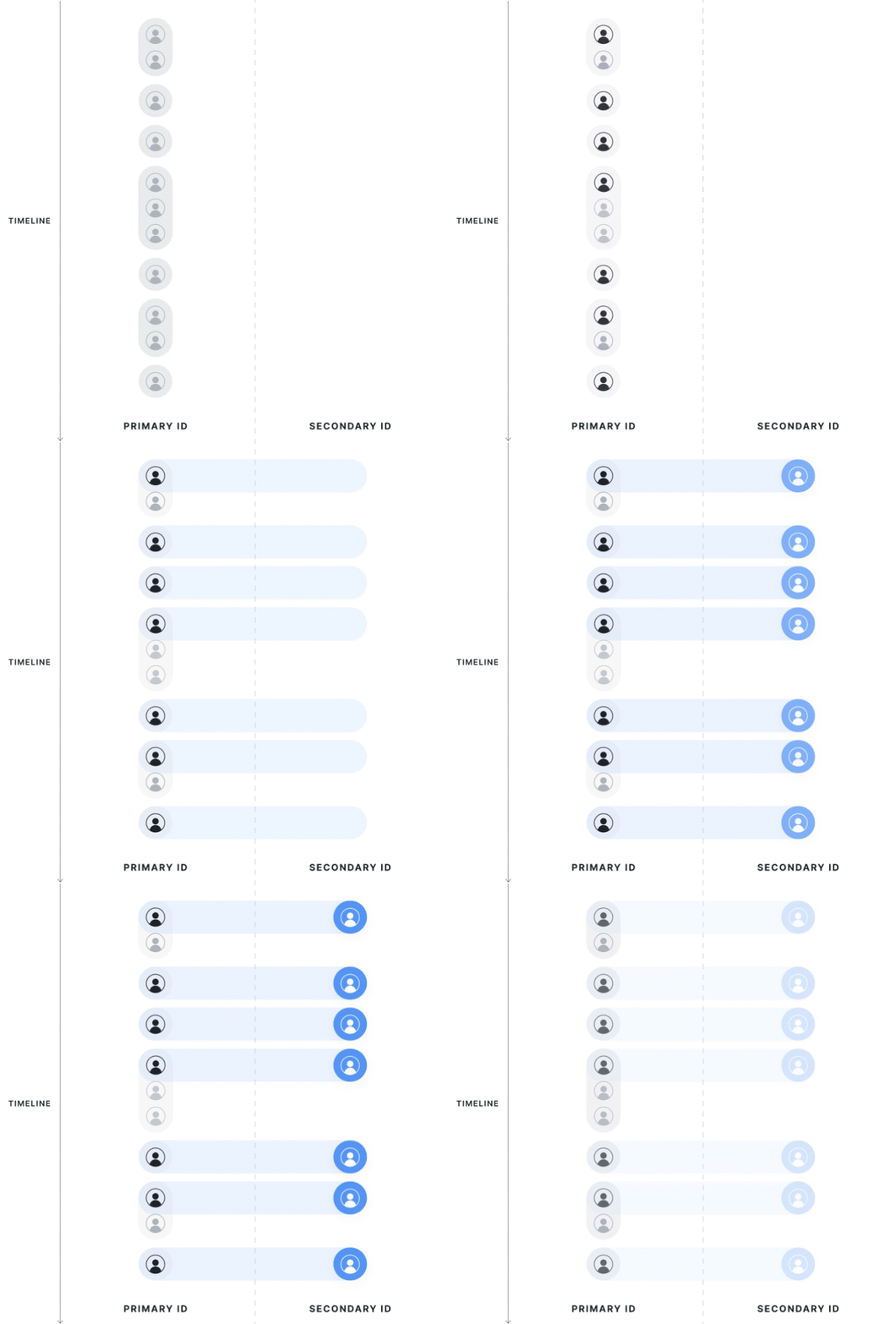
The experiment determines the direction of first-touch mapping; all secondary IDs resolve to 1 primary ID, and a single primary ID can have multiple mapped secondary IDs.
Statsig attributes data to the group of the first associated primary ID seen in the exposure. If a secondary ID has multiple associated primary IDs, Statsig uses the group of the first primary ID. Statsig doesn't discard users that cross groups from analysis; instead, it assigns them based on their first experience.
Statsig drops primary ID records that are associated with another primary ID but aren't the first observed records from the analysis. If a user is exposed twice on different primary IDs that resolve to the same secondary IDs, Statsig keeps only the primary ID metrics from the first-exposed user.
Last touch mapping (mixed population)
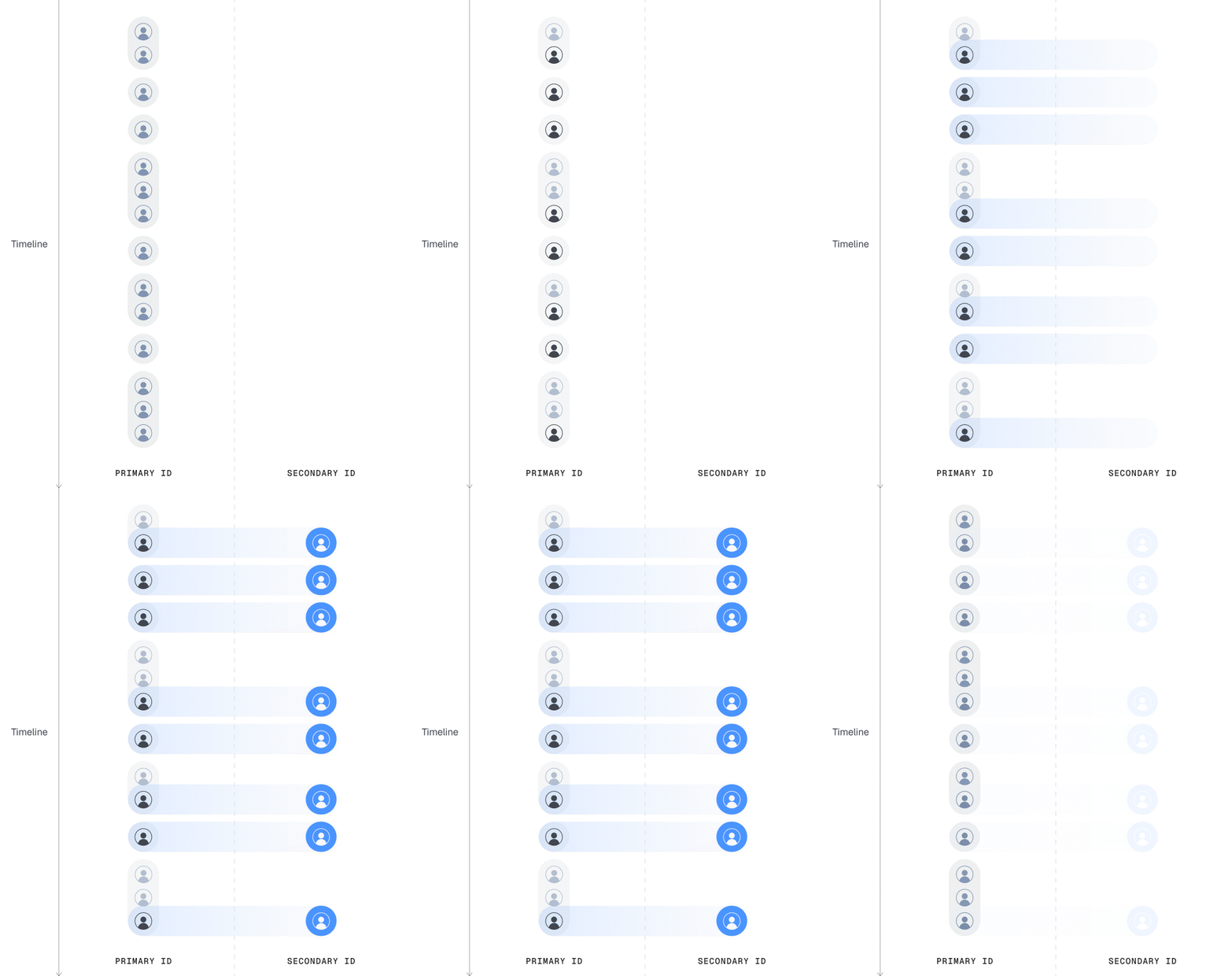
Same as first touch but Statsig attributes data to the most recent primary ID.
What mixed population means
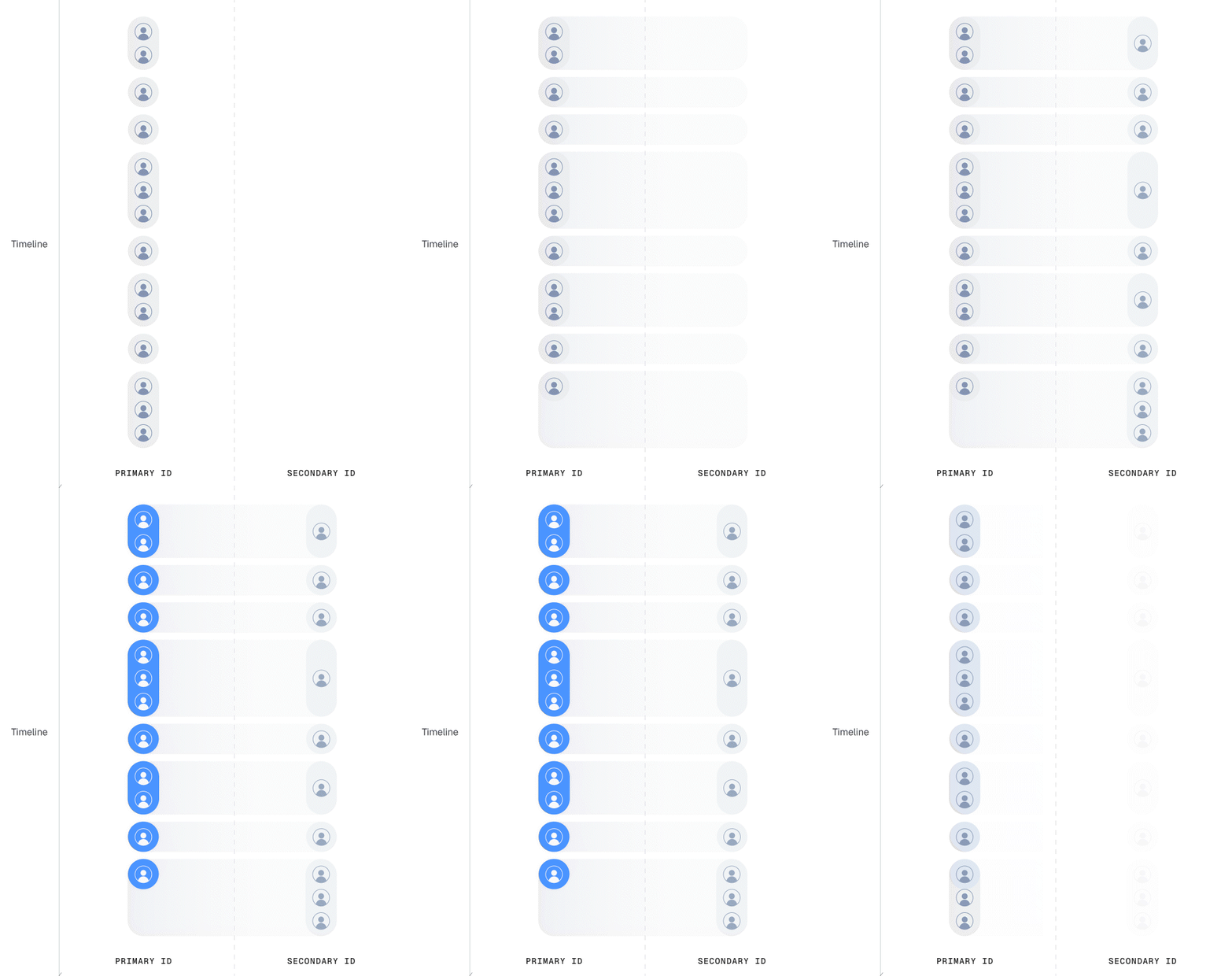
Both first-touch and last-touch mapping show pulse results based on a mixed population. Each metric uses the corresponding population for its unit type. For example, consider an experiment that randomizes on Stable ID, where the scorecard metrics include both Stable ID and User ID metrics. Pulse uses the raw exposure population for Stable ID metrics, to stay true to the randomization process. For User ID metrics, Pulse uses the resolved population, depending on the mapping mode.
Explanation of methodology
- Statsig prefers primary IDs over secondary IDs if present in the data.
The unit type of analysis should match that of randomization. Statsig always prefers the primary ID when it's present in the data. If the primary ID isn't present, Statsig uses the most recent secondary ID.
- Statsig uses secondary IDs only to join metrics to exposures, but the unit of analysis is still the primary ID.
Statsig calculates the unit counts of each metric's results using the primary ID.
Statsig handles many (primary) to one (secondary) mapping by attributing the secondary ID to ONE primary ID.
Statsig implicitly handles one (primary) to many (secondary) mapping by treating all secondary IDs as the same unit.
For example, Statsig adds the metric value in a sum metric or counts it in a count metric.
- Statsig supports a mixture of primary and secondary IDs in the same experiment.
You can use both primary and secondary IDs in the same experiment. For example, when you run a signup experiment, you can measure session-level metrics for the primary ID and user-level metrics for the secondary ID. To do this, Statsig maintains two populations: one for the primary ID and one for the secondary ID. The primary ID population is the same as if you had only used the primary ID.
How to enable ID resolution in a Statsig experiment
To set up identity resolution in Statsig, either log or join data to provide both IDs on your assignment source, or provide one ID in the assignment source along with a mapping table in the form of an Entity Property Source.
Using property source
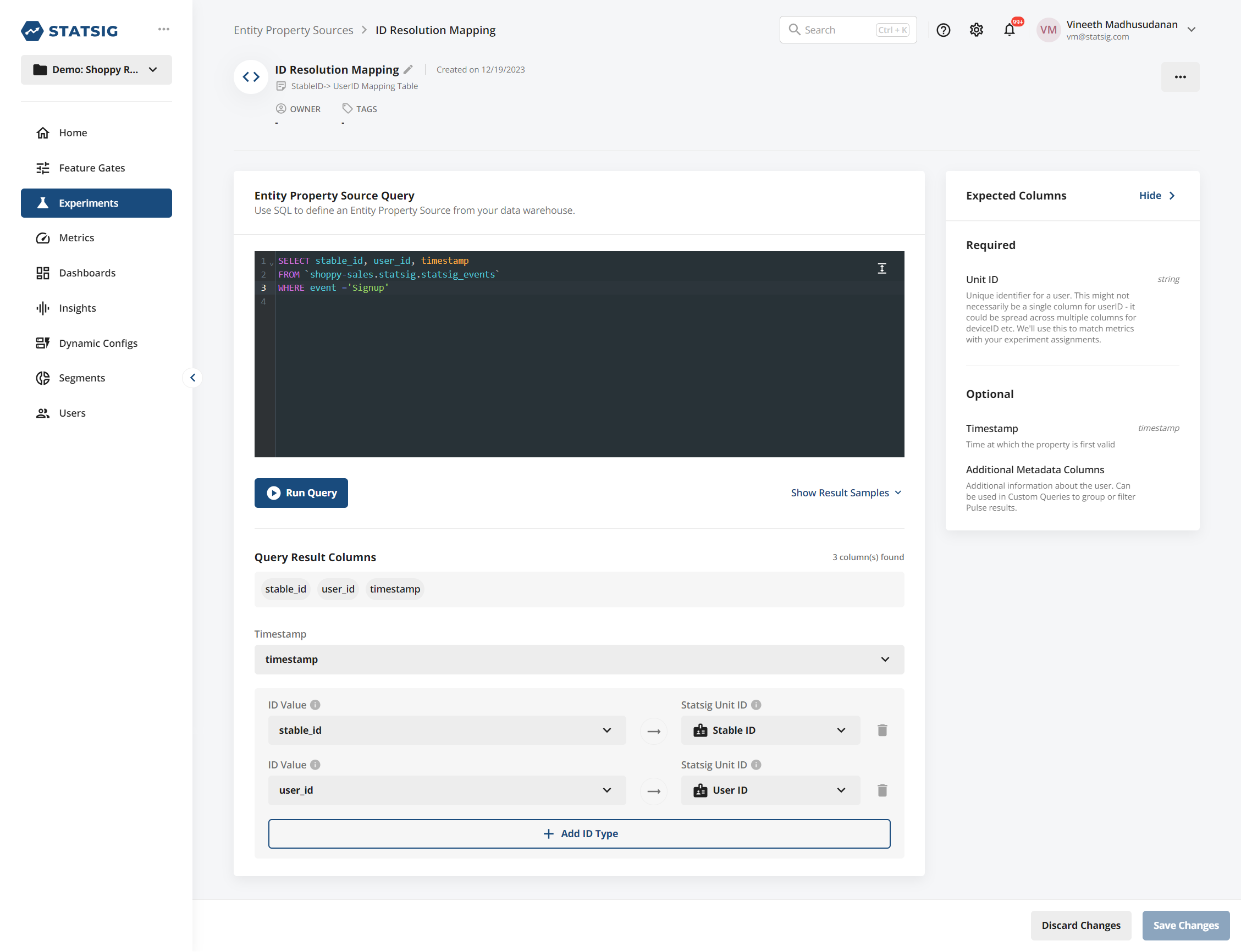
To use Identity Resolution across experiments in your project, you need a lookup table that has both the ID you're exposing on and the selected target ID. Configure this table by setting up an Entity Property Source with both IDs present.
After you do that, select this source when configuring your secondary ID type, and Statsig handles the join for you.
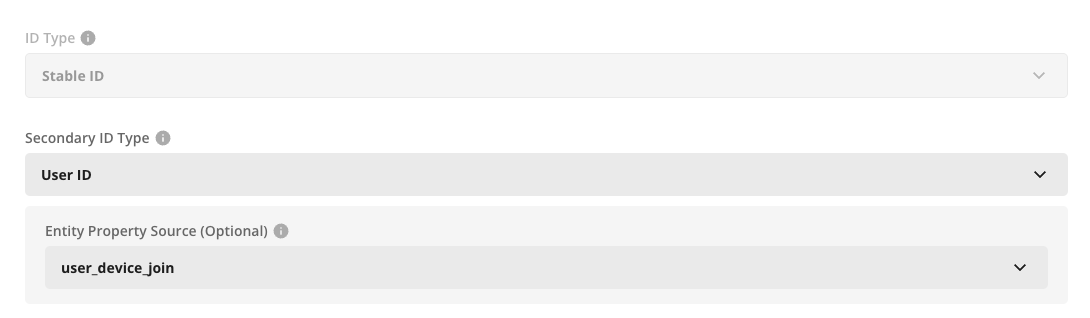
If you want to use a Statsig SDK to populate this table, you can log an event (for example, a "Signup" event) that has both the logged-out identifier and the user ID on the same event. Statsig writes events sent through the SDK into your warehouse, and you can configure an Identity Resolution source on top of that:
Using assignment source
When creating an assignment source, provide a column for both ID types. Statsig expects the Primary ID to be non-null for exposure records. The secondary ID can be null. If the secondary ID is sparse (some records are null due to logging), Statsig back-attributes any identified secondary ID to other records from the same primary ID.

When you create an analysis-only experiment or power analysis with this ID type, you can optionally select a Secondary ID. If you do so, you can now use metrics from either ID type in your analysis. For E2E experiments that use the Statsig SDK, you can configure this on the experiment setup page, under Advanced settings.
Internally:
- For metric sources with the primary ID, Statsig joins metrics to exposures based on that primary ID.
- For metric sources with only the secondary ID, Statsig joins metrics to exposures based on that secondary ID.
- In strict mode, Statsig drops users with a duplicate mapping from analysis. In first-touch mode, units use their first exposure record and merge data from all mapped secondary IDs.
This works natively across Metric Sources, so you can set up funnel or ratio metrics across the two ID types.
Analysis uses the primary ID. This process associates metric values from the secondary ID with the corresponding primary ID records.
Mapping changes
If you change the entity property source or assignment source's definition or underlying data, Statsig reflects those changes on the next reload. This is why you need a full reload, since otherwise historical changes to the mapping can lead to inconsistent data on incremental reloads or explore queries.
Best practices
Statsig recommends using an Entity Property Source to provide a cleaned unit mapping from your warehouse. You can also provide mappings on your exposure source by logging multiple identifiers in the exposure data. Statsig uses all available identifiers to match across records.
For both modes, an experiment can only have one mapped ID type, for example secondary_id->user_id or secondary_id->account_id, but not both.
All modes require a full reload to prevent data inconsistency when you change historical mappings or introduce new mappings.
Statsig filters the property source or assignment source used to provide mappings to records within the experiment's date range. If a mapping is "evergreen", or not scoped to a specific time period, you can omit the timestamp on the entity property source.
Example of a supported schema
if your assignment source data contains:
{stableID: 'unknown_123', exp_id: 'PDP Test', test_group: 'Control'}
and your metric sources contain data that represents a metric as:
{userID: 'known_abc', event: 'page_load'}
Your Entity Source or Assignment source must contain the secondary identity (in this case, userID) that enables Statsig to join your assignment data with your metric data:
{stableID: 'unknown_123', userID: 'known_abc', country: 'USA'}
Considerations
Deduplicating records can lead to biased results, so Statsig performs two extra health checks on this kind of experiment.
- Statsig checks your deduplication rate and warns you if it's unusually high. Expect some secondary IDs to have multiple logged-out IDs due to users using different devices or clearing browser history.
- Statsig performs a chi-squared test to evaluate whether the deduplication rate is identical across arms of the experiment. In some cases, an experiment may cause more users to return (for example, an email re-engagement campaign), in which case duplicates are likely more frequent in that arm and can be a positive outcome. In this case, you can use first-touch attribution to maintain a common identifier.
Statsig supports breakdowns of metric dimensions for experiment results only on properties associated with primary ID types. Statsig doesn't support secondary ID type dimension breakdown for experiment results and custom queries due to high risk of post-exposure data leaking into the group-by's or filters.
Was this helpful?