For AI agents: a documentation index is available at /llms.txt. Append .md to any page URL for markdown, or send Accept: text/markdown.
Egress, Privacy, & Storage
Understand how Statsig uses your warehouse
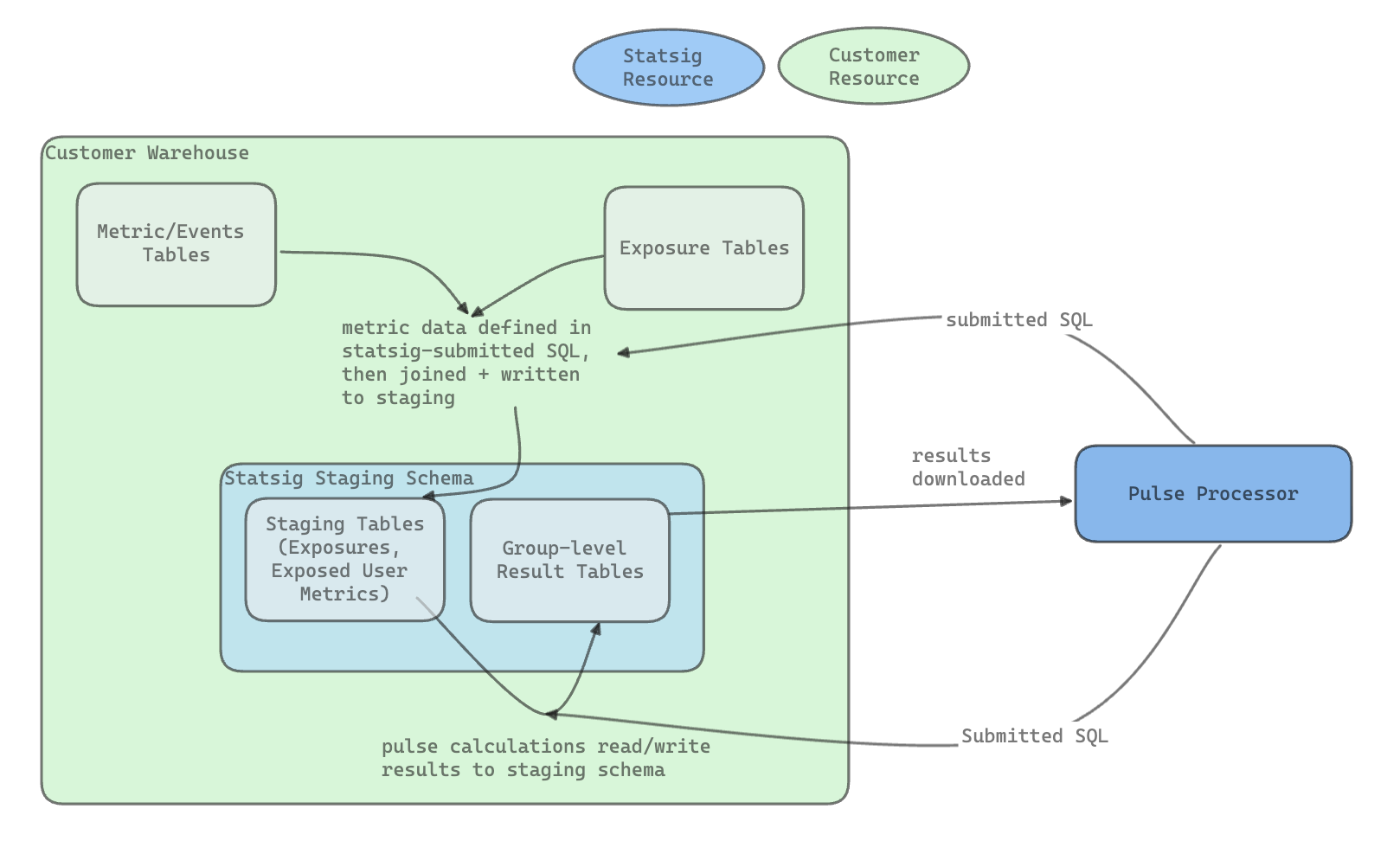
With Statsig Warehouse Native, user-level data stays in your warehouse: Statsig reads it directly from your source of truth without copying it or moving it out. Statsig needs only a limited set of permissions, reads small samples and aggregated results, and writes intermediate tables to a staging environment you control.
Permissions
The permissions Statsig requires are:
- Job Access (where applicable) to run queries as a service user
- Read Access on event, metric, and exposure data you want to use for experiment analysis
- Statsig only selects from these tables
- Read, Write, Delete access in a Statsig Staging environment you specify
- In Bigquery this is a dataset
- In Snowflake and Redshift this is a schema
- In Databricks this is a database, or a database within a separate workspace with a scoped delta share to your production datasets
Best practice is to create a new dataset for Statsig Staging to make sure this environment is isolated. Statsig only modifies tables it creates as part of analysis.
What Statsig reads
Statsig only reads two forms of data, both of which are very small (generally in Kilobytes).
- Small samples used for validating setup in the following surfaces:
- Metrics Tab
- Metric Source Tab
- Assignment Source Tab
- (If using Statsig exposures) Users Tab
- Aggregated results at the group or experiment level. This data doesn't contain user IDs and is rolled up at the group, metric, group/metric or experiment level. This includes:
- Existing groups and group sizes for experiment setup
- Pulse Results
- Total exposure counts for power analysis
- Daily total metric values
- Experiment-level health checks (e.g. distinct metrics, count of exposures)
Analysis flow
During analysis, data stays in your warehouse. Statsig writes intermediate tables and results to the Statsig data staging set. When the results of Health Checks or Pulse become available, Statsig consumes those result sets and stores them on its servers as well (usually < 1000 rows):
Data retention in Statsig
Statsig retains customer data in exposure events for a maximum of 30 days for diagnostics and debugging, when using the SDK for assignment. Statsig automatically removes this data after 30 days.
Storage management
Experimentation staging datasets can generate large amounts of data. The data grows with the number of experiments you run. For example, if you have user-day data and run 100 experiments that all expose every user, you get 100 copies of that data. The copies differ slightly based on when users were exposed to each experiment.
Statsig includes a table management system to help control storage costs and visibility:
- Statsig drops temporary artifacts (tables generated as part of explore queries or pulse results) 2-7 days after creation. This gives some buffer to debug, but Statsig doesn't maintain long-term copies of data.
- When you finish an experiment by making a decision, Statsig prompts you to delete the tables. By default, Statsig leaves the result sets (on the order of kilobytes) in your warehouse for reference, but you can override this setting.
- At any time, you can drop tables for your experiment from the three-dot menu in the experiment.
Was this helpful?