For AI agents: a documentation index is available at /llms.txt. Append .md to any page URL for markdown, or send Accept: text/markdown.
Experiment Quality Score
Learn how to assess and improve the quality and trustworthiness of your experiments with Statsig's quality scoring system.
How Experiment Quality Score works
The Experiment Quality Score is a metric that gives a quick view of the quality and trustworthiness of an experiment configured in Statsig.
The score helps experimenters and their peers across an organization identify potential issues in experiment setup, execution, and data collection, supporting more confident decision-making. Measuring this score across all experiments can help teams discover systematic issues in their program and identify opportunities to improve their experimentation program over time.
Configure Experiment Quality Score
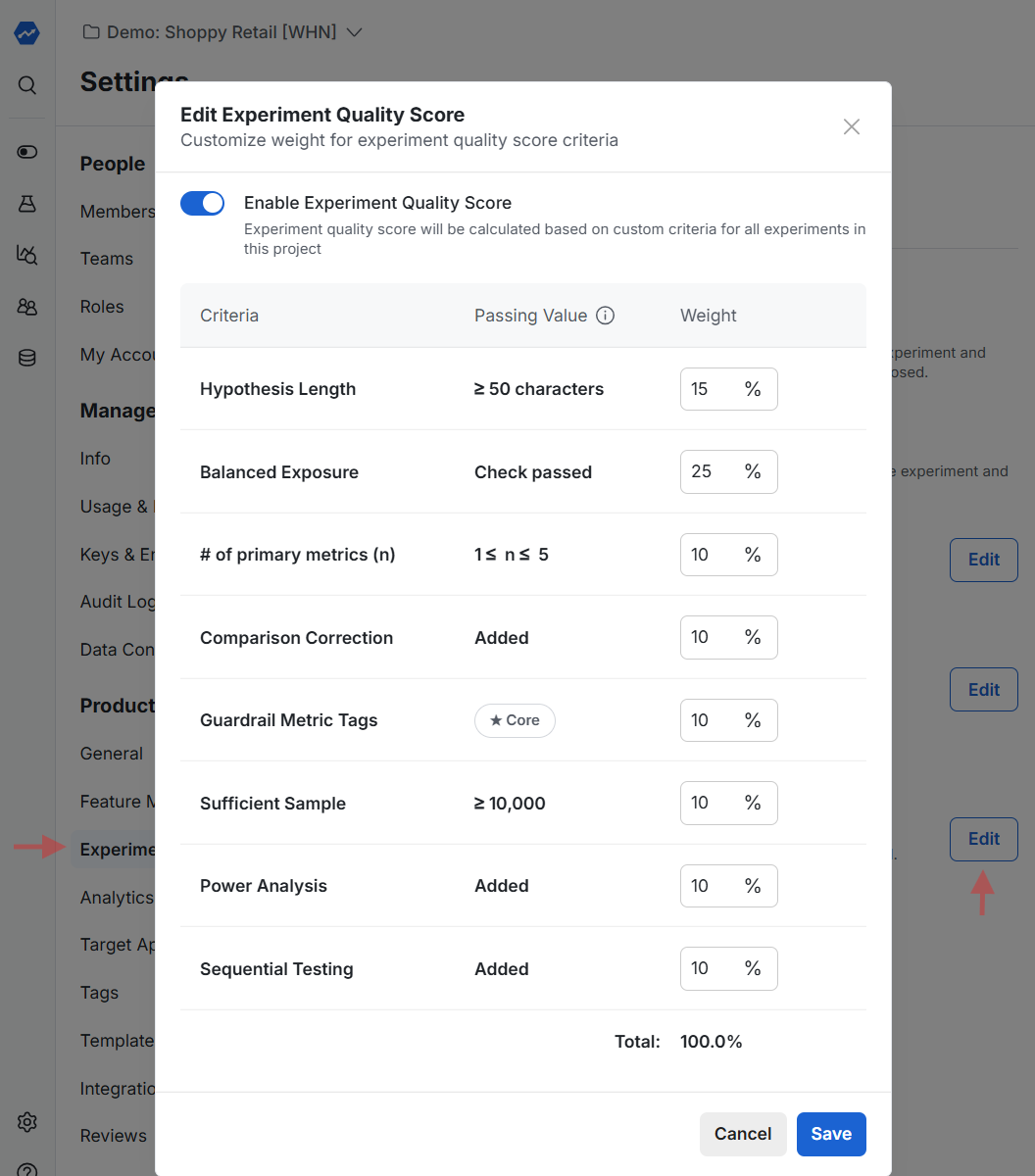
Enable Experiment Quality Score in the project settings under Settings > Experimentation > Experiment Quality Score.
The feature uses a list of pre-defined assessment criteria. You can customize the weight of each criterion based on your organization's needs, though Statsig provides default values.
Advanced configuration using the console API
For teams that need additional checks, have different requirements across product teams, or need different thresholds, Statsig supports advanced configuration through the console API. For example, you can require hypotheses to be at least 200 characters and contain a link to an external planning document.
To configure this, run a POST or PATCH on the console/v1/experiments endpoint to update individual scores on any given experiment. Targeting the existing set of scores lets you override weights (usually to 0), so the list contains only the custom set needed.
For example, running patch on an experiment with this payload:
{
    "manualQualityScores": [
        {
            "criteriaName": "HYPOTHESIS_LENGTH",
            "criteriaDescription": "Check passed",
            "status": "PASSED",
            "score": 0,
            "weight": 0
        },
        {
            "criteriaName": "MyCompany\'s Hypothesis Check",
            "criteriaDescription": "Has Internal URL and > 200 Chars",
            "status": "PASSED",
            "score": 100,
            "weight": 100
        },
        {
            "criteriaName": "Naming",
            "criteriaDescription": "Experiment prefixed with team name",
            "status": "FAILED",
            "score": 0,
            "weight": 100
        }
    ]
}
Would:
- Drop the original HYPOTHESIS_LENGTH check
- Keep the other original checks, with their weights
- Add a new check,
MyCompany's Hypothesis Check, for custom logic on the hypothesis - Add a new check,
Naming, for custom logic on the name
Statsig normalizes the other weights. If the original HYPOTHESIS_LENGTH had a weight of 10, the total weight becomes 290 and Statsig normalizes scores accordingly. If all non-custom checks are passing, the score is 190/290 or ~66%.
The general flow for using this approach is:
- Use Console API's
experiments/getto pull all experiments - For each experiment:
- Run custom logic
- Patch results
Calculation notes
Statsig skips checks in an unready state during evaluation and renormalizes the other weights to 100%. For example, if the experiment hasn't started, the Balanced Exposures component is in an unready state and Statsig ignores it.
Statsig omits checks with a weight of 0 entirely from the card.
View quality scores
When enabled, quality scores appear in the details tab of an experiment. Statsig evaluates applicable checks and contributes them to the number shown.
Statsig color-codes the score based on the percentage threshold:
= 85% corresponds to passing/green
= 50% corresponds to warning/yellow
- < 50% corresponds to error/red
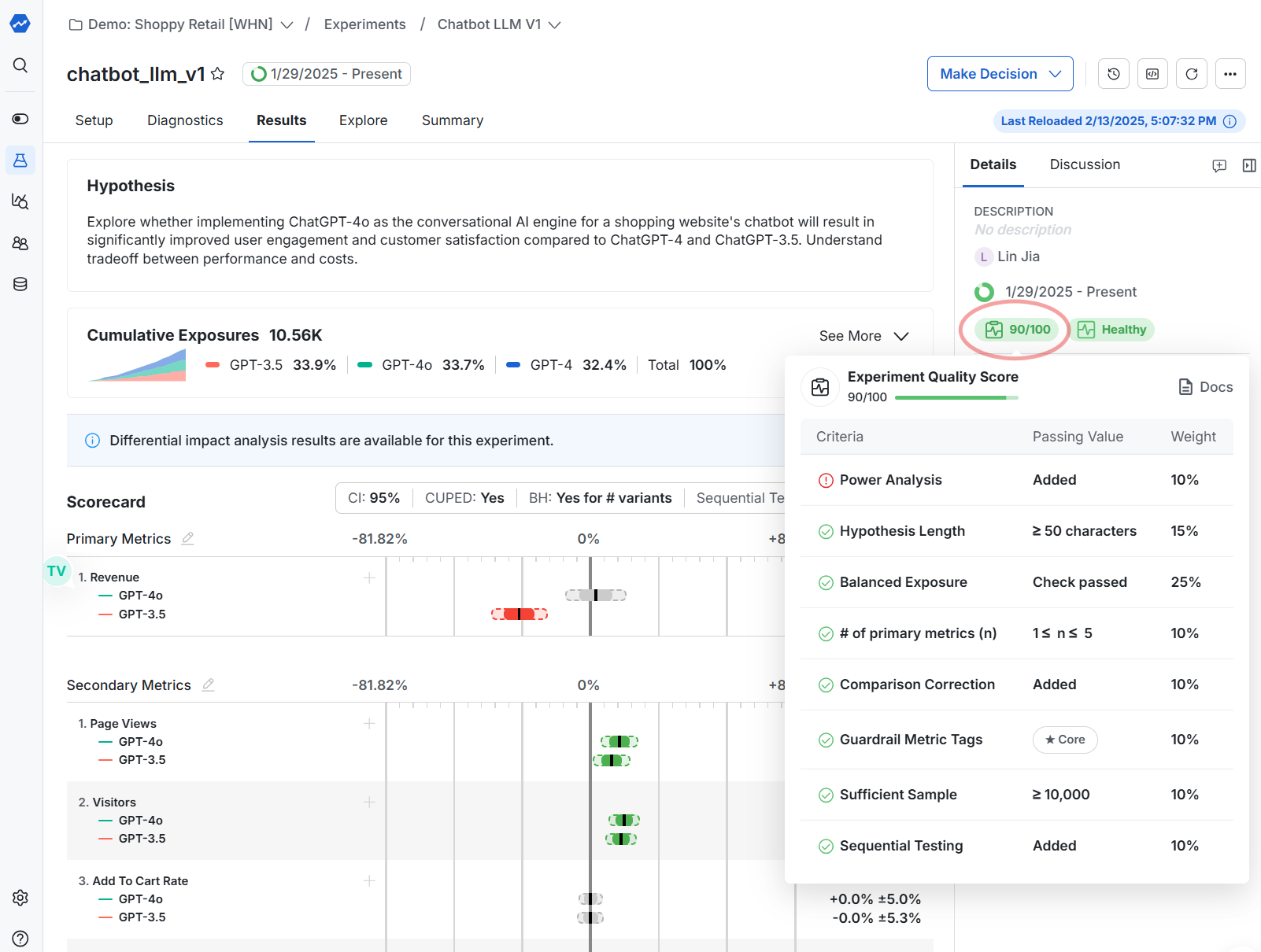
The console API also provides quality scores, letting you retrieve the data in bulk for analysis.
Was this helpful?