For AI agents: a documentation index is available at /llms.txt. Append .md to any page URL for markdown, or send Accept: text/markdown.
Practical Use Cases
Common Statsig Warehouse Native use cases, including A/B testing on top of an existing warehouse, observational analysis, and metric exploration.
Statsig Warehouse Native supports practical experiment workflows such as filtering experiment results to new users only and analyzing logged-in metrics when your experiment exposures happen at a logged-out grain. Each example pairs a common scenario with the queries and configuration Statsig uses to solve it.
How can I define and filter results to 'new users' only
Scenario
I want to filter the experiment results to new users only: A user is 'new' if they had never visited the website before this experiment exposed them. If the first time the user visited the website was after the exposure timestamp in this experiment, the user was a 'new user'; otherwise the user was an existing user.
Solution
Assuming you have a logging table that contains every visit with a relative timestamp (logging), and another table with all users' user_id values (user), first create an Entity Property with the following logic:
select distinct
  user_id,
  'new' as new_user,

  timestamp('1900-01-01') as timestamp
from user -- you can add filters here to include only targeted population only
union all
select distinct
  user_id,
  'existing' as new_user,
  timestamp as timestamp
from logging
Select Run Query to return a table like this. Select Save Results to use this Entity Property across all experiments and gates to filter or group experiment results by whether a user is new or existing.
| user_id | new_user | timestamp |
|---|---|---|
| A | new | 1900-01-01T00:00:00+00:00 |
| A | existing | 2024-01-01T10:10:18+00:00 |
| B | new | 1900-01-01T00:00:00+00:00 |
How can I analyze logged-in metrics when my experiment exposures are at logged-out grain
Scenario
I want to run an experiment to find out which version of my website design leads to a higher signup rate among new visitors. The experiment assignment occurs when a logged-out user visits my website, and the experiment exposes them to one of the design variants.
When a user decides to sign up, they receive a new and unique logged-in user ID. To calculate the conversion rate (CVR) accurately and consistently, I need a reliable way to map the logged-out IDs to the corresponding logged-in IDs. This mapping allows me to attribute each signup to the correct experiment variant and evaluate which design performs better in driving conversions.
Solution
Statsig supports two commonly used approaches for this mapping, each suited to different business scenarios:
Strict 1:1 Mapping: Keeps only records where there is a unique, unambiguous mapping between the logged-out ID and the logged-in ID. Statsig discards any records with duplication (for example, multiple logged-out IDs mapping to the same logged-in ID or the reverse). Use this approach when accuracy and clarity are the top priorities and data duplication is rare.
First Touch Mapping: When a logged-in ID maps to multiple logged-out IDs, retains only the first association and discards the rest. Better suited for scenarios where you want to preserve as much data as possible and duplications are common (for example, users frequently access the website from multiple devices or sessions).
For either mapping approach, you need to create a mapping between the logged-out ID and the logged-in ID. Set up an Entity Property that contains both IDs, or create an exposure assignment source with columns for both ID types.
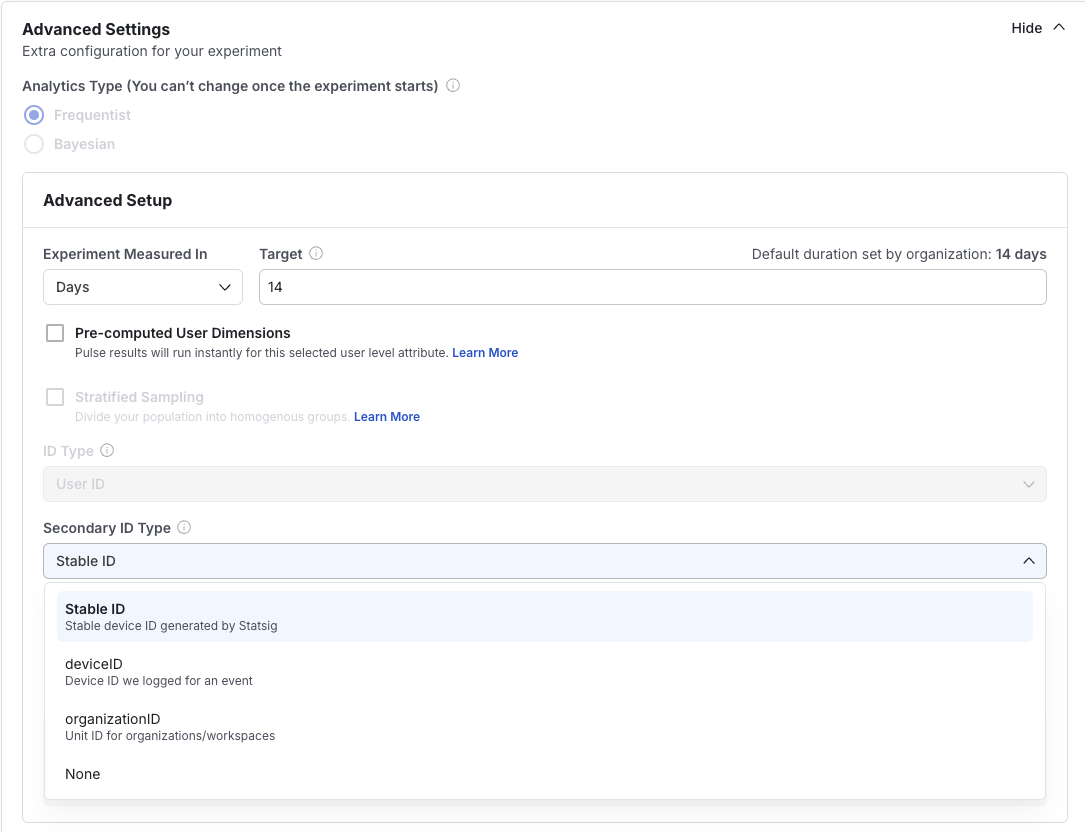
Step 1: Advanced settings for your experiments
When setting up your experiment, navigate to Setup > Advanced Settings, and select your Secondary ID type (the log-in user ID in this scenario).
Step 2: Identify the mapping mode that suits your need

Step 3: Choose your Entity Property Source
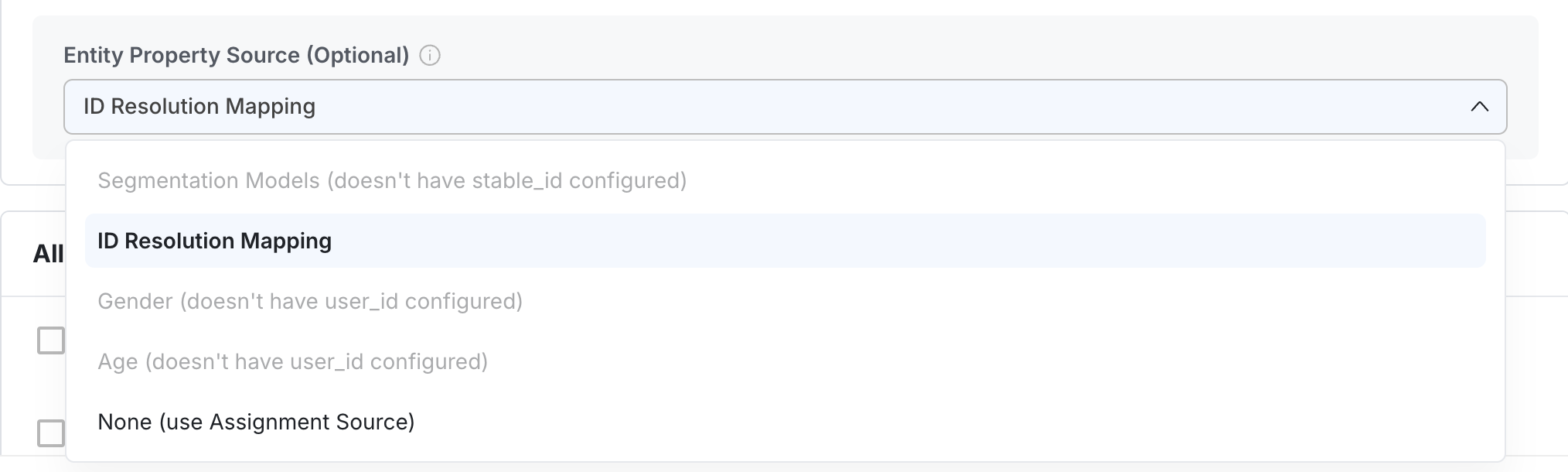
[Recommended] Create a new Entity Property Source for your ID Resolution mapping if you haven't already.
Go to Data > Entity Properties. You can either enter an existing table with the ID mappings or write a new query to create the mappings with the following logic:
sqlSELECT stable_id, user_id, timestamp FROM id_mappingYou can also choose "None" to use your assignment source for the mapping.
Create your new assignment source by going to Data > Assignment Sources. Statsig doesn't recommend this option because it becomes more complex to manage as your experiments scale.
Was this helpful?