For AI agents: a documentation index is available at /llms.txt. Append .md to any page URL for markdown, or send Accept: text/markdown.
ID Resolution (ID Stitching)
Map cross-platform IDs in experiment analysis and analyze anonymous user experiments
ID resolution (also called ID stitching) maps cross-platform IDs in experiment analysis so you can connect a user's logged-out and logged-in activity to the same experiment result. Use ID resolution to analyze experiments where exposure and metrics happen at different ID grains. For example, exposure happens at a device or logged-out ID, while metrics land at an account or user ID.
At the earliest, Statsig will update its ID resolution methodology to reflect mixed population on November 15th.
Mapping modes
When using Advanced ID resolution, you can choose between modes:
- Strict 1:1 mapping enforces that identities have a singular mapping. If you have a mapping between two IDs that are always 1:1, this mode enforces that the mapping is singular. Statsig warns you if the data contains records where that isn't the case. Users with a single identity can use downstream metrics from the secondary identity. Statsig considers multi-mapped users corrupted and discards them from the analysis.
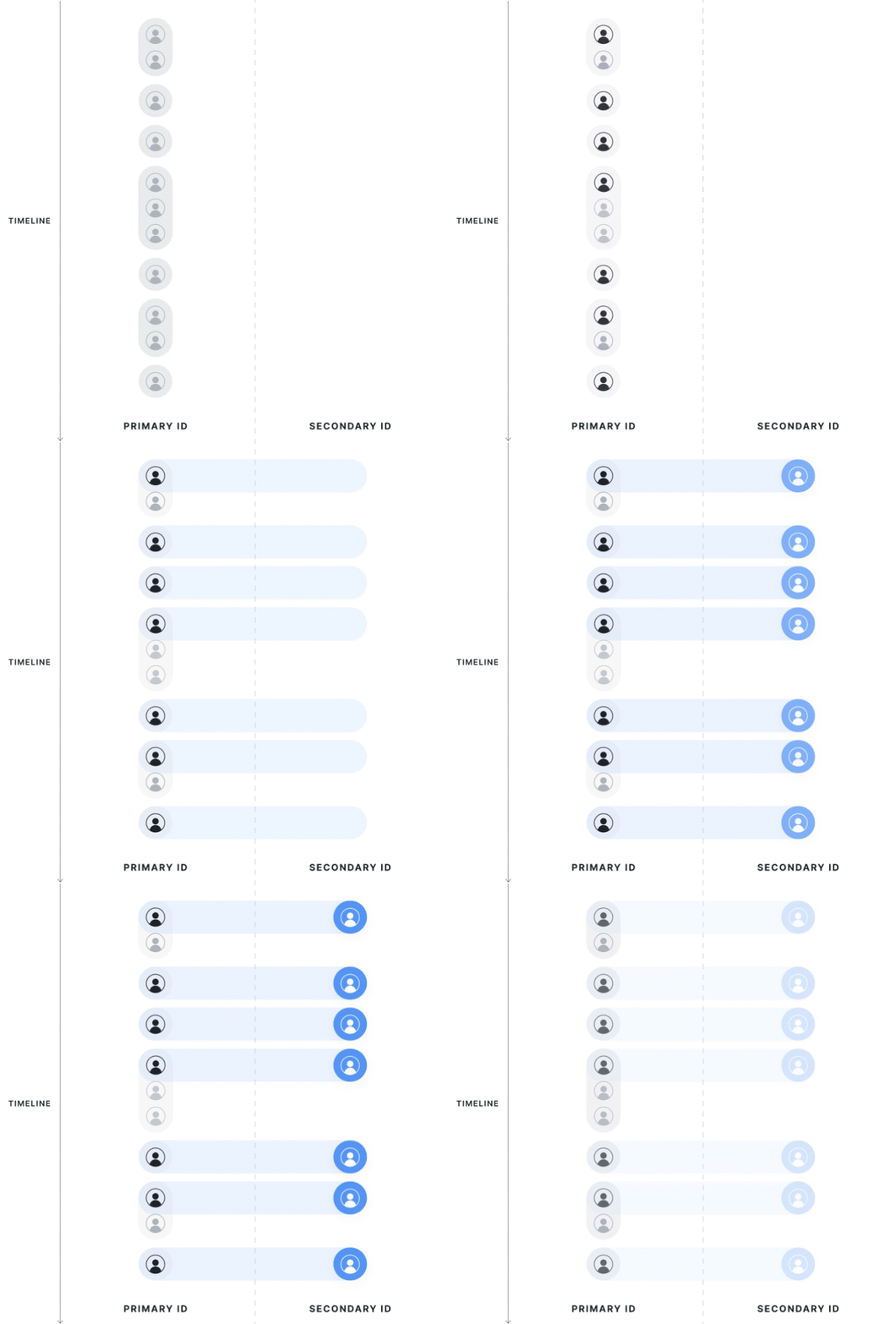
- First-touch mapping applies when units might have multiple mappings in either direction. For example, a single user may have multiple "profiles", or someone may have logged into the same account from several devices or web sessions. In this case, units use the experiment group of their first exposure for analysis and aggregate metrics from all of their associated secondary IDs.
| Strict 1:1 Mapping | First Touch Mapping |
|---|---|
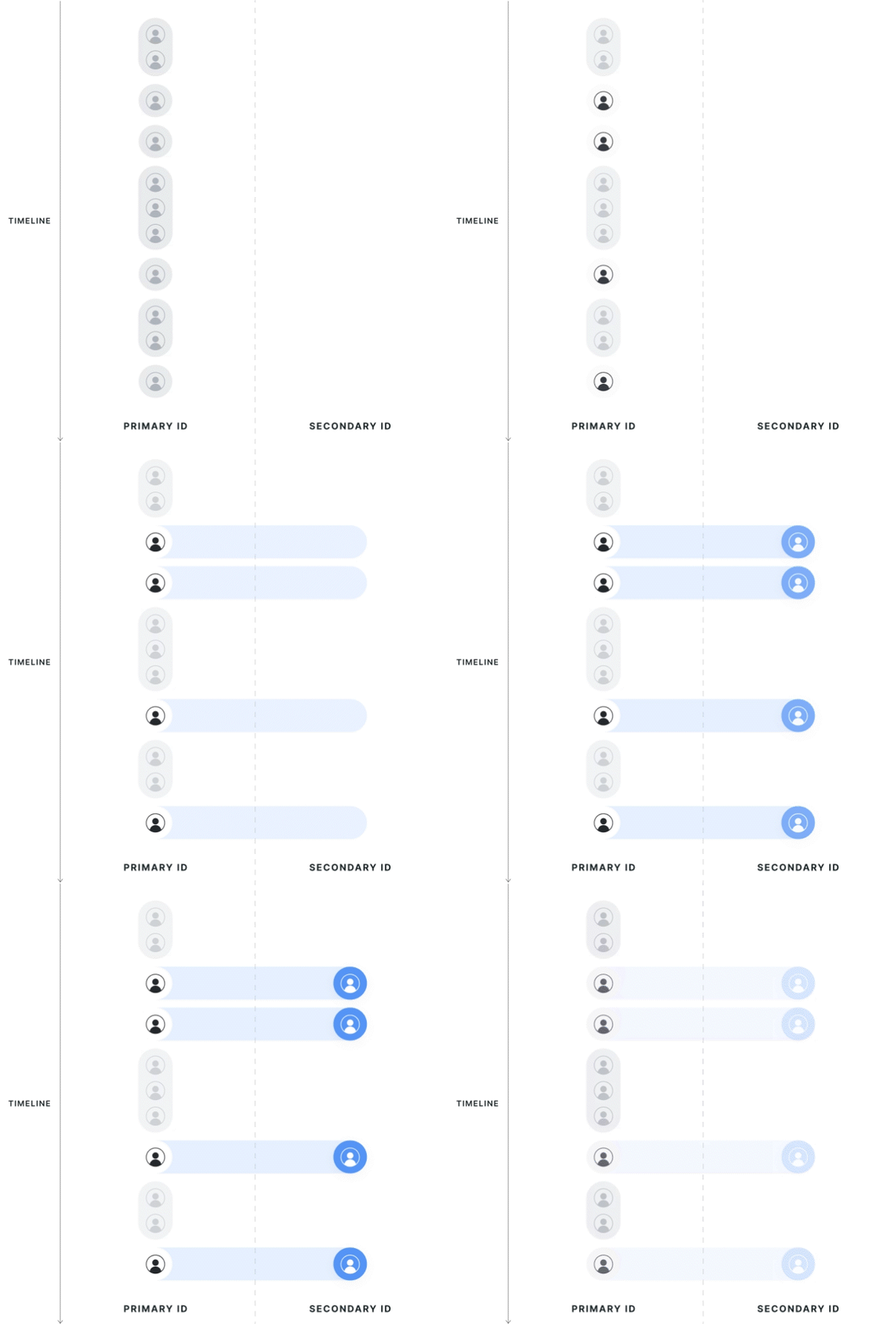 |  |
Strict 1:1 mapping
Statsig collects all potential mappings between identifiers within the experiment date range, on the exposed population. If the primary ID has multiple secondary IDs, or vice versa, Statsig considers it polluted and drops it from the analysis.
First touch mapping
The experiment determines the direction of first-touch mapping; all secondary IDs resolve to 1 primary ID, and a single primary ID can have multiple mapped secondary IDs. If your aim is to only have one secondary ID, you can manage that logic inside the entity property source today. Contact support if you want to request specific logic.
Statsig attributes data to the group of the first associated primary ID seen in the exposure. If a secondary ID has multiple associated primary IDs, Statsig uses the group of the first primary ID. Statsig doesn't discard users that cross groups from analysis; instead, it assigns them based on their first experience.
Statsig drops primary ID records that are associated with another Primary ID but aren't the first observed records from the analysis. If a user is exposed twice on different primary IDs that resolve to the same secondary IDs, Statsig keeps only the primary ID metrics from the first-exposed user.
Last touch mapping
Same as first touch but Statsig attributes data to the most recent primary ID.
Note on ID stitching
Multiple secondary IDs attached to one primary ID still count as "one" experimental primary ID. Statsig merges the metric values across records from the different secondary IDs, for example added in a sum metric or counted in a count metric.
Statsig is interested in supporting more complex 1-to-many relationships of identities and is eager to partner with customers to develop these capabilities if you need a more advanced use-case.
How it works
To set up identity resolution in Statsig, either log or join data to provide both IDs on your assignment source, or provide one ID in the assignment source along with a mapping table in the form of an Entity Property Source.
Using property source
To use Identity Resolution across experiments in your project, you need a lookup table that has both the ID you're exposing on and the selected target ID. Configure this table by setting up an Entity Property Source with both IDs present.
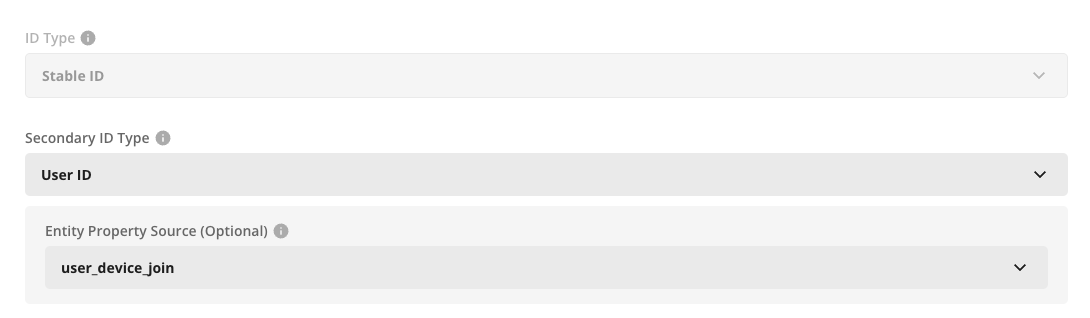
After you do that, select this source when configuring your secondary ID type, and Statsig handles the join for you.
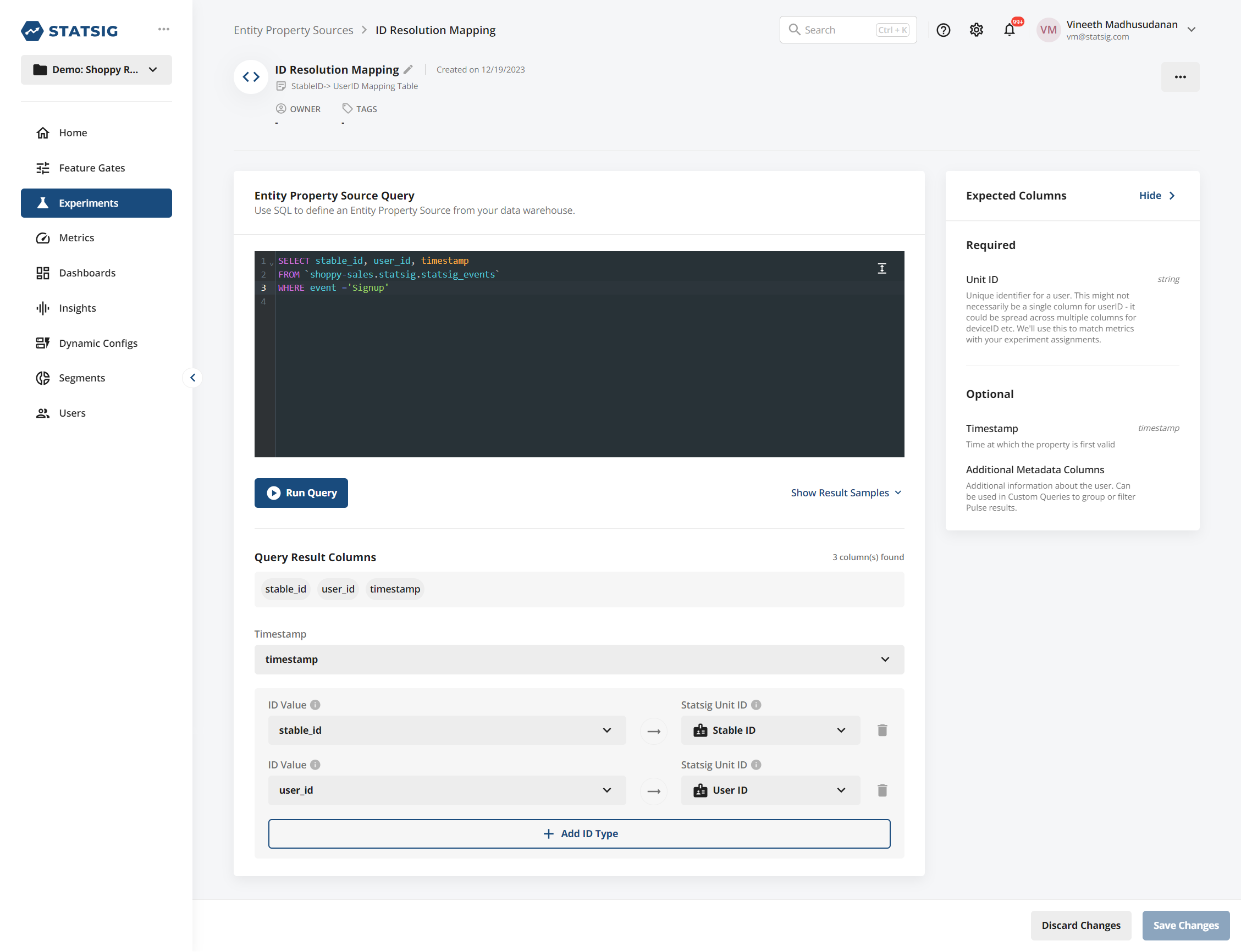
If you want to use a Statsig SDK to populate this table, you can log an event (for example, a "Signup" event) that has both the logged-out identifier and the user ID on the same event. Statsig writes events sent through the SDK into your warehouse, and you can configure an Identity Resolution source on top of that:
Using assignment source
When creating an assignment source, provide a column for both ID types. Statsig expects the Primary ID to be non-null for exposure records. Your secondary ID can be null. If your secondary ID is sparse (some records are null, and some are not due to logging), Statsig back-attributes any identified secondary ID to other records from the same Primary ID.
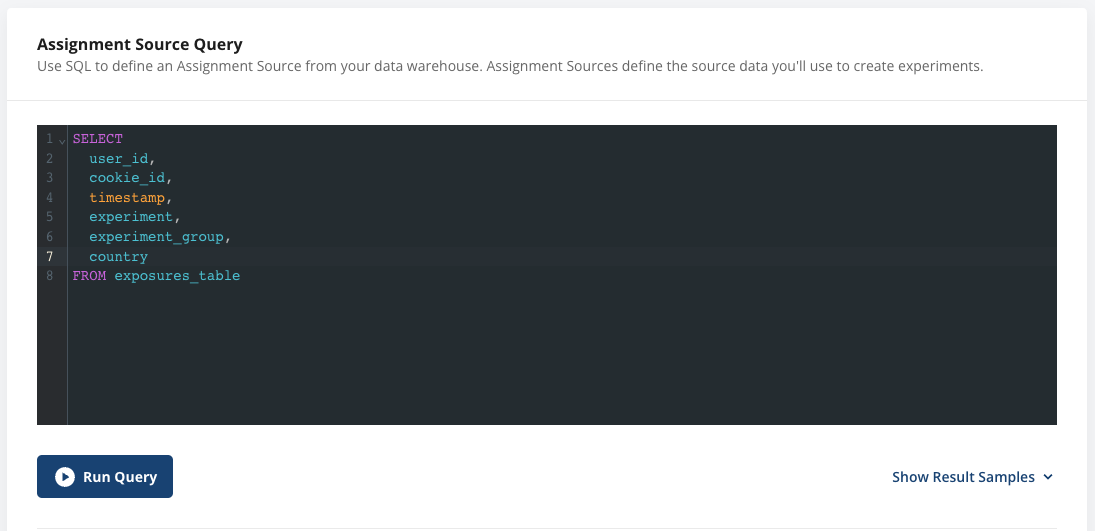
When you create an analysis-only experiment or power analysis with this ID type, you can optionally select a Secondary ID. If you do so, you can now use metrics from either ID type in your analysis. For E2E experiments that use the Statsig SDK, you can configure this on the experiment setup page, under Advanced settings.
Internally:
- For metric sources with the primary ID, Statsig joins metrics to exposures based on that primary ID.
- For metric sources with only the secondary ID, Statsig joins metrics to exposures based on that secondary ID.
- In strict mode, Statsig drops users with a duplicate mapping from analysis. In first-touch mode, units use their first exposure record and merge data from all mapped secondary IDs.
This works natively across Metric Sources, so you can set up funnel or ratio metrics across the two ID types.
Analysis uses the primary ID. This process associates metric values from the secondary ID with the corresponding primary ID records.
Mapping changes
If you change the entity property source or assignment source's definition or underlying data, Statsig reflects those changes on the next reload. This is why you need a full reload, since otherwise historical changes to the mapping can lead to inconsistent data on incremental reloads or explore queries.
Best practices
Statsig recommends using an Entity Property Source to provide a cleaned unit mapping from your warehouse. You can also provide mappings on your exposure source by logging multiple identifiers in the exposure data. Statsig uses all available identifiers to match across records.
For both modes, an experiment can only have one mapped ID type, for example secondary_id->user_id or secondary_id->account_id, but not both.
All modes require a full reload to prevent data inconsistency when you change historical mappings or introduce new mappings.
Statsig filters the property source or assignment source used to provide mappings to records within the experiment's date range. If a mapping is "evergreen", or not scoped to a specific time period, you can omit the timestamp on the entity property source.
Example of a supported schema
if your assignment source data contains:
{stableID: 'unknown_123', exp_id: 'PDP Test', test_group: 'Control'}
and your metric sources contain data that represents a metric as:
{userID: 'known_abc', event: 'page_load'}
Your Entity Source or Assignment source must contain the secondary identity (in this case, userID) that enables Statsig to join your assignment data with your metric data:
{stableID: 'unknown_123', userID: 'known_abc', country: 'USA'}
Considerations
Deduplicating records can lead to biased results, so Statsig performs two extra health checks on this kind of experiment.
- Statsig checks your deduplication rate and warns you if it's unusually high. Expect some secondary IDs to have multiple logged-out IDs due to users using different devices or clearing browser history.
- Statsig performs a chi-squared test to evaluate whether the deduplication rate is identical across arms of the experiment. In some cases, an experiment may cause more users to return (for example, an email re-engagement campaign), in which case duplicates are likely more frequent in that arm and can be a positive outcome. In this case, you can use first-touch attribution to maintain a common identifier.
Was this helpful?