For AI agents: a documentation index is available at /llms.txt. Append .md to any page URL for markdown, or send Accept: text/markdown.
Heap
Connect Heap with Statsig to send autocaptured events to Statsig for experiment analysis and metric tracking across your product surfaces.
How the Heap integration works
Enabling the Heap integration allows you to export Statsig events to your configured Heap app with information on the status of each user's feature gate and experimentation groups.
Statsig sends events to Heap when you initialize a client SDK, and also forwards events as it receives them.
Client SDK initialize events
Statsig sends the following events to your Heap app every time you call the initialize API from a Statsig client SDK.
| Event Name | Properties |
|---|---|
| Statsig Feature Gates | For each Statsig Feature Gate, this field contains a property that maps the name of the feature gate to true or false, stating whether the user passes or doesn't pass the feature gate. |
| Statsig Experiments | For each Statsig Experiment, this field contains a property that maps the name of the experiment to the variant that Statsig assigns to the user. |
Exposures and custom event forwarding
Statsig can forward events as it receives them from SDKs, Integrations or the HTTP API.
Events include exposures (Gate, Experiment, Config) and custom events.
Event format
Statsig sends events in batches in JSON format. Each Statsig event has the following structure:
| Field | Type | Description |
|---|---|---|
| eventName | String | Name of the event provided |
| user | JSON | Statsig User Object |
| userID | String | User ID provided |
| timestamp | Number | Timestamp in MS of the event |
| value | String | Value of the event provided |
| metadata | JSON | Custom Metadata provided |
| statsigMetadata | JSON | Metadata related to the logging of this event added by Statsig |
| timeUUID | String | UUID for the event |
| unitID | String | Unit ID of the exposure (e.g. userID, stableID, or the customID) |
Custom event formatting - logEvent
{
  "eventName": "my_custom_event",
  "user": {
    "userID": "a_user",
    "email": "a.user@email.com"
  },
  "userID": "a_user",
  "timestamp": "1655231253265",
  "statsigMetadata": {
    ...
  },
  "value": "a_custom_value",
  "metadata": {
    "key_a": "value_a",
    "key_b": "123"
  },
  "timeUUID": "abd2a983-ec0f-11ec-917a-fb8cdaeda578"
}
Feature gate exposure formatting - checkGate
{
  "eventName": "statsig::gate_exposure",
  "user": { ... },
  "userID": "a_user",
  "timestamp": "1655231253265",
  "statsigMetadata": { ... },
  "value": "",
  "metadata": {
    "gate": "a_gate",
    "gateValue": "false",
    "ruleID": "default",
    "reason": "Network",
    "time": "1655231249644"
  },
  "timeUUID": "8d7c1040-ec11-11ec-g123-abe2c32fcf46",
  "unitID": "userID"
}
Dynamic config exposure formatting - getConfig
{
  "eventName": "statsig::config_exposure",
  "user": { ... },
  "userID": "a_user",
  "timestamp": "1655231253265",
  "statsigMetadata": { ... },
  "value": "",
  "metadata": {
    "config": "a_config",
    "ruleID": "default",
    "reason": "Network",
    "time": "1655231249644"
  },
  "timeUUID": "af379f60-ec11-22ad-8e0a-05c3ee70bd0c",
  "unitID": "userID"
}
Experiment exposure formatting - getExperiment
{
  "eventName": "statsig::experiment_exposure",
  "user": { ... },
  "userID": "a_user",
  "timestamp": "1655232119734",
  "statsigMetadata": { ... },
  "value": "",
  "metadata": {
    "config": "an_experiment",
    "ruleID": "4SauZJcM1T7zNvh1igBjwE",
    "reason": "Network",
    "time": "1655231249644",
    "experimentGroupName": "Control"
  },
  "timeUUID": "af379f61-ab22-11ec-8e0a-05c3ee70bd0c",
  "unitID": "userID"
}
Example batch
[
  {
    "eventName": "page_view",
    "user": {"userID": "user_1", "country": "US"},
    "userID": "user_1",
    "timestamp": 1644520566967,
    "value": "example_value",
    "metadata": {"page": "home_page"},
    "statsigMetadata": {},
    "timeUUID": "f4c414a0-8ab5-11ec-a8a3-0242ac120002"
  },
  {
    "eventName": "statsig::gate_exposure",
    "user": {"userID": "user_1", "country": "US"},
    "userID": "user_1",
    "timestamp": 1644520566968,
    "value": "",
    "metadata": {"gate": "test_gate", "gateValue": "true", "ruleID": "default"},
    "statsigMetadata": {},
    "timeUUID": "f4c414a0-8ab5-11ec-a8a3-0242ac120003",
    "unitID": "userID"
  },
  {
    "eventName": "statsig::experiment_exposure"
    "user": {"userID": "user_1", "country": "US"},
    "userID": "user_1",
    "timestamp": 1644520566969,
    "value": "",
    "metadata": {
       "config": "an_experiment", "ruleID": "4SauZJcM1T7zNvh1igBjwE", "reason": "Network", "time": "1655231249644", "experimentGroupName": "Control"
    },
    "statsigMetadata": {},
    "timeUUID": "f4c414a0-8ab5-11ec-a8a3-0242ac120004",
    "unitID": "userID"
  }
]
Configuring outbound events
- Navigate to your Heap Projects page to find and copy the App ID for your project.
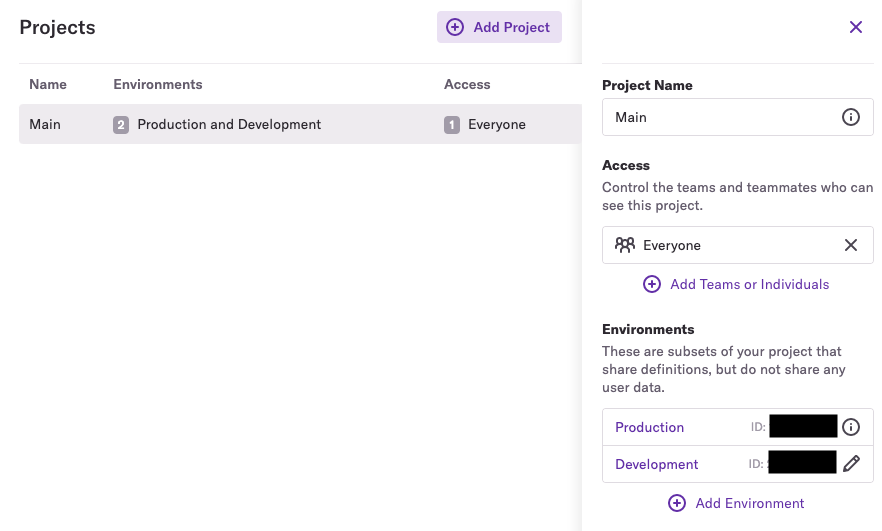
- Paste the App ID into the App ID input field for the Heap configuration in the Statsig Integrations page and save your changes.
First exposures
First exposures are an enterprise-tier feature that simplifies your project insights.
This is available for Enterprise contracts. Reach out to the support team, your sales contact, or through the Slack community if you want this enabled.
How first exposures work
The Heap integration can forward first exposures instead of every exposure, reducing the total number of events forwarded. Statsig calculates first exposures daily and forwards them to integrations at around 7pm UTC.
Enable first exposures
Ensure Statsig has enabled the "first exposure" feature for your company by contacting the support team, your sales contact, or the Slack community. Then go to the event filtering tab of the integration and enable the First Exposure setting.
Was this helpful?