For AI agents: a documentation index is available at /llms.txt. Append .md to any page URL for markdown, or send Accept: text/markdown.
Metric Drill-Down
Drill down into a Statsig Warehouse Native metric to inspect contributions by segment, time period, and user property for deeper experiment analysis.
Metric tooltip
A tooltip with key statistics and additional detail appears when you hover over a metric in Pulse.
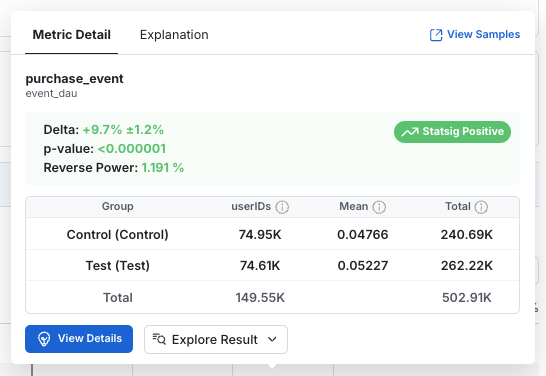
- Group: The name of the group of users. For Feature Gates, the "Pass" group is considered the test group while the "Fail" group is the control. In Experiments, these are the variant names.
- Units: The number of distinct units included in the metric. E.g.: Distinct users for user_id experiments, devices for stable_id experiments, etc.
- Mean: The average per-unit value of the metric for each group.
- Total: The total metric value across all units in the group, over the time period of the analysis.
Calculation details
| Metric Type | Total Calculation | Mean | Units |
|---|---|---|---|
| event_count | Sum of events (99.9% winsorization) | Average events per user (99.9% winsorization) | All users |
| event_user | Sum of event DAU (distinct user-day pairs) | Average event_dau value per user per day. Statsig calls this "Event Participation Rate" because it represents the probability a user is DAU for that event. | All users |
| ratio | Overall ratio: sum(numerator values)/sum(denominator values) | Overall ratio | Participating users |
| sum | Total sum of values (99.9% winsorization) | Average value per user (99.9% winsorization) | All users |
| mean | Overall mean value | Overall mean value | Participating users |
| user: dau | sum of daily active users | Average metric value per user per day. The probability that a user is DAU | All users |
| user: wau, mau_28day | Not shown | Average metric value per user per day. The probability that a user is xAU | All users |
| user: new_dau, new_wau, new_mau_28day | Count of distinct users that are new xAU at some point in the experiment | Fraction of users that are new xAU | All users |
| user: retention metrics | Overall average retention rate | Overall average retention rate | Participating users |
| user: L7, L14, L28 | Not shown | Average L-ness value per user per day | All users |
p-value
In null hypothesis significance tests, the p-value is the probability that such an extreme difference arises by random chance when the experiment has no effect. A low p-value means the observed difference is unlikely to be due to random chance. In hypothesis testing, a p-value threshold determines which results reflect a real effect and which are plausibly due to random chance. (p-value calculation)
Reverse power
Reverse power is the smallest effect size that an experiment can reliably detect in its current state (some studies refer to this value as ex-post MDE). Statsig calculates it from the sample size and standard error of the control group. Reverse power does not depend on the observed effect size. In practice, reverse power answers questions such as: given how the test performed, what is the smallest effect detectable with sufficient power (typically 80%)?
For a two-sided test, Statsig computes the reverse power for a given metric X using the following equation:
For a one-sided test, Statsig computes the reverse power for a given metric X using the following equation:
- is the mean metric value across control users
- is the population variance of delta
- are the observed number of units in the control group
- is the standard Z-score for the selected power. Typically = 0.8 and = 0.84
- and are the standard Z-scores for the selected significance level in a two-sided test and in a one-sided test.
Reverse power is an optional feature. To manage it, go to Settings > Product Configuration > Experimentation > Organization and toggle it on or off.
Detailed view
Click View Details to access in-depth metric information. The detailed view contains three sections:
- Time Series: How the metrics evolve over time
- Raw Date: Group level statistics
- Impact: How the experiment impacts the metric
Time series
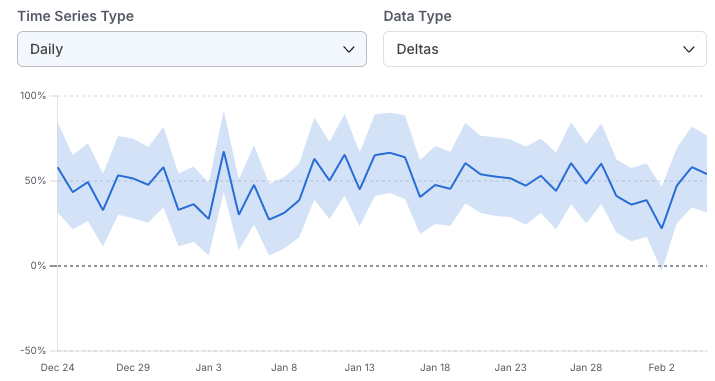
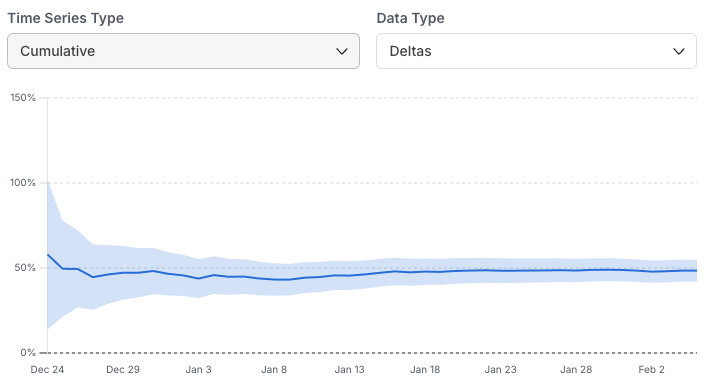
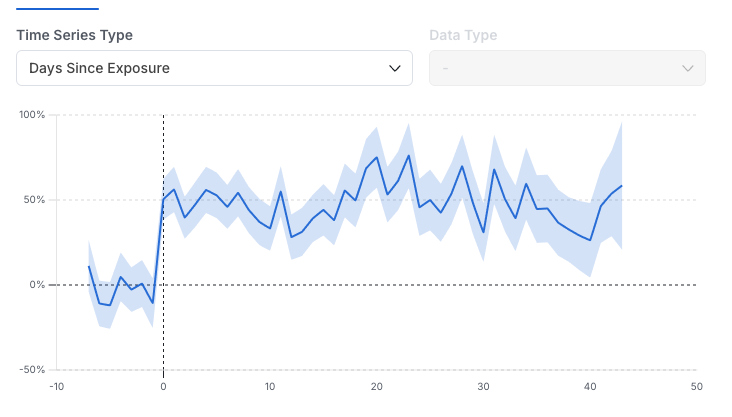
In this view, select and drag to zoom in on different time ranges. Three types of time series are available in the drop-down:
Daily: The metric impact on each calendar day without aggregating days together. This is useful for assessing day-over-day metric variability and the impact of specific events. The daily view is the recommended time series view for Holdouts, because it highlights the impact over time as new features are launched.
Cumulative: Shows the cumulative metric impact from the start of the experiment over time. This is useful for observing trends and seeing how your confidence interval changes over time.
Days Since Exposure: Shows the metric impact based on how long a user has been in the experiment. Daily data for each user is aligned by the day they entered the experiment (Day 0, Day 1, etc.), not by calendar date. This alignment lets you distinguish early (novelty) effects from long-term effects. This view also shows pre-experiment data, which identifies biases between groups before the experiment started. Such biases can result from random chance or from an issue in the random assignment process.
Raw data
This view shows the group-level statistics needed to compute the metric deltas and confidence interval. It includes Units, Mean, and Total (defined in the Metric Tooltip section above), as well as the Standard Error of the mean (Std Err). For details on the statistical calculations, go to the stats engine documentation.
Impact
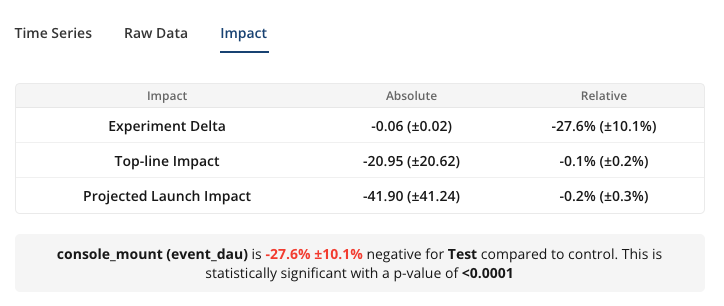
- Experiment Delta (absolute): The absolute difference of the Mean between test groups i.e. Test Mean - Control Mean. Statsig shows the p-value to indicate whether the observed absolute difference is statistically significant.
- Experiment Delta (relative): Relative difference of the Mean i.e. 100% x (Test Mean – Control Mean) / Control Mean.
- Topline Impact: The measured effect that the experiment has on the overall topline metric each day, on average. Statsig computes this daily and averages it across days in the analysis window. The absolute value is the net daily increase or decrease in the metric; the relative value is the daily percentage change.
- Projected Launch Impact: An estimate of the daily topline impact expected if you make a decision and launch the test group to all users. This accounts for the layer allocation and the size of the test group. This assumes the targeting gate (if there is one) remains the same after launch.
Go to topline impact for details on the exact calculation for topline and projected impact.
FAQs about topline impact
Why is the projected launch impact smaller than the relative experiment delta?
An experiment may affect only a subset of the user base that contributes to a topline metric. The relative experiment delta is therefore diluted when measured against the topline metric value.
For example: consider a top-of-funnel experiment on the registration page. Among users who visit that page, the treatment leads to more sign-ups and a 10% lift in daily active users (DAU). The topline DAU metric includes other user segments outside the experiment, such as long-term users who don't visit the registration page. A 10% lift in the test vs. control comparison may therefore amount to only a 1% increase in overall DAU.
How can the topline impact be higher than the experiment delta?
The topline impact can be higher or lower than the experiment delta because Statsig computes the two values differently and they have different meanings.
Experiment deltas are based on unit-level averages: the mean metric value is computed for each user across all days, then averaged to get the group mean. The topline impact is computed daily based on the total pooled effect from all users, averaged across days to show the daily impact.
Statsig computes topline impacts this way because most metrics are tracked daily and the topline value is typically an aggregation across all users, not a user-level average. For experiment analysis, best practice is to match the analysis unit to the randomization unit, so metrics are aggregated at the unit level before computing experiment deltas.
Was this helpful?