For AI agents: a documentation index is available at /llms.txt. Append .md to any page URL for markdown, or send Accept: text/markdown.
Feature Gate overrides
During development, it can be useful to explicitly state which users should pass or fail a given feature gate. This is where overrides come in.
Override results of a feature gate
Overrides force specific user IDs to pass or fail a feature gate, regardless of the rules you configure. Use them during development to state explicitly which users see a feature.
Overrides use user IDs, and you can set them to pass or fail for a given user ID. When Statsig evaluates a gate, if the user ID has an override, Statsig returns the overridden result immediately before evaluating any rules.
Adding an override
- Log into the Statsig console at https://console.statsig.com
- On the left-hand navigation panel, select Feature Gates
- Select the feature gate where you want to add an Override
- Click the Add Override button

- Select either 'Pass List' or 'Fail List' from the tabs in the dialog
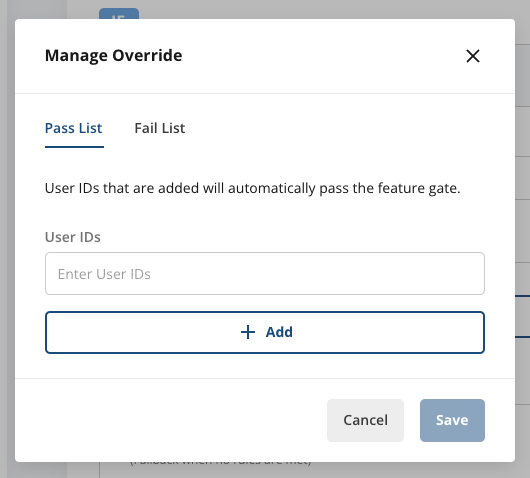
For users you want to pass the gate, add them to the 'Pass List'
For users you want to fail the gate, add them to the 'Fail List'
A user can only exist on one of these lists at a time.
After you've added the user IDs, select Save
Deleting an override
If you add an override but later decide you don't need it, you can remove it so Statsig evaluates the rules normally.
- Log into the Statsig console at https://console.statsig.com
- On the left-hand navigation panel, select Feature Gates
- Select the feature gate where you want to add an Override
- Click the Edit Overrides button

Select the trashcan icon next to the user ID you want to remove from a list.
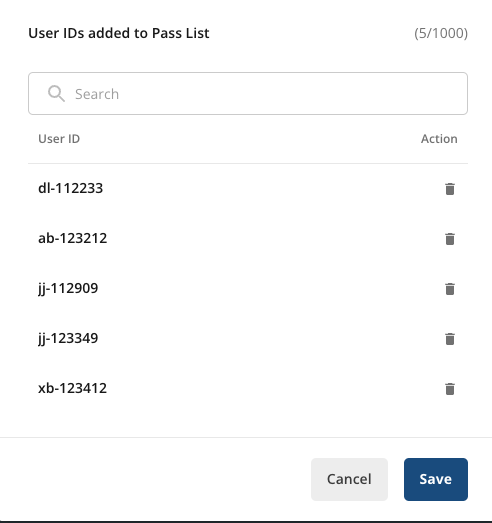
After you've updated the lists, select Save
Testing an override
After you add your override, you can test it in the Test Gate window by adding userID as a property of the user object.
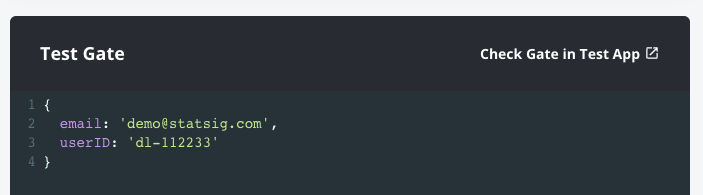
Users that pass see "PASS (User ID Override)"

Users that fail see "FAIL (User ID Override)"

Was this helpful?