For AI agents: a documentation index is available at /llms.txt. Append .md to any page URL for markdown, or send Accept: text/markdown.
Parameter Stores
Use Statsig Parameter Stores to map dynamic config or experiment parameters to runtime values in client SDKs with type-safe access patterns.
Parameter Stores provide a way to organize and manage parameters in your web or mobile app through the Statsig console. Available for JS, React, React Native, Android, iOS, and Dart SDKs on the client side and Java, Node, Python, and Rust on the server side. Reach out in Slack if you want support for a specific language.
What is a Parameter Store
Rather than thinking in terms of Statsig entities like Feature Gates, Experiments, Layers, or Dynamic Configs, Parameter Stores let you focus on parameters. Parameters are the values in your app that need to be configurable remotely.
Parameter Stores decouple your code from configuration. This abstraction lets you run experiments, adjust gating, or change values dynamically without hardcoding any experiment or gate names. Instead, you define parameters that you can remap remotely to any value or any Statsig entity.
An example: parameterizing the Statsig website
Release cycles are often more constrained on mobile platforms. As an example, the Statsig website marketing team frequently requests updates, so the team parameterizes text, images, buttons, colors, and more:
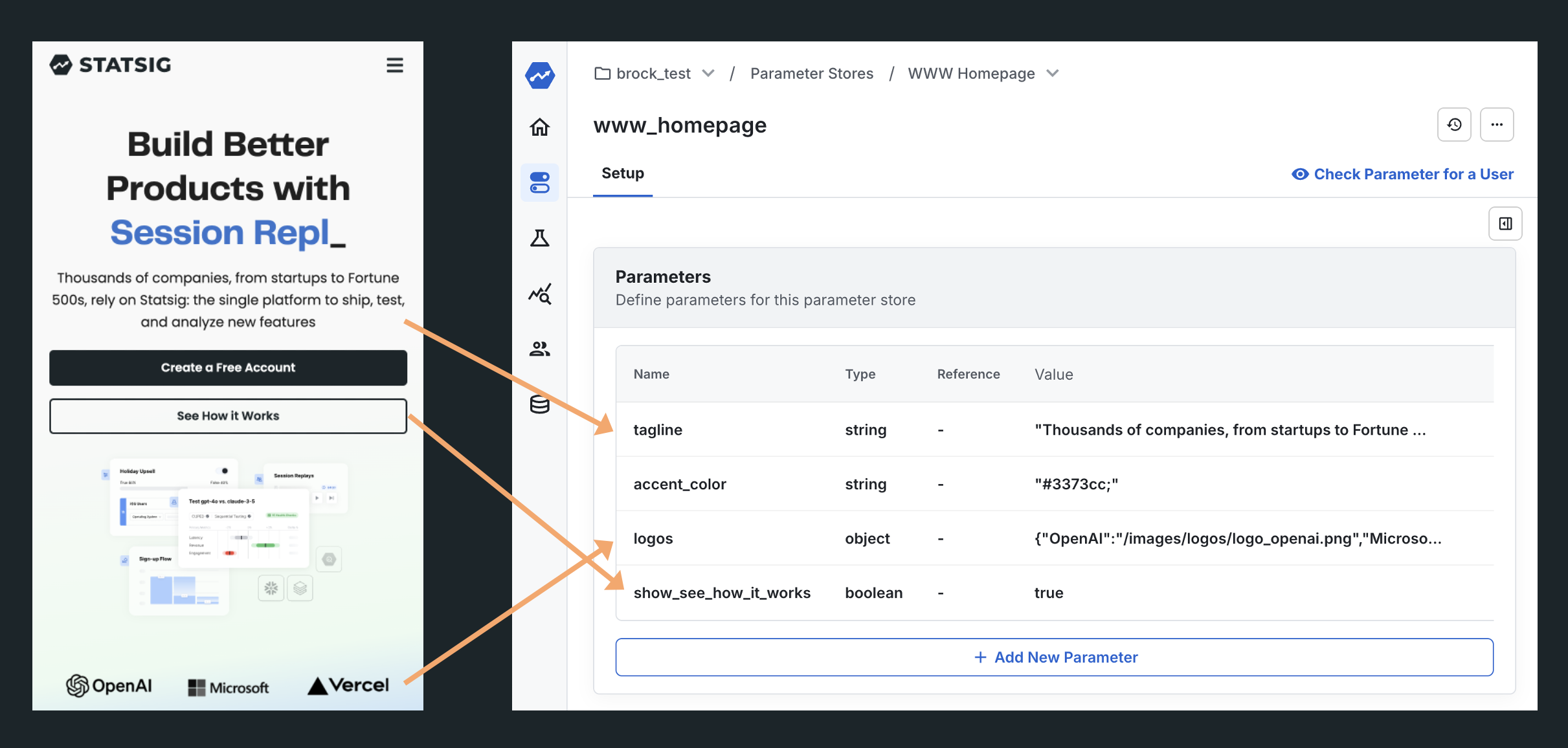
To run an experiment, point these variables directly at experiments to start an A/B test without writing any code:
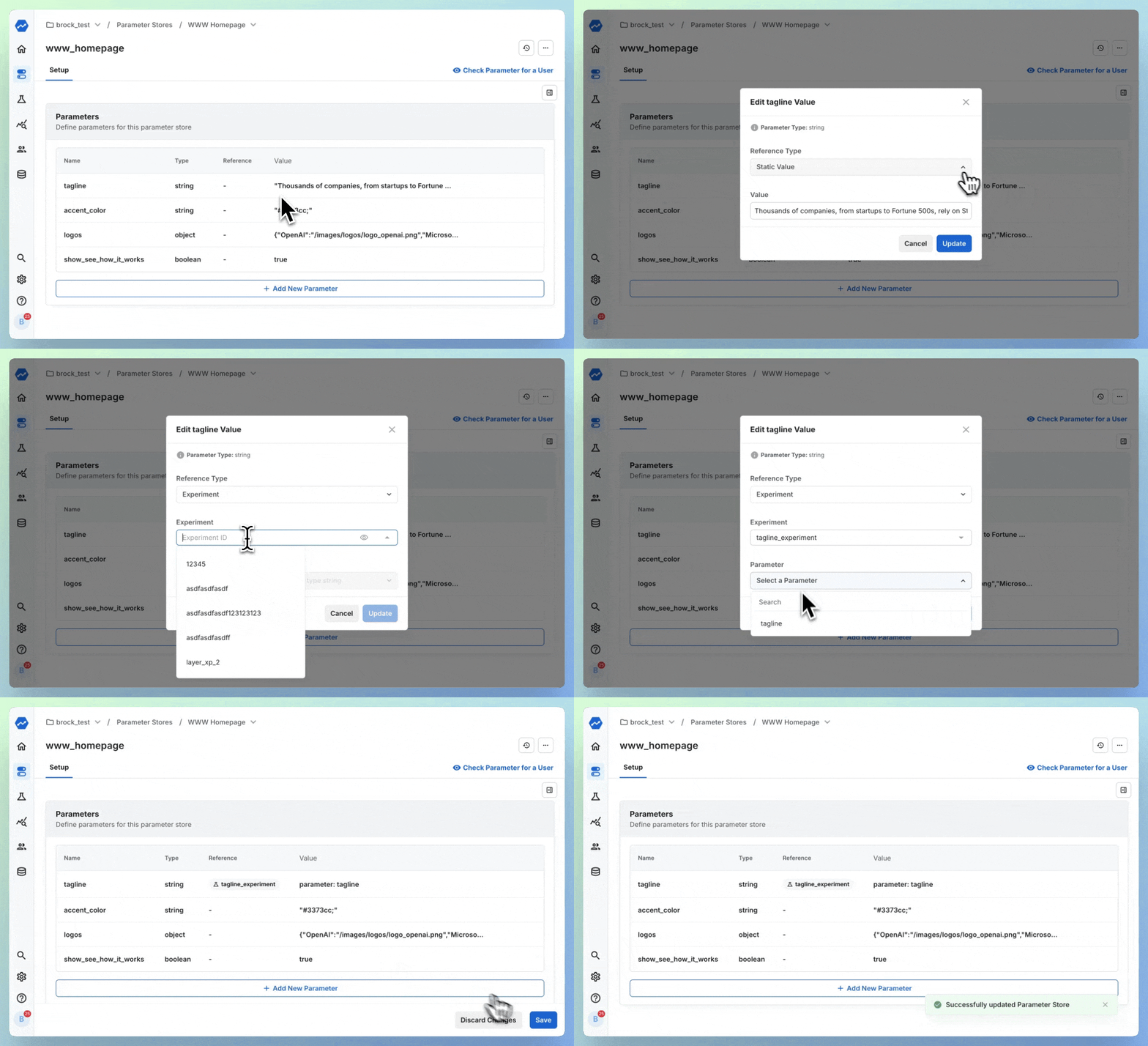
The experiment on the tagline is now running without any code change. Access the parameter in code like this:
const homepageStore = StatsigClient.getParameterStore("www_homepage");
const tagline = homepageStore.get("tagline", <optional_default_value>);
How to use Parameter Stores
Here’s a suggested workflow:
Create a Parameter Store: Set up a Parameter Store for your team or project. Parameter Stores hold related parameters in one object.
Identify Configuration Variables: Consider which variables you want to decouple from your app and control through Statsig rather than hardcoding them in your app. These could include:
- A boolean parameter to control access to a new feature. Even if you're used to using Feature Gates for boolean feature management, start with a boolean parameter instead.
- A string parameter for text resources that you may want to swap or experiment with.
- A number parameter for inputs such as the number of onboarding steps, a list length to truncate, and more.
Start with Static Values: Begin with a static value for each parameter (what you would have hardcoded in the app). Use this static value initially.
Remap When Ready: After you ship your app and the feature is ready, remap the parameter to a Feature Gate, Experiment, Dynamic Config, or Layer to test and target different variants.
Update in Real-Time: After experimenting, you can update the static value or gate the feature for specific app versions. You can do this in real time across mobile apps that you've already released.
Why use Parameter Stores
Parameter Stores draw inspiration from solutions such as Facebook’s Mobile Config, Uber’s experimentation approach, and Firebase Remote Config. Leading mobile companies use these patterns to:
- Move faster
- Maintain backward compatibility
- Experiment more freely
The extra setup in the Statsig console takes more initial effort than creating a gate, but saves time after you ship the app. Parameter Stores ensure you don't hardcode any Statsig entity values, giving you flexibility to update parameters without a new release. This is particularly useful for mobile apps, where app store release cycles create delays unlike backends or websites.
Supported SDK versions
The following SDKs support Parameter Stores:
- Android SDK v4.33.0+
- iOS SDK v1.45.0+
- @statsig/js-client, @statsig/react-bindings, @statsig/react-native-bindings, @statsig/expo-bindings v1.4.0+
- Dart SDK v1.2.1+
- Statsig Server Core SDKs are gradually adding support, available in:
- com.statsig:javacore 0.1.0+
- statsig-rust 0.1.0+
- @statsig/statsig-node-core 0.1.0+
- statsig-python-core 0.5.0+
- statsig-dotnet-core 0.6.1+
Non-server-core server SDKs don't support Parameter Stores, and Parameter Stores aren't available when bootstrapping a client SDK from one of those SDKs. For support in a specific language, reach out in Slack.
Was this helpful?