For AI agents: a documentation index is available at /llms.txt. Append .md to any page URL for markdown, or send Accept: text/markdown.
Layers
Group related experiments into mutually exclusive universes and share parameters without code churn.
A layer (also called a universe) is a pool of users that Statsig divides among several experiments so that no user is in more than one experiment in that layer. A layer also owns shared parameters: your code reads one layer parameter, and each experiment in the layer sets its value. Use a layer when experiments touch the same surface and could interfere with each other, or when you iterate on the same parameter repeatedly. A standalone experiment doesn't need a layer you manage; by default, Statsig runs it in its own layer.
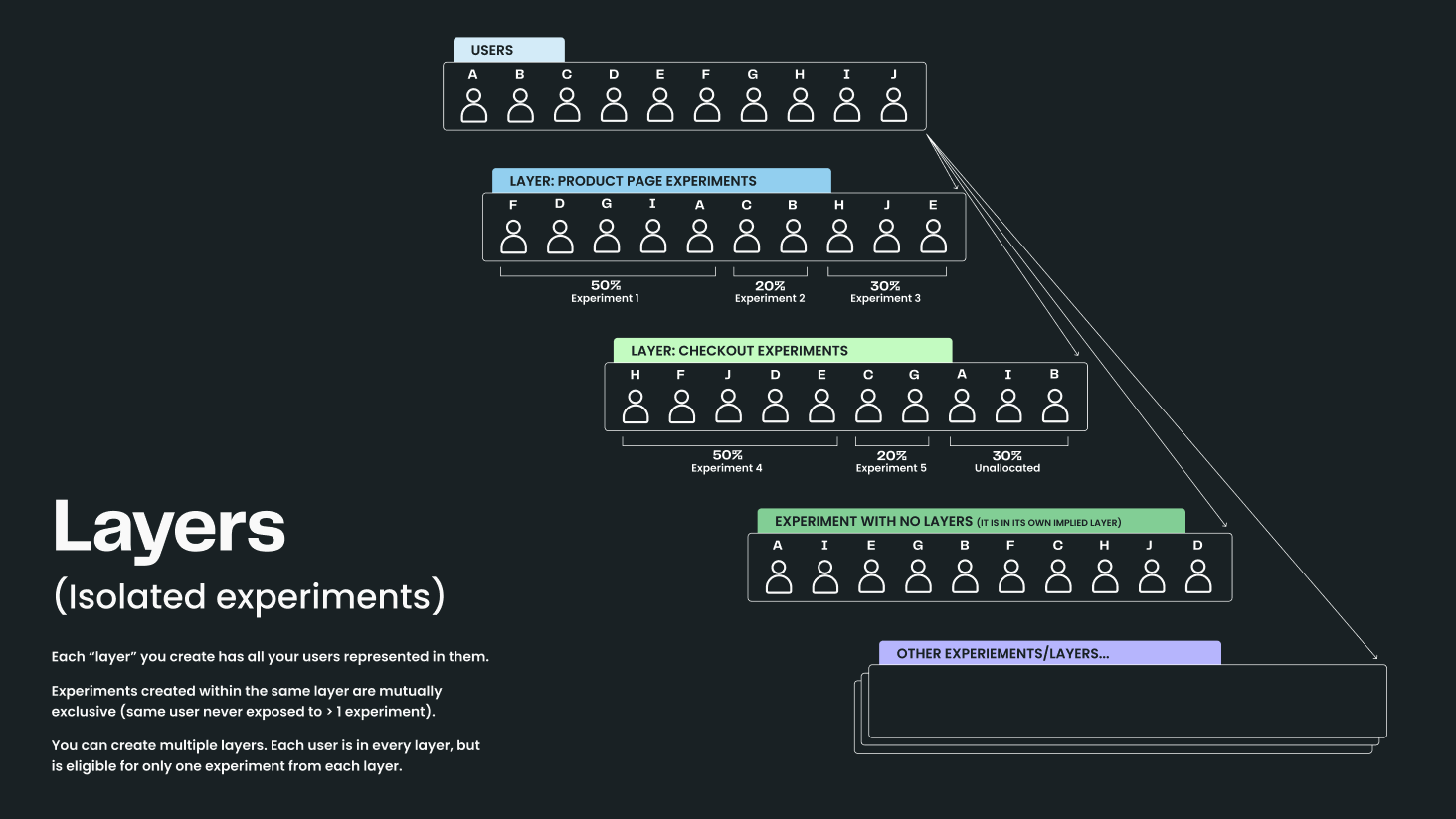
Create and manage layers
You add an experiment to a layer, or create a new layer, in the experiment creation modal.
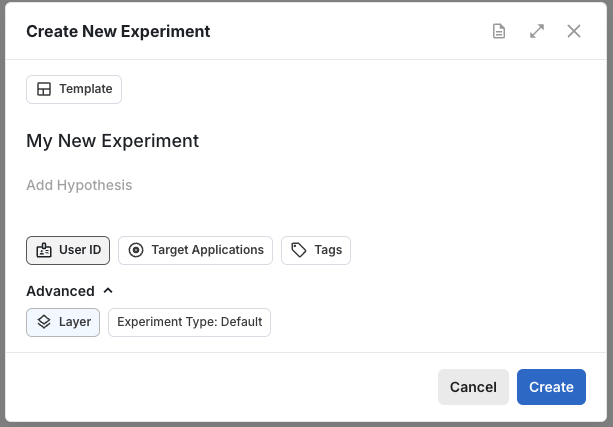
Choose the layer before the experiment starts. Statsig locks an experiment's layer when the experiment starts, so you can't add a running experiment to a layer or move it to a different layer.
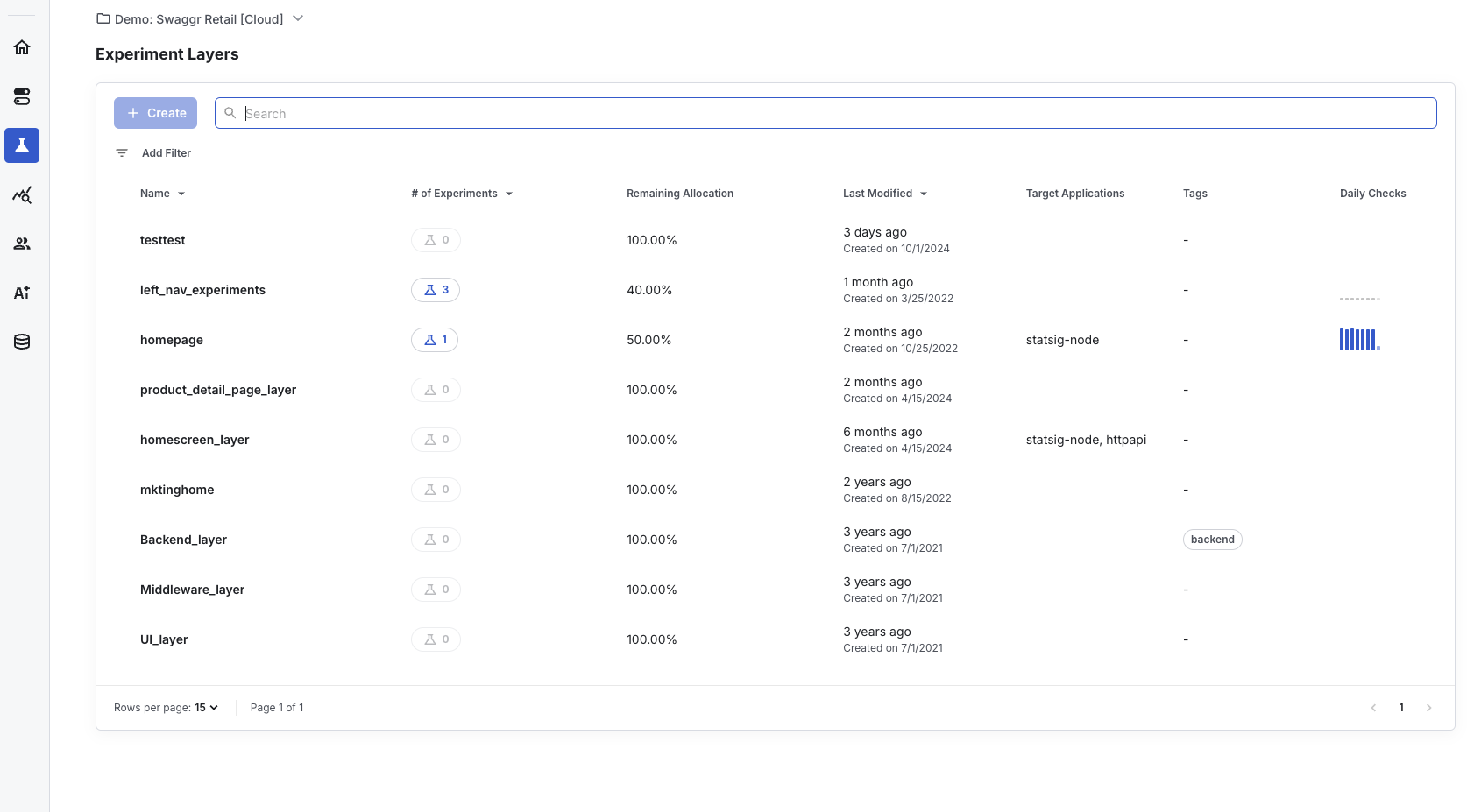
After you create a layer, manage it from the Layers tab under Experiments in the Statsig console. To override a user into an experiment in a layer, add the override on the layer, not on the experiment. Refer to Overrides.
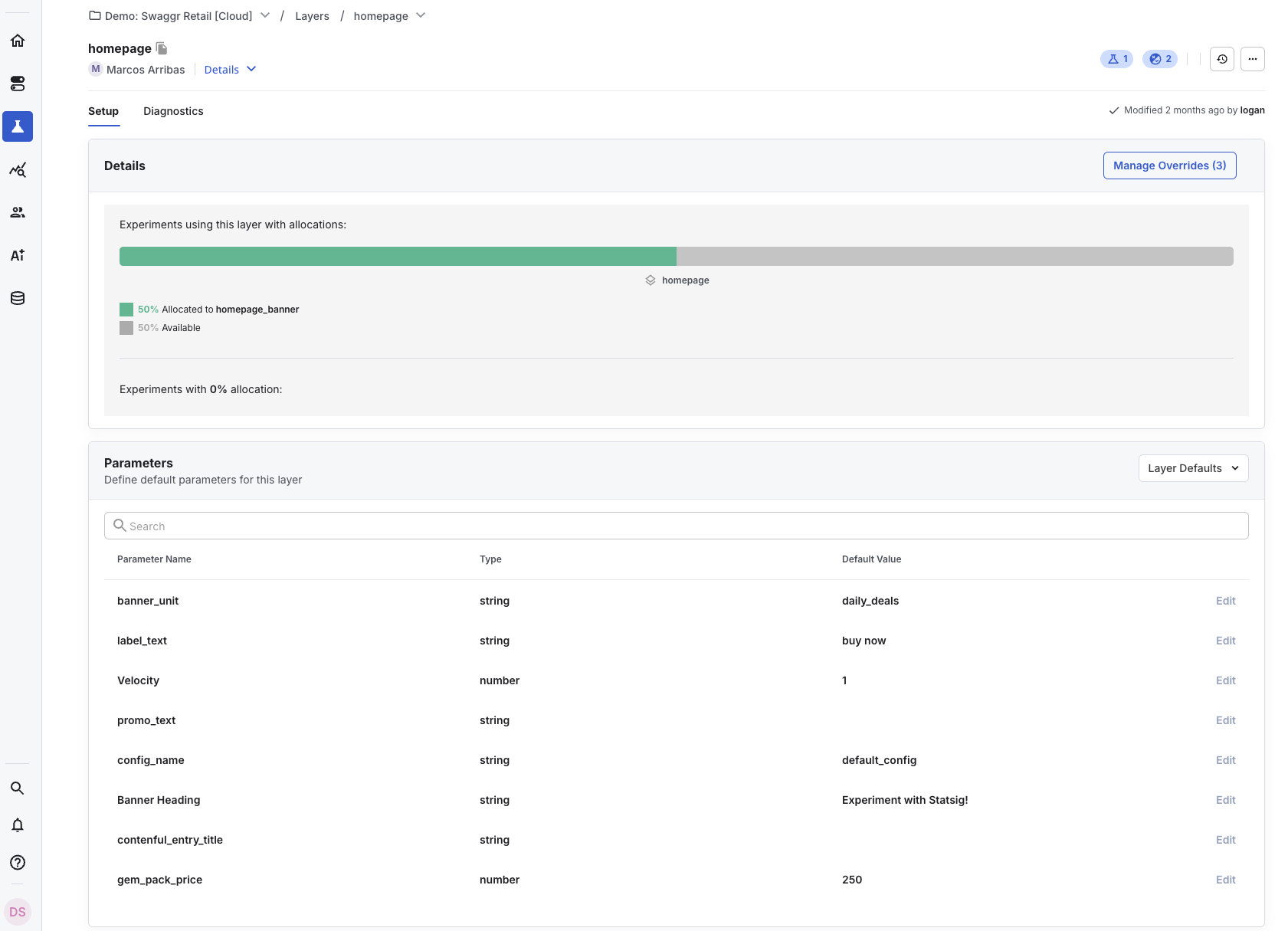
The layer details page shows the layer's shared parameters.
Share parameters across experiments
Parameters exist at the layer level, and experiments within the layer share them. Your code works only with layer parameters, so multiple experiments that change the same parameter can run and iterate without code changes.
Suppose your product has a signup dialog with text that your team tests frequently. Some tests run in parallel, and others iterate on previous experiments. If your code calls each experiment directly, it grows like this over time:
let signUpText = DEFAULT_SIGNUP_TEXT;
const signUpTestV1 = statsig.getExperiment("sign_up_dialog_text_test_v1");
const signUpTestV2 = statsig.getExperiment("sign_up_dialog_text_test_v2");
const specialSignUpTest = statsig.getExperiment("sign_up_test_special_offer");
const holidaySignUpTest = statsig.getExperiment("sign_up_test_holiday");

if (signUpTestV1.get("is_in_test", false)) {
  // original test, added in app version v1.2
  signUpText = signUpTestV1.get("dialog_content", DEFAULT_SIGNUP_TEXT);
} else if (signUpTestV2.get("is_in_test", false)) {
  // v2 of the original test, added in app version v1.6 because we wanted to test a new copy but don't want to stop v1
  signUpText = signUpTestV2.get("dialog_content", DEFAULT_SIGNUP_TEXT);
} else if (specialSignUpTest.get("is_in_test", false)) {
  // test showing a special offer in the text, added in v2.0
  signUpText = specialSignUpTest.get("dialog_content", DEFAULT_SIGNUP_TEXT);
} else if (holidaySignUpTest.get("is_in_test", false)) {
  // test showing some holiday greetings in the dialog, added in v2.1
  signUpText = holidaySignUpTest.get("dialog_content", DEFAULT_SIGNUP_TEXT);
}

// Then we display the text in the dialog
Every time you add a test, you change the code, and the change ships only with a new release.
With a layer, the code reads one parameter:
let signUpText = statsig
  .getLayer("sign_up_tests")
  .get("sign_up_dialog_text", DEFAULT_SIGNUP_TEXT);

// Then we display the text in the dialog
To add a test, add a new experiment to the same layer and choose sign_up_dialog_text as a parameter. The SDK serves the value from whichever experiment Statsig allocates the user to, with no code change or app release.
Use getLayer for layered experiments
Layered experiments remain accessible through getExperiment, but that API evaluates only the current experiment. Use getLayer so the SDK honors layer-level decisions, mutual exclusion, and shared parameters.
How Statsig assigns users in a layer
Statsig assigns a user to an experiment in a layer in two independent steps:
- Layer allocation: Statsig hashes the user's unit ID with the layer's salt and places the user in one of 1,000 layer buckets. Each experiment in the layer owns a specific set of buckets, and no two experiments share a bucket. The experiment that owns the user's bucket receives the user. If no experiment owns the bucket, the user receives the layer's default values.
- Group assignment: Statsig hashes the unit ID again with the experiment's own salt to choose the user's group, such as control or test.
The two steps use different salts, so a user's layer bucket doesn't influence the user's group assignment. Statsig always places the same unit ID in the same layer bucket, so assignment stays consistent across sessions and SDKs.
Statsig checks the experiment's targeting gate after layer allocation. A user who fails the targeting gate receives the layer's default values. Statsig doesn't move the user to another experiment in the layer. Overrides and holdouts apply before layer allocation. For the full evaluation order, refer to How evaluation works.
Change an experiment's allocation in a layer
An experiment's allocation in a layer is the share of layer buckets it owns. Changing one experiment's allocation doesn't reassign users in the other experiments in the layer.
- Increase allocation: Statsig gives the experiment more buckets from the layer's unallocated buckets. Users already in the experiment keep their buckets and groups. The increase can't exceed the number of unallocated buckets in the layer.
- Decrease allocation: Statsig removes some of the experiment's buckets. Users in the removed buckets leave the experiment and receive the layer's default values. Users in the remaining buckets keep their assignment. Decreasing allocation biases your results, so reset the experiment instead where possible. Refer to Allocation.
- Decrease, then increase: The buckets the experiment regains can contain different users from the users who left. Only users in buckets the experiment kept throughout stay in the experiment continuously.
- Shift allocation between experiments: When you decrease one experiment's allocation and increase another's, the second experiment can receive the freed buckets. Users who stay in either experiment keep their assignment.
Experiment allocation works differently from a feature gate's percentage rollout. A gate uses a fixed threshold, so changing a gate's rollout from 50% to 0% and back to 50% re-exposes the same users. An experiment owns an explicit set of buckets, so the same change to an experiment's allocation doesn't guarantee the same users.
Stop or ship an experiment in a layer
When an experiment in a layer stops, its buckets become unallocated. Statsig doesn't rearrange the other experiments' buckets. A new experiment receives buckets from all unallocated buckets in the layer. Those buckets can include both previously unallocated buckets and buckets that the stopped experiment released.
When you make a decision on an experiment in a layer, the result depends on whether the experiment has a targeting gate:
- Without a targeting gate: The shipped group's parameter values become the layer's default values, and Statsig releases the experiment's buckets. Users who aren't in another experiment in the layer receive the shipped values.
- With a targeting gate: Statsig adds an override to the layer. Users who pass the gate receive the shipped values. Users who fail the gate receive the layer's default values.
Mutual exclusion applies only to experiments that run at the same time. A layer doesn't track which buckets a stopped experiment used, so users in a new experiment might have been in an earlier experiment in the layer.
Plan layer capacity
All experiments in a layer share one 100% allocation, even when their audiences can't overlap. For example, if one experiment targets users in the US and another targets users in Japan, both still draw from the same layer buckets. Statsig places some users in Japan in the US experiment's buckets. Those users fail the US experiment's targeting gate, and Statsig doesn't move them to the Japan experiment. As a result, those users don't enter either experiment.
For experiments with separate audiences, choose one of these options:
- To keep experiments mutually exclusive within each audience, create one layer per audience.
- If overlap between experiments is acceptable, run them as standalone experiments. Each standalone experiment runs in its own layer.
How exposures work with layers
Calling getLayer("layer_name") by itself doesn't log an exposure. Statsig logs a statsig::layer_exposure event when you read a specific parameter with getLayer("layer_name").get("parameter_name").
- If Statsig assigns the user to an experiment within the layer, the
statsig::layer_exposureevent is billable. - If Statsig doesn't assign the user to an experiment within the layer, the
statsig::layer_exposureevent isn't billable.
Repeated reads of the same layer parameter for the same user within the deduplication window count as a single billable exposure. Reads of different layer parameters use separate dedupe keys and may count separately.
Deduplication window lengths:
- Client SDKs (JS/web, iOS, Android): 10 minutes per user, layer, and parameter combination.
- Server SDKs: About 1 minute. The dedupe set resets every 60 seconds.
Was this helpful?