About Warehouse Native
Introduction to Statsig Warehouse Native, a deployment model that runs experiment analysis directly on your data warehouse for privacy and control.
Warehouse Native is part of Statsig's Enterprise tier. Contact Statsig to get started.
Statsig Warehouse Native is an experimentation platform that runs analysis directly in your data warehouse. Statsig Warehouse Native connects to your existing datasets and any source of experiment assignment data, including Statsig's SDKs and real-time logging infrastructure.
Warehouse Native shares core features with Statsig Cloud but focuses on specific scenarios around running experiments on top of your warehouse.
Use cases for Statsig Warehouse Native
- End-to-end experimentation platform covering targeting, experiment setup and assignment, and analysis.
- Features include Feature Flagging, Automated/Protected Rollouts, Native Holdouts, Mutual Exclusion, and comprehensive analysis tools.
- Modern statistical engine for running analyses on existing experiments from third-party or internal systems.
- Statsig offers a full suite of experiment measurement tools, including CUPED, Stratified Sampling, Switchback Tests, and more.
If you aren't sure whether Statsig Warehouse Native or Statsig Cloud is a better fit, contact the support team, your sales contact, or the Slack community.
How Warehouse Native works
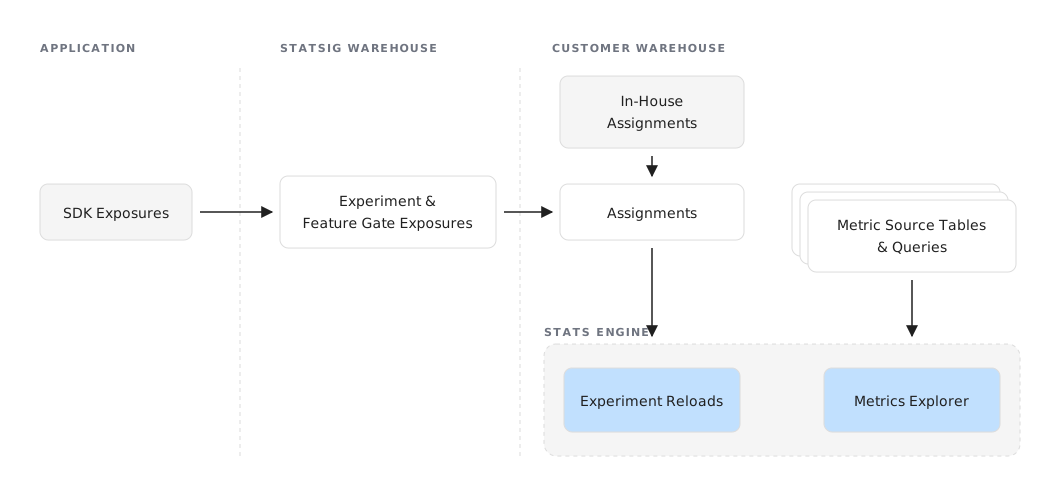
Statsig Warehouse Native runs experimentation compute jobs directly in your data warehouse, using your existing datasets to calculate metrics and enrich experiment analysis based on your data.
SDK integration
Using Statsig SDKs with Statsig Warehouse Native is similar to integrating with Statsig Cloud:
- Set Up Targeting and Experiments: Create and manage experiments using the Statsig console.
- Initialize the SDK: Integrate the Statsig SDK on your client or server-side applications.
- Targeting and Assignment: Call the Statsig SDK to assign users to variants.
- Optionally provide a logging callback to store logs in your warehouse or use Statsig's real-time infrastructure for instant diagnostics and safe rollouts.
The resulting assignment and optional event logging data is stored in your warehouse, where you can connect it to other datasets for analysis. If you log to Statsig, Statsig exports data on-demand for real-time analysis or in scheduled batch jobs.
Experiment setup
Running experiments on Warehouse Native involves several key steps:
- Connect Statsig to Your Warehouse: Integrate Statsig with your data warehouse to access relevant datasets.
- Create Metrics: Define the input data and configure experiment metrics.
- Log Exposures: Log experiment exposures with Statsig or point to existing assignments in your warehouse.
- State Your Hypothesis: Formulate a hypothesis and choose scorecard metrics to evaluate the experiment.
- Run Pulse Analysis: Execute a Pulse analysis to test your hypotheses and measure the impact on scorecard metrics.
Advanced analysis tools
Statsig’s data analysis tools run directly in your data warehouse. Your warehouse holds all queries, intermediate datasets, and final results that Statsig generates, for auditing and custom analysis.
- Pulse Analysis: Pulse helps you test your hypotheses and measure the impact of changes on your scorecard metrics.
- Metrics Explorer: Visualize experiment metrics for your entire population and drill down into user behavior. Metrics Explorer is part of a broader suite of product observability tools, including Session Replay, advanced filtering, and custom dashboards.
- Exposure Analysis: Analyze your experiment's first exposures to debug and gain insights on your experiments in Metrics Explorer. Drill down into certain properties or understand how your experiments interact with one another.
Start using Warehouse Native
Contact the support team, your sales contact, or the Slack community with any questions.
Use the following guides to start running or analyzing an experiment:
Connect Statsig to your warehouse and get test results in minutes
Evaluate how Statsig Warehouse Native can work for you
Learn about Statsig's modern Stats Engine
Was this helpful?
For AI agents: a documentation index is available at /llms.txt. Append .md to any page URL for markdown, or send Accept: text/markdown.