For AI agents: a documentation index is available at /llms.txt. Append .md to any page URL for markdown, or send Accept: text/markdown.
Abandon an Experiment
Abandon a Statsig experiment to end it without shipping a group, return every user to the default experience, and keep the results available for review.
Abandon an experiment when a technical error or an unforeseen issue stopped it from reaching a conclusive result. Abandoning an experiment moves it to the abandoned state, a finished state in which the experiment no longer enrolls users and every user receives the default experience. The experiment's results stay available.
Abandoning isn't a verdict on the variants. It records that the run produced no reliable data. If control turned out to be the better experience, ship control instead. Use Reset when one group has a bug you plan to fix and you want to run the same test again.
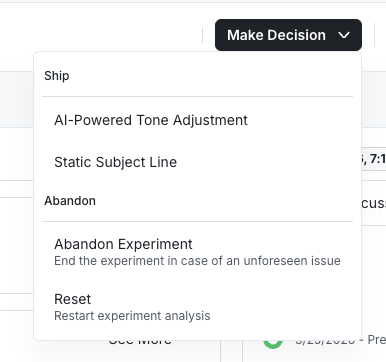
Abandon an experiment
- Open the experiment and select the Make Decision dropdown.
- Under Abandon, select Abandon Experiment.
- Optionally, enter Experiment Notes describing why you abandoned the run.
- Select Submit for Review, or Save if your project doesn't require reviews.
What happens after you abandon an experiment
- The experiment's status becomes Abandoned and it stops enrolling users.
- All users, including users already exposed, receive the default experience defined in code or in the layer.
- The experiment's results remain available for review.
- To run the test again, reset the abandoned experiment and start it. The reset generates a new salt, so users are reassigned and don't necessarily land in the group they were in before.
- You can archive the experiment to make it read-only.
Was this helpful?