For AI agents: a documentation index is available at /llms.txt. Append .md to any page URL for markdown, or send Accept: text/markdown.
Funnel++
Funnel metrics in Statsig Warehouse Native measure conversion rates through a defined sequence of steps for multi-step user journey analysis.
Funnel++ measures how users convert through a defined sequence of steps in an experiment, so you can see completion rates and where users drop off between steps. Funnel++ extends standard funnel analysis with per-step completion windows, session-level conversion, and built-in tolerance for timestamp noise, all within the statistical framework Statsig uses for Pulse analysis.
Funnel++ is a Statsig Warehouse Native feature.
How funnel metrics work
Funnel metrics measure user journeys through a series of steps. For configuration guidance, refer to funnel metrics.
Statsig provides advanced capabilities within the statistical framework used in pulse analysis. These include:
- Configurable completion windows per-step
- Session controls - going beyond user-based conversion
- Built-in allowance for timestamp noise
Use cases
Use funnel metrics to understand how users move through your product. For example, you might want to measure:
- User conversion through a subscription flow, for example Start -> Description Page -> Payment Info -> Confirm, to measure if an experiment causes users to drop off less, and at which steps.
- User conversion from "logged out visitor" to "first logged-in-article-read" using Statsig's ID Resolution.
- Session-level conversion for checking out a vacation property, to understand conversion for every unique checkout flow, not only at the user level.
Calculation
At the unit level, funnel metrics calculate, for each step of the funnel, if the unit completed that step some time after completing all previous steps in order. This creates a series of step flags.
If using session funnels, those step flags are instead counts of unique sessions.
At the group level, Statsig calculates the stepwise mean as the units for the next step divided by the units for the current step. Statsig calculates the overall mean as the units/sessions that completed the funnel divided by the unit/sessions that started the funnel.
For each step, Statsig treats the first occurrence after the previous step as the canonical trigger and timestamp for that event in subsequent timestamp comparisons.
The SQL looks like the following:
-- Unit Level, per step
SELECT distinct
  source_data.unit_id,
  source_data.funnel_session_id, -- optional
  source_data.funnel_step_id,
  IF(`<Completed All Steps Up to Current Step In Order>`, 1, 0) as numerator,
  IF(`<Completed Previous Steps In Order>`, 1, 0) as denominator
FROM source_data
JOIN exposure_data
ON
  -- Only include users who saw the experiment
  source_data.unit_id = exposure_data.unit_id
  -- Only include data from after the user saw the experiment
  -- In this case exposure_data is already deduped to the "first exposure"
  AND source_data.timestamp >= exposure_data.timestamp
;

--Group Level
SELECT
  group_id,
  funnel_step_id,
  SUM(numerator)/SUM(denominator) as mean
FROM unit_data
GROUP BY group_id;
Methodology notes
Conversion metrics require adjustment due to potential unit-level covariance between the numerator and the denominator. Statsig uses the delta method to estimate this adjustment.
By default, Statsig only includes numerators from metrics with non-null, non-zero denominators. You can configure this behavior in the advanced settings.
In experiment analysis, funnels enforce strict ordering. For example, in the funnel A->B->C, all subsequent timestamp comparisons use the FIRST occurrence of A. Consider a user who has an A event on day 0 with no other events, and then completes A, B, and C in order on day 5. If the conversion window from A->B is 1 day, this funnel won't count as completed, because the time from the first A to the first B is 5 days.
Options
- Conversion window
- A step-level setting specifying how long this step has to occur after the previous step. For example, in the funnel A->B->C, if B has a conversion window of one hour, Statsig only counts it if it occurs within 1 hour of A.
- Use Strict Event Ordering
- Whether to use >= or > when comparing step timestamps. Strict mode allows you to have two subsequent steps of the same event without it "automatically" passing.
- Timestamp Allowance
- Allow some amount of buffer, in milliseconds, between funnel steps. Event logs can have noise on timestamps, so sometimes events may be logged slightly out of order. This setting helps to correct for this issue.
- Count Distinct Mode
- Whether to count sessions or units. For sessions, you must provide a session identifier field on each step.
- Calculation window (optional)
- How long a unit has to complete the funnel after starting, and whether the funnel starts when the unit is exposed to the experiment or when they trigger the first event in the funnel
- Treat Exposure as Initial Funnel Event
- With this setting enabled, the first step of the funnel is the exposure event of the experiment. This makes it easy to measure the conversion rate to the first event, and additionally normalizes the final outcome per experiment-user. This setting is incompatible with session-based funnels.
- Measure time to complete
- Switches the funnel mode into measuring the average time for users to complete a funnel. This creates a ratio metric, where the numerator is the sum of funnel seconds-to-complete, and the denominator is the number of completed funnels. This can be useful in isolation, or when paired with a conversion measurement to understand the change to both completion rate and time to complete.
Visualization
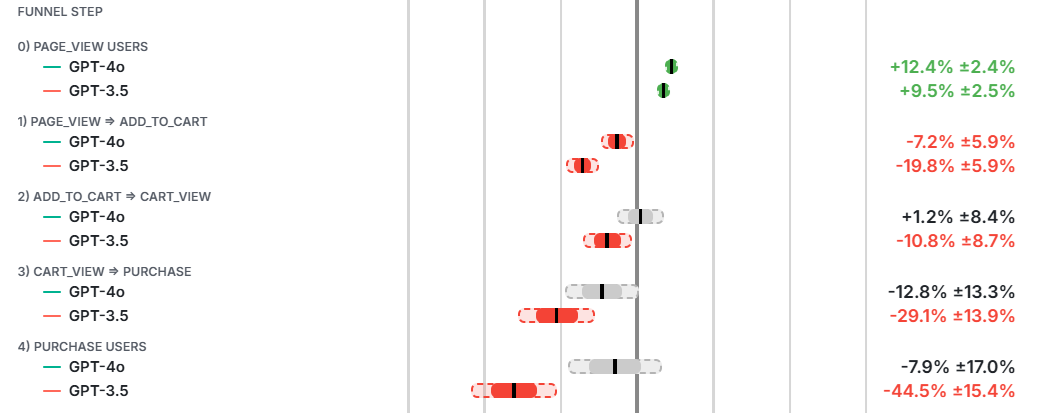
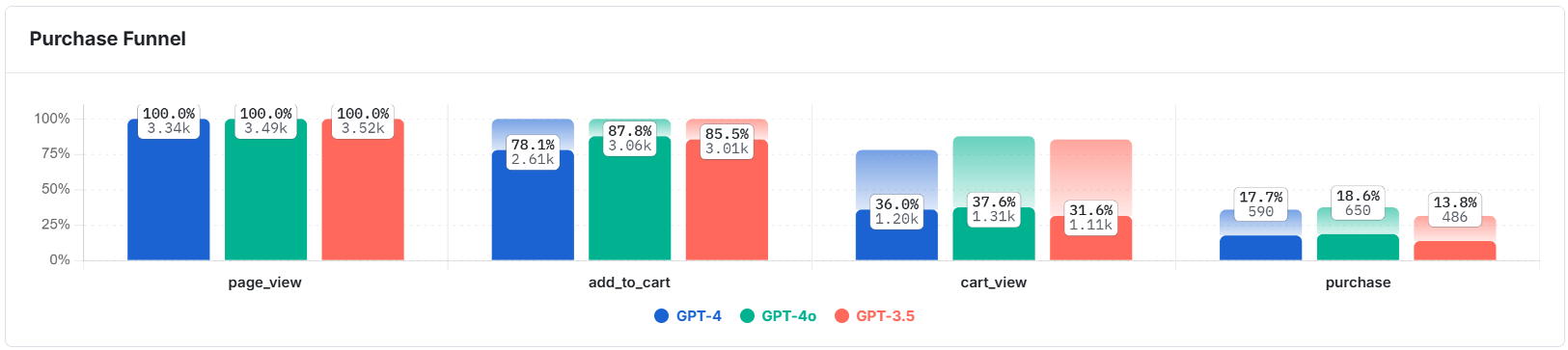
In addition to breaking down lift by funnel steps, you can create funnel visualizations by step.
Was this helpful?