For AI agents: a documentation index is available at /llms.txt. Append .md to any page URL for markdown, or send Accept: text/markdown.
Fivetran
Connect Fivetran with Statsig to ingest events from third-party sources via your warehouse for use in Statsig metrics and experiment analysis.
How the Fivetran integration works
Enabling the Fivetran integration for Statsig allows Statsig to push events to your Fivetran account through a webhook. This integration lets you forward Statsig data to any connectors available from Fivetran.
Configuring outbound events
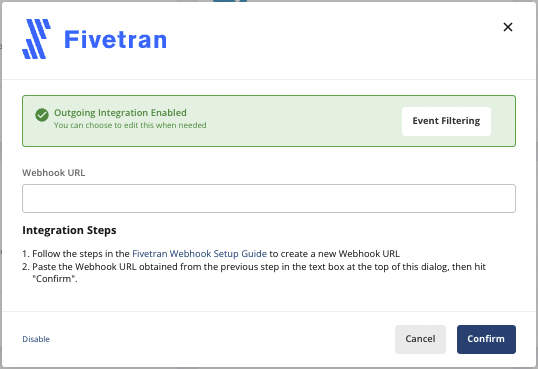
- Follow the steps in the Fivetran Webhook Setup Guide to create a new Webhook URL.
- On the Statsig Integrations page, enable the Fivetran integration by pasting in the Fivetran Webhook URL and click Confirm.
Event format
Statsig sends events in batches in JSON format. Each Statsig event has the following structure:
| Field | Type | Description |
|---|---|---|
| eventName | String | Name of the event provided |
| user | JSON | Statsig User Object |
| userID | String | User ID provided |
| timestamp | Number | Timestamp in MS of the event |
| value | String | Value of the event provided |
| metadata | JSON | Custom Metadata provided |
| statsigMetadata | JSON | Metadata related to the logging of this event added by Statsig |
| timeUUID | String | UUID for the event |
| unitID | String | Unit ID of the exposure (e.g. userID, stableID, or the customID) |
Custom event formatting - logEvent
{
  "eventName": "my_custom_event",
  "user": {
    "userID": "a_user",
    "email": "a.user@email.com"
  },
  "userID": "a_user",
  "timestamp": "1655231253265",
  "statsigMetadata": {
    ...
  },
  "value": "a_custom_value",
  "metadata": {
    "key_a": "value_a",
    "key_b": "123"
  },
  "timeUUID": "abd2a983-ec0f-11ec-917a-fb8cdaeda578"
}
Feature gate exposure formatting - checkGate
{
  "eventName": "statsig::gate_exposure",
  "user": { ... },
  "userID": "a_user",
  "timestamp": "1655231253265",
  "statsigMetadata": { ... },
  "value": "",
  "metadata": {
    "gate": "a_gate",
    "gateValue": "false",
    "ruleID": "default",
    "reason": "Network",
    "time": "1655231249644"
  },
  "timeUUID": "8d7c1040-ec11-11ec-g123-abe2c32fcf46",
  "unitID": "userID"
}
Dynamic config exposure formatting - getConfig
{
  "eventName": "statsig::config_exposure",
  "user": { ... },
  "userID": "a_user",
  "timestamp": "1655231253265",
  "statsigMetadata": { ... },
  "value": "",
  "metadata": {
    "config": "a_config",
    "ruleID": "default",
    "reason": "Network",
    "time": "1655231249644"
  },
  "timeUUID": "af379f60-ec11-22ad-8e0a-05c3ee70bd0c",
  "unitID": "userID"
}
Experiment exposure formatting - getExperiment
{
  "eventName": "statsig::experiment_exposure",
  "user": { ... },
  "userID": "a_user",
  "timestamp": "1655232119734",
  "statsigMetadata": { ... },
  "value": "",
  "metadata": {
    "config": "an_experiment",
    "ruleID": "4SauZJcM1T7zNvh1igBjwE",
    "reason": "Network",
    "time": "1655231249644",
    "experimentGroupName": "Control"
  },
  "timeUUID": "af379f61-ab22-11ec-8e0a-05c3ee70bd0c",
  "unitID": "userID"
}
Example batch
[
  {
    "eventName": "page_view",
    "user": {"userID": "user_1", "country": "US"},
    "userID": "user_1",
    "timestamp": 1644520566967,
    "value": "example_value",
    "metadata": {"page": "home_page"},
    "statsigMetadata": {},
    "timeUUID": "f4c414a0-8ab5-11ec-a8a3-0242ac120002"
  },
  {
    "eventName": "statsig::gate_exposure",
    "user": {"userID": "user_1", "country": "US"},
    "userID": "user_1",
    "timestamp": 1644520566968,
    "value": "",
    "metadata": {"gate": "test_gate", "gateValue": "true", "ruleID": "default"},
    "statsigMetadata": {},
    "timeUUID": "f4c414a0-8ab5-11ec-a8a3-0242ac120003",
    "unitID": "userID"
  },
  {
    "eventName": "statsig::experiment_exposure"
    "user": {"userID": "user_1", "country": "US"},
    "userID": "user_1",
    "timestamp": 1644520566969,
    "value": "",
    "metadata": {
       "config": "an_experiment", "ruleID": "4SauZJcM1T7zNvh1igBjwE", "reason": "Network", "time": "1655231249644", "experimentGroupName": "Control"
    },
    "statsigMetadata": {},
    "timeUUID": "f4c414a0-8ab5-11ec-a8a3-0242ac120004",
    "unitID": "userID"
  }
]
Filtering events
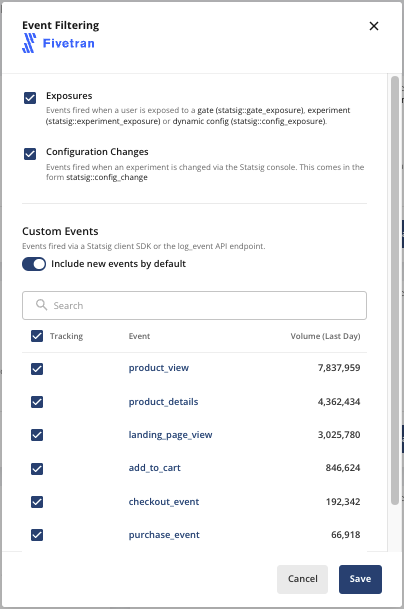
After you enable outbound events to Fivetran, you can select which categories of Statsig events to export by clicking the Event Filtering button and checking the appropriate boxes as shown below.
Was this helpful?