For AI agents: a documentation index is available at /llms.txt. Append .md to any page URL for markdown, or send Accept: text/markdown.
Google Tag Manager (GTM)
Integrate Statsig with Google Tag Manager to forward GTM-tagged events to Statsig for experiment analysis and metric tracking without code changes.
Inbound integration: Events from GTM dataLayer to Statsig
This integration lets customers using Statsig on the web use their existing Google Tag Manager configuration to track events to Statsig. Customers don't need to retag their web properties with calls specific to Statsig's SDK. The integration uses a global listener to consume all GTM triggers and send a corresponding event to Statsig.
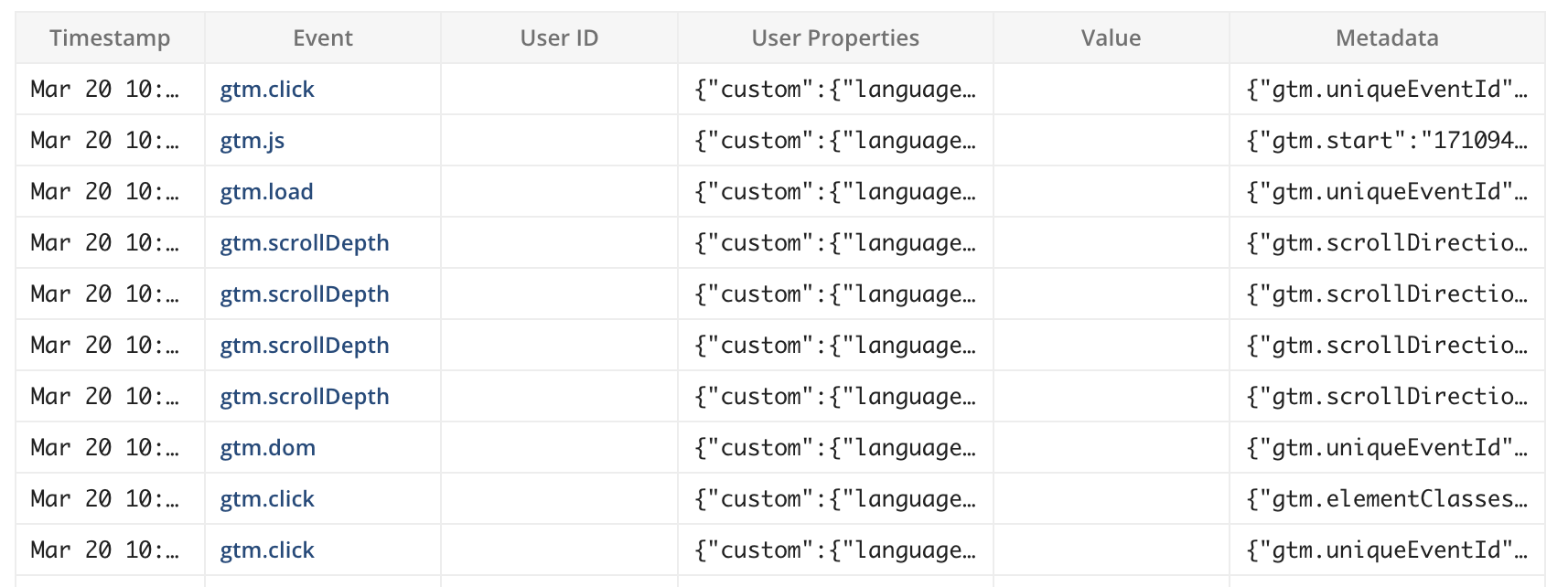
(statsig log stream showing GTM events flowing in)
Set up the GTM integration
Step 1: Broadcast Statsig client readiness to GTM
The tracking code in GTM must know when the Statsig client is ready for tracking. Broadcast a window-level event and pass the statsig instance for the GTM tag code to use. In your initialize call, implement the initCompletionCallback callback as follows:
Using @statsig/js-client
window.statsig = new Statsig.StatsigClient('<CLIENT-SDK-KEY>', {/* USER */}, {/* OPTIONS */});
statsig.on('values_updated', function(evt) { // bind before init is called
  if(evt.status && evt.status === 'Ready') {
    window.dispatchEvent(new CustomEvent("statsig:ready", {
      detail: { statsig: statsig }
    }));
  }
});
await statsig.initializeAsync();
Using statsig-js
await statsig.initialize('<CLIENT-SDK-KEY>', '<USER-OBJECT>', {
  initCompletionCallback: function (duration, success, message) {
    window.dispatchEvent(new CustomEvent("statsig:ready", {
      detail: { statsig: statsig }
    }));
  }
});
Step 2: Create new tag
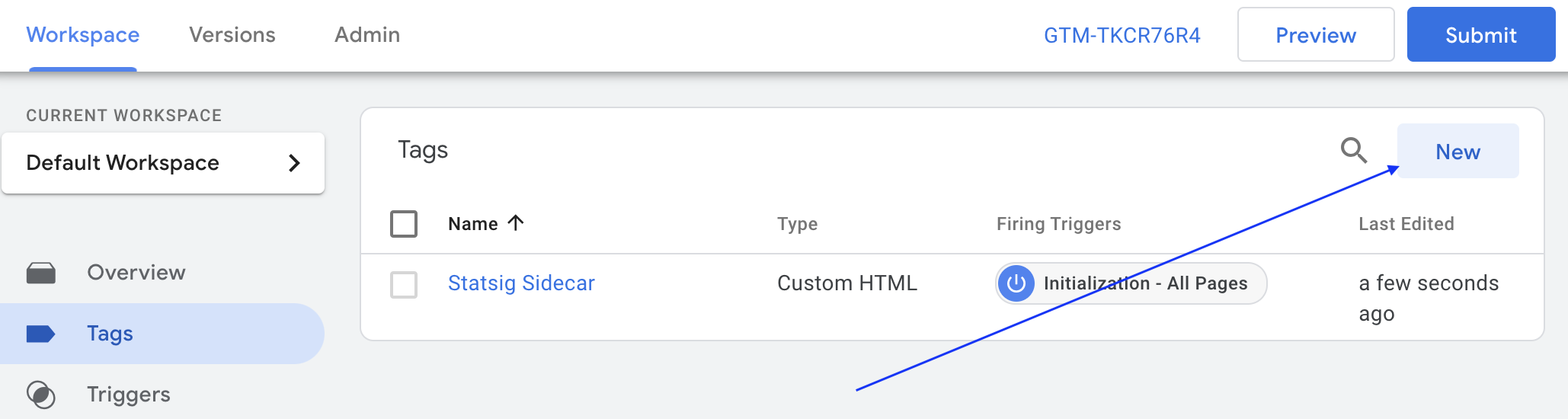
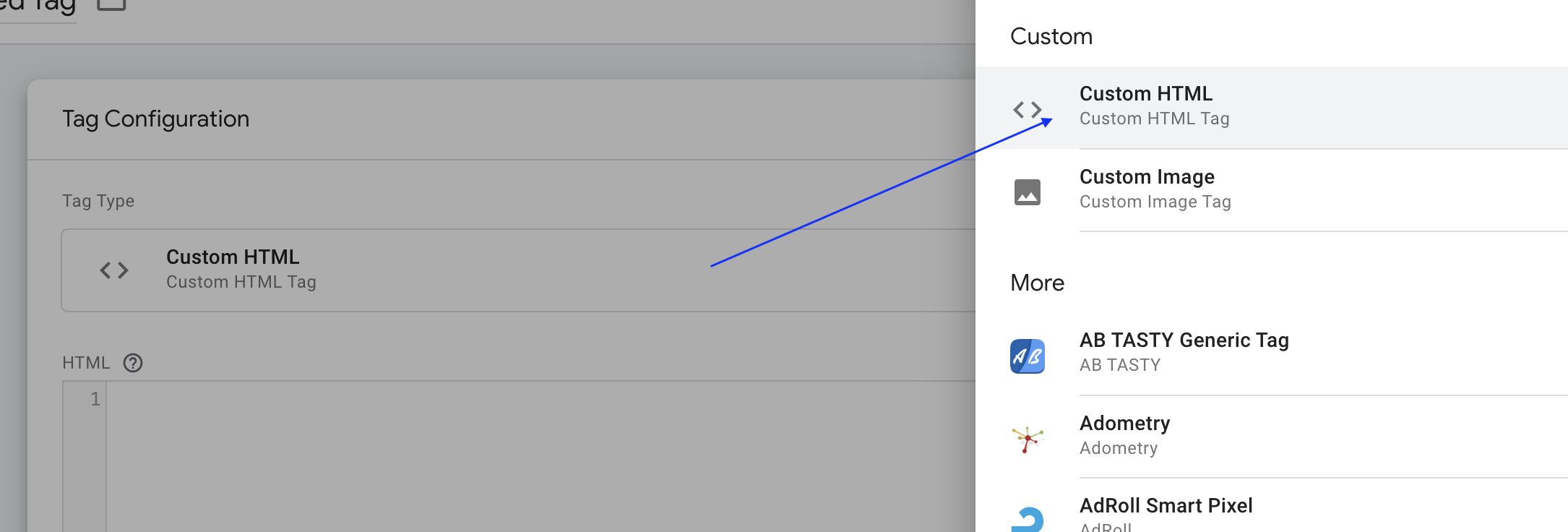
Step 3: Choose tag type
Choose "Custom HTML" for tag type, and paste the GTM code below (including the script tag).
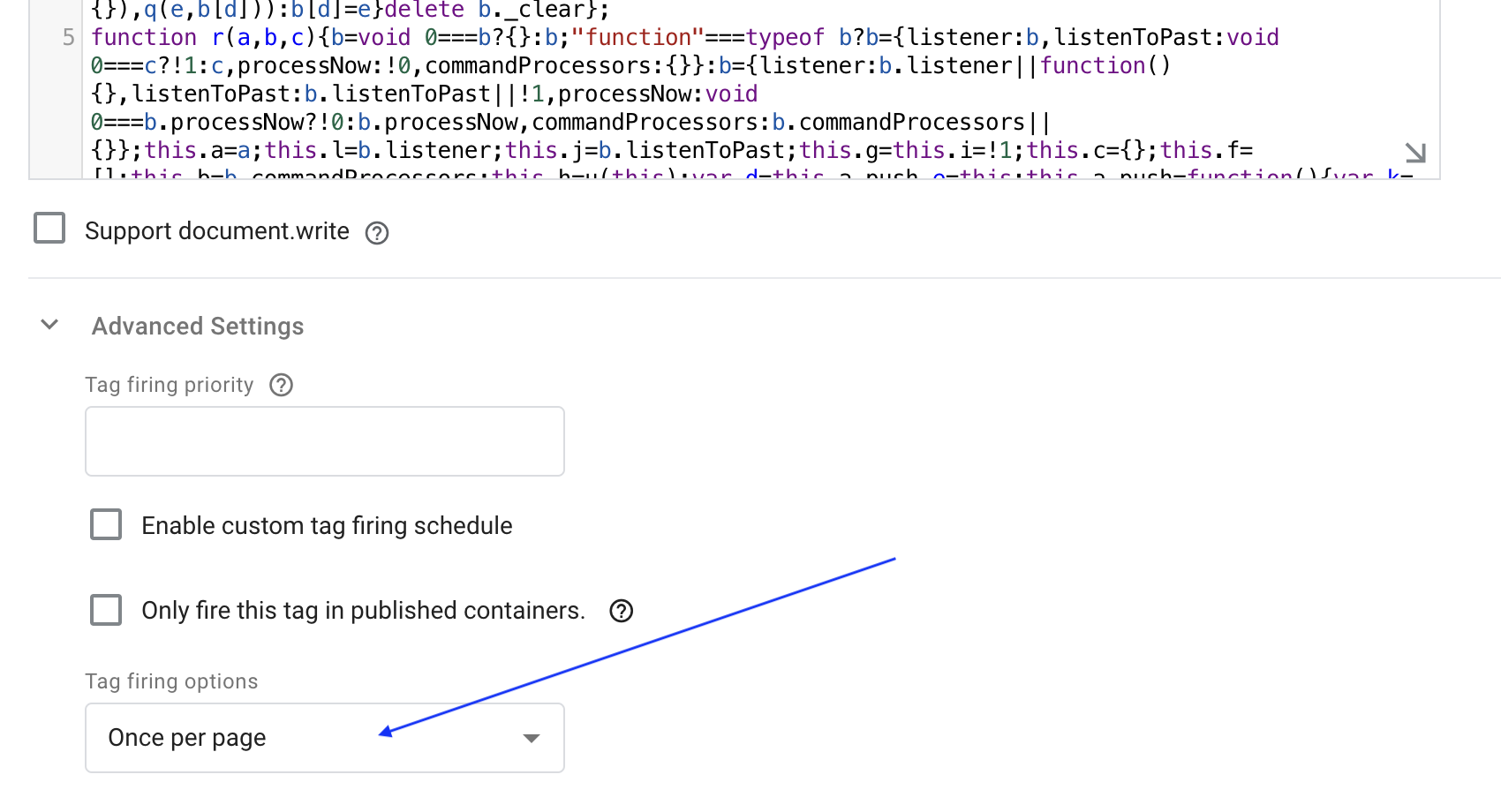
Step 4: Adjust fire options
Under Advanced Settings, under "Tag Firing options", select Once per page.
Step 5: Set tag trigger
Below the "Tag Configuration" section, set the Trigger to Initialization - All Pages.
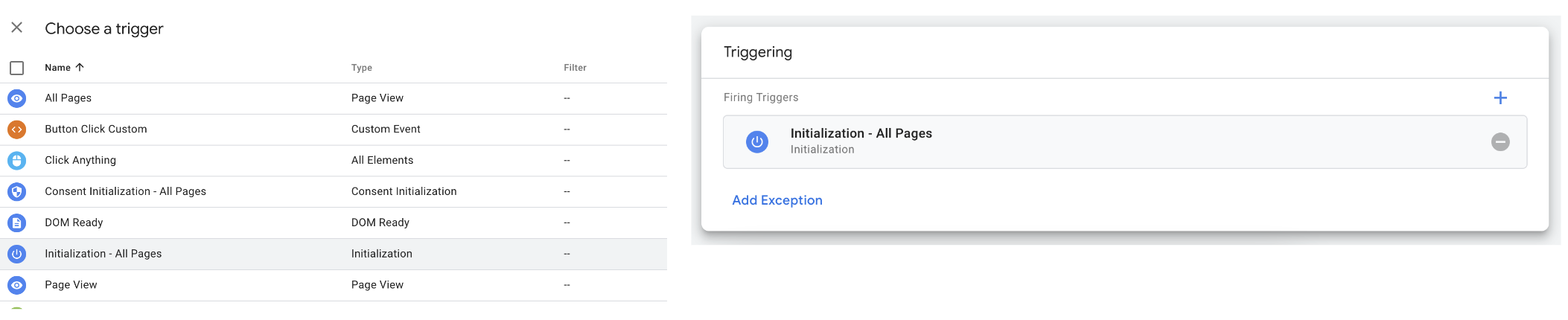
Step 6: Save tag and test
After saving and publishing the GTM tag, tracking runs automatically without additional configuration. To debug the integration, set a local storage entry debug_ss_gtm with any value on your webpage. Console log statements appear for each tracking call sent to Statsig. You can also inspect your browser's network traffic to see the events Statsig tracks.
GTM code
The code below assumes that the statsig client lives at window.statsig
<script type="text/javascript">
/* dataLayer helper */
(function(){
var f=/\[object (Boolean|Number|String|Function|Array|Date|RegExp|Arguments)\]/;function g(a){return null==a?String(a):(a=f.exec(Object.prototype.toString.call(Object(a))))?a[1].toLowerCase():"object"}function m(a,b){return Object.prototype.hasOwnProperty.call(Object(a),b)}function n(a){if(!a||"object"!=g(a)||a.nodeType||a==a.window)return!1;try{if(a.constructor&&!m(a,"constructor")&&!m(a.constructor.prototype,"isPrototypeOf"))return!1}catch(c){return!1}for(var b in a);return void 0===b||m(a,b)};function p(a,b){var c={},d=c;a=a.split(".");for(var e=0;e<a.length-1;e++)d=d[a[e]]={};d[a[a.length-1]]=b;return c}function q(a,b){var c=!a._clear,d;for(d in a)if(m(a,d)){var e=a[d];"array"===g(e)&&c?("array"===g(b[d])||(b[d]=[]),q(e,b[d])):n(e)&&c?(n(b[d])||(b[d]={}),q(e,b[d])):b[d]=e}delete b._clear};
function r(a,b,c){b=void 0===b?{}:b;"function"===typeof b?b={listener:b,listenToPast:void 0===c?!1:c,processNow:!0,commandProcessors:{}}:b={listener:b.listener||function(){},listenToPast:b.listenToPast||!1,processNow:void 0===b.processNow?!0:b.processNow,commandProcessors:b.commandProcessors||{}};this.a=a;this.l=b.listener;this.j=b.listenToPast;this.g=this.i=!1;this.c={};this.f=[];this.b=b.commandProcessors;this.h=u(this);var d=this.a.push,e=this;this.a.push=function(){var k=[].slice.call(arguments,
0),l=d.apply(e.a,k);v(e,k);return l};b.processNow&&this.process()}r.prototype.process=function(){this.registerProcessor("set",function(){var c={};1===arguments.length&&"object"===g(arguments[0])?c=arguments[0]:2===arguments.length&&"string"===g(arguments[0])&&(c=p(arguments[0],arguments[1]));return c});this.i=!0;for(var a=this.a.length,b=0;b<a;b++)v(this,[this.a[b]],!this.j)};r.prototype.get=function(a){var b=this.c;a=a.split(".");for(var c=0;c<a.length;c++){if(void 0===b[a[c]])return;b=b[a[c]]}return b};
r.prototype.flatten=function(){this.a.splice(0,this.a.length);this.a[0]={};q(this.c,this.a[0])};r.prototype.registerProcessor=function(a,b){a in this.b||(this.b[a]=[]);this.b[a].push(b)};
function v(a,b,c){c=void 0===c?!1:c;if(a.i&&(a.f.push.apply(a.f,b),!a.g))for(;0<a.f.length;){b=a.f.shift();if("array"===g(b))a:{var d=a.c;g(b[0]);for(var e=b[0].split("."),k=e.pop(),l=b.slice(1),h=0;h<e.length;h++){if(void 0===d[e[h]])break a;d=d[e[h]]}try{d[k].apply(d,l)}catch(w){}}else if("arguments"===g(b)){e=a;k=[];l=b[0];if(e.b[l])for(d=e.b[l].length,h=0;h<d;h++)k.push(e.b[l][h].apply(e.h,[].slice.call(b,1)));a.f.push.apply(a.f,k)}else if("function"==typeof b)try{b.call(a.h)}catch(w){}else if(n(b))for(var t in b)q(p(t,
b[t]),a.c);else continue;c||(a.g=!0,a.l(a.c,b),a.g=!1)}}r.prototype.registerProcessor=r.prototype.registerProcessor;r.prototype.flatten=r.prototype.flatten;r.prototype.get=r.prototype.get;r.prototype.process=r.prototype.process;window.DataLayerHelper=r;function u(a){return{set:function(b,c){q(p(b,c),a.c)},get:function(b){return a.get(b)}}};})();

window.StatsigLogger = (function () {

  var statsigInstance;
  var log = function () {
    if (typeof localStorage !== 'undefined' && typeof console !== 'undefined' && localStorage.getItem('debug_ss_gtm')) {
      console.log.apply(console, arguments);
    }
  };

  var handleGTMMessage = function (model, message) {
    if (typeof message === 'object' && typeof message.event === 'string') {
      var metadata = {};
      for (var prop in message) {
          if(!(message[prop] instanceof HTMLElement) && typeof(message[prop]) !== 'object') {
            metadata[prop] = message[prop];
          }
      }
      log('++ handleGTMMessage', message.event, message.conversionValue || null, metadata);
      statsigInstance.logEvent(message.event, message.conversionValue || null, metadata);
    }
    else {
      log('++ handleGTMMessage / skip');
    }
  }

  var init = function(condition) {
    log('+++ Statsig:ready ->', condition);
    // this may have past messages that haven't yet been handled
    var globalGTMListener = new DataLayerHelper(dataLayer, {
      listener: handleGTMMessage,
      listenToPast: true,
    });
  }

  var clientReady = false;
  try {
    // The code below assumes that the statsig client lives at `window.statsig`
    clientReady = (statsig && statsig.getClientX && statsig.getClientX().ready) || statsig.loadingStatus === 'Ready';
  } catch(err) { }

  if(clientReady) {
    // if client is already initialized, proceed
    statsigInstance = statsig;
    init('pre-GTM');
  }
  else {
    // otherwise wait for statsig
    window.addEventListener('statsig:ready', function(evt) {
      statsigInstance = evt.detail.statsig;
      init('post-GTM');
    });
  }

})();
</script>
Outbound integration: GTM data enriched with Statsig test assignments
This pattern lets you enrich your GTM dataLayer with experiment assignment information.
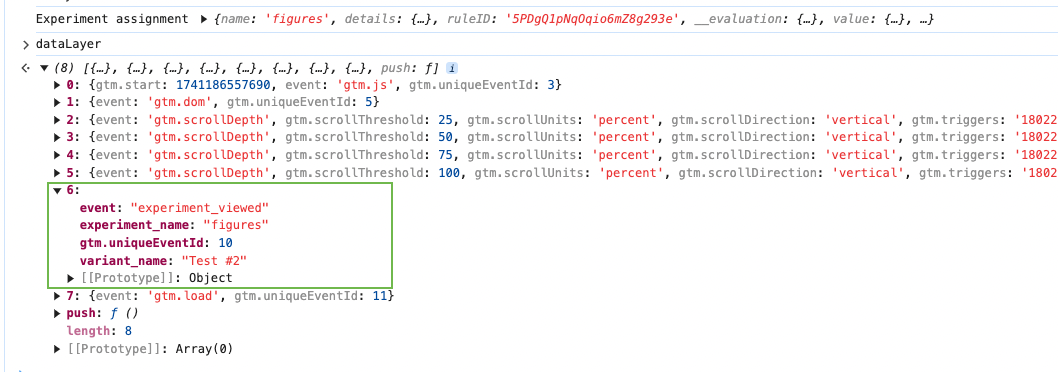
Before your Statsig initialize call, bind an EventEmitter listener that captures the assigned experiment name and test group, then push these values into the dataLayer. The argument passed to the callback contains context about the assignment. Modify the GTM dataLayer properties as needed.
// use event emitter to listen for experiment assignments
statsigClient.on("experiment_evaluation", function(evt) {
  window.dataLayer.push({
    'event': 'experiment_viewed',
    'experiment_name': evt.experiment.name,
    'variant_name': evt.experiment.groupName
  })
});

await statsigClient.initializeAsync();
Was this helpful?