For AI agents: a documentation index is available at /llms.txt. Append .md to any page URL for markdown, or send Accept: text/markdown.
Event Filtering
Configure event filtering in Statsig to control which events are ingested, dropped, or transformed before they reach metrics and experiments.
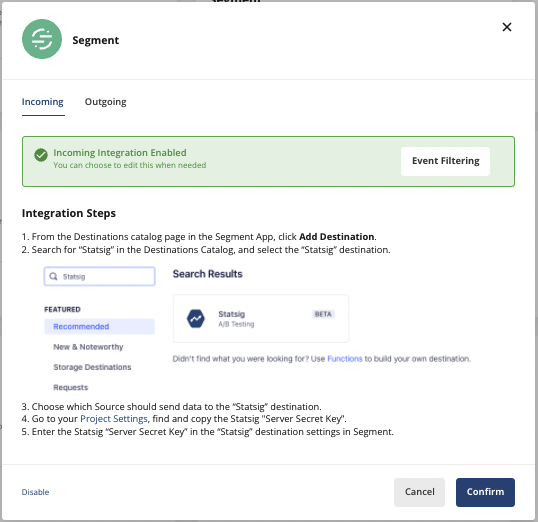
After you enable an integration, you can select specific events to send, receive, or both by selecting Event Filtering.
The steps below use the Segment integration as an example, but the steps to enable Event Filtering are the same across integrations.
Incoming Event Filtering
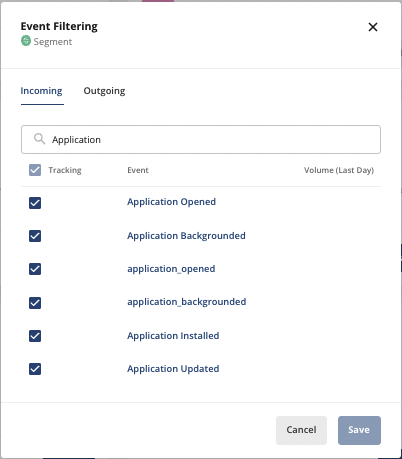
If your integration includes "Incoming" events, you can filter which ones Statsig ingests. Statsig doesn't log all others.
- Go to the integrations page on console.statsig.com.
- Select the integration you want to filter events for.
- In the dialog that appears, select Event Filtering.
- Search for specific events and select or deselect the events you want Statsig to ingest.
Outgoing Event Filtering
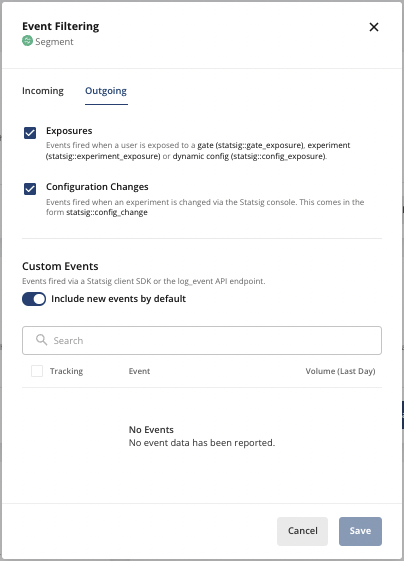
If your integration includes "Outgoing" events, you can select which events Statsig forwards to the integration.
- Go to the integrations page on console.statsig.com.
- Select the integration you want to filter events for.
- In the dialog that appears, select Event Filtering.
Was this helpful?