For AI agents: a documentation index is available at /llms.txt. Append .md to any page URL for markdown, or send Accept: text/markdown.
Advanced Configurations
Configure advanced Sidecar features including Single Page App support, targeting, segmentation, consent management, and cross-domain tracking.
Single Page App support
Sidecar supports integration within Single Page Apps. Sidecar provides configuration tools and SDK methods for defining custom trigger points, giving you full flexibility to control when an experiment runs.
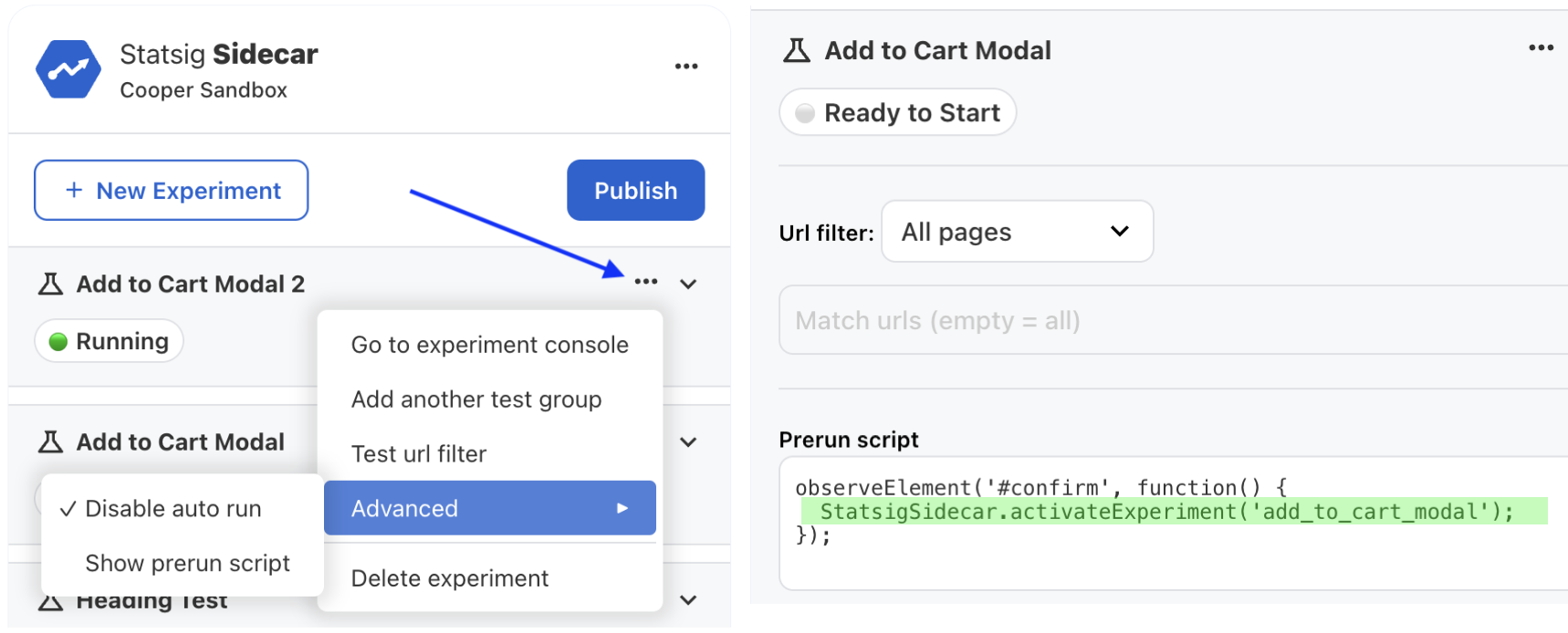
- Disable Auto Run: When you select it, Sidecar doesn't automatically attempt to run the test on page load.
- Custom activation: Use
StatsigSidecar.activateExperiment("<experiment_id>")to activate an experiment manually. - Prerun Script: Define a custom script that runs only once per experiment if the URL filter passes. Use the Prerun Script to bind listeners or evaluate custom logic to control when to trigger the experiment using
activateExperiment.
Advanced targeting and segmentation
This section describes how to set user identity and attributes for Sidecar to enable more advanced targeting and results segmentation.
By default, Sidecar and Autocapture use stableID (an auto-generated device-level GUID stored in the user's localStorage) for tracking. To enrich autocapture events with known user identities and attributes, define the following object before autocapture or Sidecar loads.
Watch this video tutorial on how to configure more advanced targeting for your Sidecar experiments.
window.statsigUser = {
  userID: "<USER ID>",
  custom: { // optional attributes object
     isLoggedIn: false
  }
}
Accessing the Statsig JS client
To access the underlying Statsig js client instance, call StatsigSidecar.getStatsigInstance().
Configuring runtime options
Use runtime options to handle consent management, GDPR compliance, and more. Sidecar fully supports all StatsigOptions that the JavaScript SDK provides. Pass them to Sidecar using:
window.statsigOptions = {
  // example of disabling logging for
  loggingEnabled: 'disabled'
}
Managing consent
Before the Sidecar script tag, configure these runtime options to disable browser storage and tracking:
window.statsigOptions = {
  loggingEnabled: "disabled",
  disableStorage: true
}
After the user gives consent, re-enable storage and tracking:
__STATSIG__.instance().updateRuntimeOptions({loggingEnabled: "browser-only", disableStorage: false});
Persisting stableID across subdomains
Statsig uses localStorage as the preferred mechanism for storing the user's stableID. localStorage keys don't persist across origin boundaries, including subdomains. For example, a user visiting https://example.com, https://show.example.com, and https://account.example.com receives three distinct stableIDs.
If you assign a user to a test on one subdomain and track behavior for metrics on a different subdomain, add the following solution. The solution ensures Statsig correctly attributes cross-origin behavior to the Test Group assignment from the initial experiment domain.
Paste the following in your HEAD section.
<!-- cross domain id script -->
<script>!function(){let t="STATSIG_LOCAL_STORAGE_STABLE_ID";function e(){if(crypto&&crypto.randomUUID)return crypto.randomUUID();let t=()=>Math.floor(65536*Math.random()).toString(16).padStart(4,"0");return`$\{t()\}${t()}-$\{t()\}-4${t().substring(1)}-$\{t()\}-${t()}$\{t()\}${t()}`}let i=null,n=localStorage.getItem(t)||null;if(document.cookie.match(/statsiguuid=([\w-]+);?/)&&([,i]=document.cookie.match(/statsiguuid=([\w-]+);?/)),i&&n&&i===n);else if(i&&n&&i!==n)localStorage.setItem(t,i);else if(i&&!n)localStorage.setItem(t,i);else{let o=e();localStorage.setItem(t,o),function t(i){let n=new Date;n.setMonth(n.getMonth()+12);let o=window.location.host.split(".");o.length>2&&o.shift();let s=`.$\{o.join(".")\}`;document.cookie=`statsiguuid=${i||e()};Expires=$\{n\};Domain=${s};Path=/`}(o)}}();</script>

<!-- Manually attach stableID from local storage -->
<script>
if(localStorage.getItem('STATSIG_LOCAL_STORAGE_STABLE_ID')) {
  window.statsigUser = {
    customIDs: {stableID: localStorage.getItem('STATSIG_LOCAL_STORAGE_STABLE_ID')}
  }
}
</script>

<!-- sidecar script below -->
<script src="https://cdn.jsdelivr.net/npm/statsig-sidecar/dist/index.min.js?apikey=[client-YOUR-STATSIG-CLIENT-KEY]"></script>
Was this helpful?