For AI agents: a documentation index is available at /llms.txt. Append .md to any page URL for markdown, or send Accept: text/markdown.
JavaScript Client SDK (Web)
Statsig's JavaScript SDK for browser and React applications.
Set up the SDK
Install the SDK
To install the Statsig Web SDK, add the package using your preferred package manager. Include optional packages if you plan to enable Session Replay or Auto Capture.
bashnpm install @statsig/js-client @statsig/session-replay @statsig/web-analyticsIf you don't need Session Replay or Auto Capture, omit the
@statsig/session-replayand@statsig/web-analyticspackages.After installation, configure the SDK in your app entry point before rendering your UI.
Initialize the SDK
Next, initialize the SDK with a client SDK key from the "API Keys" tab on the Statsig console. These keys are safe to embed in a client application.
Along with the key, pass in a User Object with the attributes you'd like to target later in a gate or experiment.
tsximport { StatsigClient } from '@statsig/js-client'; const client = new StatsigClient( 'client-xyz', { userID: 'a-user' }, { environment: { tier: 'development' }, }, ); await client.initializeAsync();Use
initializeAsyncwhen you need to await the latest values. For a non-blocking approach, you can callinitializeAsync()without awaiting and rely on cached values until the promise resolves.
Use the SDK
Checking a feature flag/gate
Now that your SDK is initialized, check a Feature Gate. Feature Gates create logic branches in code that you can roll out to different users from the Statsig Console. Gates are always CLOSED or OFF (think return false;) by default.
if (client.checkGate('new_homepage_design')) {
  // Gate is on, show new experience
} else {
  // Gate is off, render the default experience
}
Reading a dynamic config
Feature Gates work well for simple on/off switches with optional advanced user targeting. To send different values (strings, numbers, and similar types) to your clients based on specific user attributes such as country, use Dynamic Configs. The API is similar to Feature Gates but returns a full JSON object you can configure on the server and fetch typed parameters from. For example:
const config = client.getDynamicConfig('awesome_product_details');
const itemName = config.get('product_name', 'Some Fallback');
const price = config.value.price ?? 10.0;

if (config.value.is_discount_enabled === true) {
  // apply discount logic
}
Getting a layer/experiment
Use Layers/Experiments to run A/B/n experiments. Statsig offers two APIs, but recommends layers to enable quicker iterations with parameter reuse.
// Reading values via getLayer
const layer = client.getLayer('user_promo_experiments');
const promoTitle = layer.get('title', 'Welcome to Statsig!');
const discount = layer.get('discount', 0.1);
// Reading values via getExperiment
const titleExperiment = client.getExperiment('new_user_promo_title');
const priceExperiment = client.getExperiment('new_user_promo_price');

const experimentTitle = titleExperiment.value.title ?? 'Welcome to Statsig!';
const experimentDiscount = priceExperiment.value.discount ?? 0.1;
Logging an event
After you set up a Feature Gate or an Experiment, you can track custom events to measure how your new features or experiment groups affect those events. Call the Log Event API for the event, and optionally provide a value and/or a metadata object to log together with the event:
client.logEvent('my_simple_event');

client.logEvent({
  eventName: 'add_to_cart',
  value: 'SKU_12345',
  metadata: {
    price: '9.99',
    item_name: 'diet_coke_48_pack',
  },
});
Flushing logged events
flush() sends queued events immediately. Use shutdown() when your app is exiting.
await client.flush();
Typed getters
Layer, Experiment, and DynamicConfig objects support a typed get method. Using a fallback that matches the expected type helps avoid returning unintended values.
// config value: { "my_value": 1 }
const dynamicConfig = client.getDynamicConfig('a_config');

const fallbackString = dynamicConfig.get('my_value', 'fallback'); // returns 'fallback'
const fallbackNumber = dynamicConfig.get('my_value', 0); // returns 1
const rawValue = dynamicConfig.get('my_value'); // returns 1
Passing a fallback of the wrong type returns that fallback. When you don't need type safety, omit the fallback to receive the raw value.
Evaluation details
Each gate, config, experiment, and layer exposes details describing how Statsig resolved the value.
reasonexplains the source (e.g.,Network:Recognized,Cache:Unrecognized).lcutis the last time any configuration changed in your project.receivedAtmarks when the SDK received this response, useful for judging cache staleness.
const gate = client.getFeatureGate('a_gate');
console.log(gate.details);
// { reason: 'Cache:Recognized', lcut: 1713837126636, receivedAt: 1713838137598 }

const config = client.getDynamicConfig('a_config');
console.log(config.details);
// { reason: 'Cache:Unrecognized', lcut: 1713837126636, receivedAt: 1713838137598 }
Go to /sdk/debugging for the full list of reason values.
Sample projects
Explore end-to-end examples in the js-client-monorepo samples folder for React, Next.js, precomputed clients, and more.
Parameter Stores
Parameter Stores hold a set of parameters for your mobile app. You can remap these parameters dynamically from a static value to a Statsig entity (Feature Gates, Experiments, and Layers), so you can decouple your code from the configuration in Statsig. Go to Parameter Stores to learn more.
const homepageStore = client.getParameterStore('homepage');

const title = homepageStore.get('title', 'Welcome');
const showUpsell = homepageStore.get('upsell_upgrade_now', false);
Statsig user
Provide a StatsigUser object to check or get your configurations. Pass as much information as possible to take advantage of advanced gate and config conditions.
You usually need the userID field to provide a consistent experience for a given user. (Refer to logged-out experiments to understand how to correctly run experiments for logged-out users.)
Besides userID, StatsigUser also has the following top-level fields: email, ip, userAgent, country, locale, and appVersion. You can also pass any key-value pairs in an object/dictionary to the custom field to create targeting based on them.
After the user logs in or their attributes change, call updateUser with the updated userID and/or any other updated user attributes.
Updating users
Call updateUserAsync when the signed-in user changes to fetch fresh values for that identity.
const user = { userID: 'a-user' };
await client.updateUserAsync(user);
For advanced flows such as bootstrapping or prefetching users, go to Using EvaluationsDataAdapter.
Prefetching users
Use prefetchData to prepare values for another user so you can switch synchronously later.
const nextUser = { userID: 'my-other-user' };

await client.dataAdapter.prefetchData(nextUser);
// Optionally handle failures without blocking the UI
client.dataAdapter.prefetchData(nextUser).catch((err) => {
  console.warn('Failed to prefetch', err);
});

client.updateUserSync(nextUser);
const gate = client.getFeatureGate('a_gate');
console.log(gate.value, gate.details.reason); // true, 'Prefetch:Recognized'
Statsig options
loggingEnabledLoggingEnabledOptionControls logging behavior.
browser-only(default): log events from browser environments.disabled: never send events.always: log in every environment, including non-browser contexts.
disableLoggingbooleanUse loggingEnabled: 'disabled' instead.
disableStableIDbooleanSkip generating a device-level Stable ID.
disableEvaluationMemoizationbooleanRecompute every evaluation instead of using the memoized result.
initialSessionIDstringOverride the generated session ID.
enableCookiesbooleanPersist Stable ID in cookies for cross-domain tracking.
disableStoragebooleanPrevent any local storage writes (disables caching).
networkConfigNetworkConfigOverride network endpoints per request type.
environmentStatsigEnvironmentSet environment-wide defaults (for example { tier: 'staging' }).
logLevelLogLevelConsole verbosity.
loggingBufferMaxSizenumberMax events per log batch.
loggingIntervalMsnumberInterval between automatic flushes.
overrideAdapterOverrideAdapterModify evaluations before returning them.
includeCurrentPageUrlWithEventsbooleanAttach the current page URL to logged events.
disableStatsigEncodingbooleanSend requests without Statsig-specific encoding.
logEventCompressionModeLogEventCompressionModeControl compression for batched events.
disableCompressionbooleanUse logEventCompressionMode instead.
dataAdapterEvaluationsDataAdapterProvide a custom data adapter to control caching/fetching.
customUserCacheKeyFuncCustomCacheKeyGeneratorOverride cache key generation for stored evaluations.
Manual exposures
Manual logging is error-prone and can often introduce issues like uneven exposures, which compromise experiment results.
You can query your gates/experiments without triggering an exposure, and manually log the exposures later:
const result = client.checkGate('a_gate_name', { disableExposureLog: true });
// ...
client.checkGate('a_gate_name'); // later, when ready to log the exposure
Session Replay
Install @statsig/session-replay and register the plugin to record user sessions.
import { StatsigProvider } from '@statsig/react-bindings';
import { StatsigSessionReplayPlugin } from '@statsig/session-replay';

<StatsigProvider
  sdkKey="client-xyz"
  user={{ userID: 'a-user' }}
  loadingComponent={<div style={{ height: 100, width: 300, padding: 16 }}>Loading...</div>}
  options={{ plugins: [new StatsigSessionReplayPlugin()] }}
>
  <App />
</StatsigProvider>;
Web Analytics / Auto Capture
By including the @statsig/web-analytics package in your project, you can automatically capture common web events like clicks and page views.
For more information on filtering events, enabling console log capture, and other configuration options available in web analytics, refer to the Web Analytics Configuration documentation.
import { StatsigProvider } from '@statsig/react-bindings';
import { StatsigAutoCapturePlugin } from '@statsig/web-analytics';

<StatsigProvider
  sdkKey="client-xyz"
  user={{ userID: 'a-user' }}
  loadingComponent={<div style={{ height: 100, width: 300, padding: 16 }}>Loading...</div>}
  options={{ plugins: [new StatsigAutoCapturePlugin()] }}
>
  <App />
</StatsigProvider>;
Content Security Policy
Add Statsig endpoints to your CSP connect-src directive when running the web SDK.
const cspConfig = {
  directives: {
    'connect-src': [
      'api.statsig.com',
      'featuregates.org',
      'statsigapi.net',
      'events.statsigapi.net',
      'api.statsigcdn.com',
      'featureassets.org',
      'assetsconfigcdn.org',
      'prodregistryv2.org',
      'cloudflare-dns.com',
      'beyondwickedmapping.org',
    ],
  },
};
Statsig occasionally updates its network domains. Verify the latest list in Statsig Domains.
Lifecycle and advanced usage
Shutting Statsig down
To save users' data and battery usage and prevent dropping logged events, the SDK keeps event logs in client cache and flushes them periodically. Because of this periodic flushing, Statsig may not have sent some events when your app shuts down.
To ensure Statsig flushes or saves all logged events locally, call shutdown when your app is closing.
await client.shutdown();
Stable ID
Stable ID provides a consistent device identifier. It lets you run logged-out experiments and target gates at the device level.
How Stable ID works
- On first initialization the SDK generates a Stable ID and stores it in
localStorageunderstatsig.stable_id.<SDK_KEY_HASH>. - Subsequent sessions reuse the stored value. Each client SDK key has its own Stable ID entry.
- Local storage is scoped per domain, so cross-domain usage requires sharing the value manually (see below).
Reading the Stable ID
const context = client.getContext();
console.log('Statsig StableID:', context.stableID);
Overriding the Stable ID
Provide a custom Stable ID through StatsigUser.customIDs.stableID if you already manage a durable device identifier.
import { StatsigClient, StatsigUser } from '@statsig/js-client';

const userWithStableID: StatsigUser = {
  customIDs: {
    stableID: 'my-custom-stable-id',
  },
};

const client = new StatsigClient('client-xyz', userWithStableID);
await client.updateUserAsync(userWithStableID);
When you override the Stable ID, Statsig persists it to local storage, so subsequent sessions reuse your custom value.
Sharing Stable ID across subdomains
Add this helper script before initializing the SDK and then copy the stored value onto your user object.
<!-- cross domain id script -->
<script>!function(){let t="STATSIG_LOCAL_STORAGE_STABLE_ID";function e(){if(crypto&&crypto.randomUUID)return crypto.randomUUID();let t=()=>Math.floor(65536*Math.random()).toString(16).padStart(4,"0");return`$\{t()\}${t()}-$\{t()\}-4${t().substring(1)}-$\{t()\}-${t()}$\{t()\}${t()}`}let i=null,n=localStorage.getItem(t)||null;if(document.cookie.match(/statsiguuid=([\w-]+);?/)&&([,i]=document.cookie.match(/statsiguuid=([\w-]+);?/)),i&&n&&i===n);else if(i&&n&&i!==n)localStorage.setItem(t,i);else if(i&&!n)localStorage.setItem(t,i);else{let o=e();localStorage.setItem(t,o),function t(i){let n=new Date;n.setMonth(n.getMonth()+12);let o=window.location.host.split(".");o.length>2&&o.shift();let s=`.$\{o.join(".")\}`;document.cookie=`statsiguuid=${i||e()};Expires=$\{n\};Domain=${s};Path=/`}(o)}}();</script>

<!-- Manually attach stableID to user object -->
<script>
const userObj = {};
if (localStorage.getItem('STATSIG_LOCAL_STORAGE_STABLE_ID')) {
  userObj.customIDs = {
    stableID: localStorage.getItem('STATSIG_LOCAL_STORAGE_STABLE_ID'),
  };
}
const client = new Statsig.StatsigClient('<client-sdk-key>', userObj);
</script>
Use this script at your discretion and test thoroughly.
Aligning Stable ID between client and server
To share Stable ID with a backend Statsig SDK, send the value with requests and persist it server-side when missing. The server can bootstrap the client with the same Stable ID.
// Server: ensure Stable ID exists, then return initialize response for the client
const values = Statsig.getClientInitializeResponse(user, YOUR_CLIENT_KEY, {
  hash: 'djb2',
});

// Client: apply the server-provided values and initialize synchronously
const { values, user: verifiedUser } = await fetch('/init-statsig-client', {
  method: 'POST',
  body: loadUserData(),
}).then((res) => res.json());

const myClient = new StatsigClient(YOUR_CLIENT_KEY, verifiedUser);
myClient.dataAdapter.setData(values);
myClient.initializeSync();
Using multiple instances of the SDK
The examples above use the SDK's singleton. Statsig also supports creating multiple instances of the SDK. The Statsig singleton wraps a single instance of the SDK (typically called a StatsigClient) that you can instantiate directly.
Use a different SDK key for each SDK instance. The Statsig client keys various functionality on the SDK key you use. Using the same key causes collisions.
All top-level static methods from the singleton carry over as instance methods. To create an instance of the Statsig SDK:
import { StatsigClient } from '@statsig/js-client';

const mainClient = new StatsigClient('client-xyz', { userID: 'a-user' });
const secondaryClient = new StatsigClient('client-abc', { userID: 'another-user' });

await Promise.all([
  mainClient.initializeAsync(),
  secondaryClient.initializeAsync(),
]);

if (mainClient.checkGate('a_gate')) {
  // ...
}

if (secondaryClient.checkGate('some_other_gate')) {
  // ...
}
Override adapter
Use the LocalOverrideAdapter to define local overrides for gates, configs, experiments, or layers.
import { LocalOverrideAdapter } from '@statsig/js-local-overrides';
import { StatsigClient, LogLevel } from '@statsig/js-client';

const overrideAdapter = new LocalOverrideAdapter();
overrideAdapter.overrideGate('gate_a', false);
overrideAdapter.overrideGate('gate_b', true);

const client = new StatsigClient('client-xyz', { userID: 'a-user' }, {
  logLevel: LogLevel.Debug,
  overrideAdapter,
});
Persisting overrides
Pass your client SDK key to the adapter to persist overrides between sessions when using multi-instance setups.
const overrideAdapter = new LocalOverrideAdapter('client-xyz');
Using persistent evaluations
Persist experiment assignments so users keep the same variant even if targeting rules change.
import { StatsigClient } from '@statsig/js-client';
import { UserPersistentOverrideAdapter } from '@statsig/js-user-persisted-storage';

class LocalStorageUserPersistedStorage {
  load(key: string) {
    return JSON.parse(localStorage.getItem(key) ?? '{}');
  }

  save(key: string, experiment: string, data: string) {
    const values = JSON.parse(localStorage.getItem(key) ?? '{}');
    values[experiment] = JSON.parse(data);
    localStorage.setItem(key, JSON.stringify(values));
  }

  delete(key: string, experiment: string) {
    const data = JSON.parse(localStorage.getItem(key) ?? '{}');
    delete data[experiment];
    localStorage.setItem(key, JSON.stringify(data));
  }
}

const storage = new LocalStorageUserPersistedStorage();
const adapter = new UserPersistentOverrideAdapter(storage);
const client = new StatsigClient('client-xyz', { overrideAdapter: adapter });

await client.initializeAsync({ userID: '123' });

const userPersistedValues = adapter.loadUserPersistedValues({ userID: '123' }, 'userID');
const experiment = client.getExperiment('active_experiment', { userPersistedValues });
Refer to Client Persistent Assignment for additional patterns and storage options.
Common targeting use cases
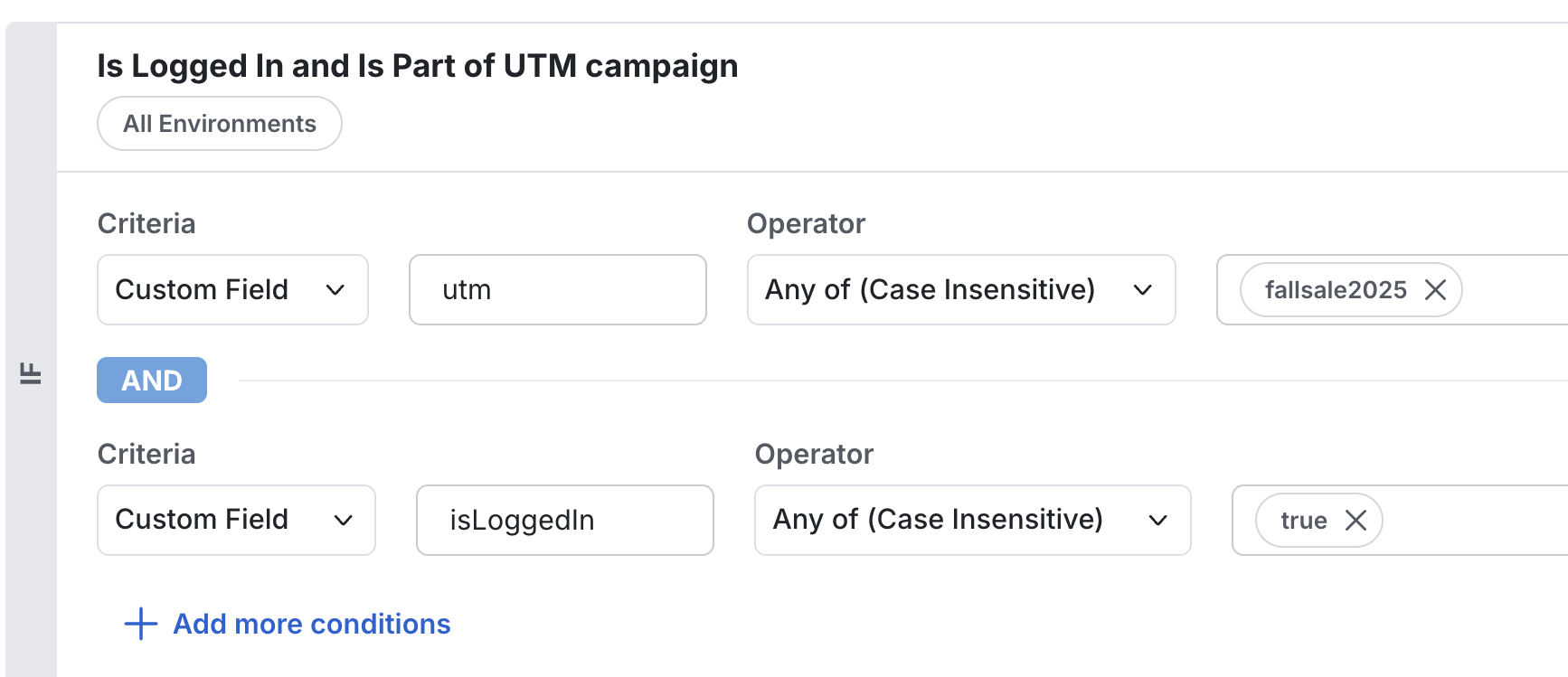
Capture cookies or URL parameters and pass them through StatsigUser.custom for targeting rules.
const user = {
  custom: {
    isLoggedIn: cookieLib.get('isLoggedIn'),
    utm: new URL(window.location.href).searchParams.get('utm'),
  },
};

const client = new StatsigClient('client-xyz', user, options);
Async timeouts
Limit how long initializeAsync and updateUserAsync wait for network responses before falling back to cached values.
await client.initializeAsync({ timeoutMs: 1000 });

await client.updateUserAsync(
  { userID: 'a-user' },
  { timeoutMs: 1000 },
);
Data adapter
StatsigClient uses an EvaluationsDataAdapter to manage caching and network fetches. The default implementation (StatsigEvaluationsDataAdapter) reads from local storage synchronously and refreshes values from Statsig asynchronously.
Go to Using EvaluationsDataAdapter for full examples, including bootstrapping, prefetching, and custom adapters.
Partial user matching
Use customUserCacheKeyFunc with updateUserSync when you need to enrich a user locally without triggering a full network refresh.
const originalUser = {
  customIDs: {
    analyticsID: 'analytics-123',
  },
};

const customKey = (sdkKey: string, user: StatsigUser) => {
  const analyticsID = user.customIDs?.analyticsID ?? 'anonymous';
  return `sdkKey:$\{sdkKey\}:analyticsID:${analyticsID}`;
};

const client = new StatsigClient('client-xyz', originalUser, {
  customUserCacheKeyFunc: customKey,
});

await client.initializeAsync();

someAsyncFunction().then((newData) => {
  const enrichedUser = {
    ...originalUser,
    userID: newData.userID,
    email: newData.email,
  };

  client.updateUserSync(enrichedUser);
});
Custom cache keys can produce stale or incorrect evaluations if multiple users map to the same key. Await updateUserAsync when you need guaranteed fresh values per user.
Client event emitter
Subscribe to Statsig client lifecycle events to respond to initialization, logging, or evaluation changes.
import type {
  AnyStatsigClientEvent,
  StatsigClientEvent,
} from '@statsig/client-core';

const onAnyEvent = (event: AnyStatsigClientEvent) => {
  console.log('Statsig event', event);
};

const onLogsFlushed = (event: StatsigClientEvent<'logs_flushed'>) => {
  console.log('Logs', event.events);
};

client.on('logs_flushed', onLogsFlushed);
client.on('*', onAnyEvent);

client.off('logs_flushed', onLogsFlushed);
client.off('*', onAnyEvent);
| Event | Payload | Description |
|---|---|---|
values_updated | { status, values } | Fired when initialize/update refreshes cached values. |
session_expired | {} | Fired when the current session expires. |
error | { error, tag } | Unexpected client errors. |
pre_logs_flushed | { events } | Before Statsig sends a batch of events. |
logs_flushed | { events } | After Statsig sends events. |
pre_shutdown | {} | Before the SDK shuts down. |
initialization_failure | {} | Initialization failed. |
gate_evaluation | { gate } | When Statsig evaluates a gate. |
dynamic_config_evaluation | { dynamicConfig } | When Statsig evaluates a config. |
experiment_evaluation | { experiment } | When Statsig evaluates an experiment. |
layer_evaluation | { layer } | When Statsig evaluates a layer. |
log_event_called | { event } | When you call logEvent. |
Quality and troubleshooting
Testing
Mock Statsig APIs in Jest to isolate business logic.
import { StatsigClient } from '@statsig/js-client';

export async function transform(input: string): Promise<string> {
  const client = new StatsigClient('client-xyz', { userID: 'a-user' }, {
    networkConfig: {
      preventAllNetworkTraffic:
        typeof process !== 'undefined' && process.env['NODE_ENV'] === 'test',
    },
  });

  await client.initializeAsync();

  if (client.checkGate('a_gate')) {
    input = 'transformed';
  }

  const experiment = client.getExperiment('an_experiment');
  input += '-' + experiment.get('my_param', 'fallback');

  await client.shutdown();
  return input;
}
import { StatsigClient } from '@statsig/js-client';

jest.mock('@statsig/js-client');

test('string transformations', async () => {
  jest
    .spyOn(StatsigClient.prototype, 'checkGate')
    .mockImplementation(() => true);

  jest
    .spyOn(StatsigClient.prototype, 'getExperiment')
    .mockImplementation(() => ({ get: () => 'my-value' } as any));

  const result = await transform('original');
  expect(result).toBe('transformed-my-value');
});
Debugging
When results look unexpected, use these tools to inspect what the SDK is doing.
Enable verbose logging
import { LogLevel, StatsigClient } from '@statsig/js-client';

const client = new StatsigClient('client-xyz', { userID: 'a-user' }, {
  logLevel: LogLevel.Debug,
});
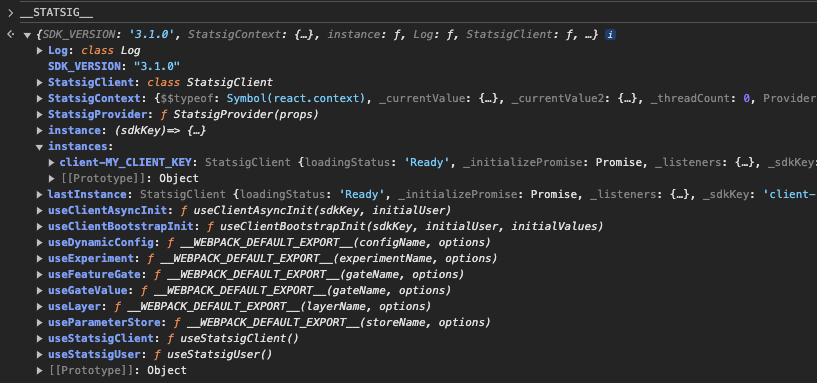
Inspect the __STATSIG__ global
Open your browser console and run __STATSIG__ to inspect the current client instance. Useful properties include _logger._queue for pending events.
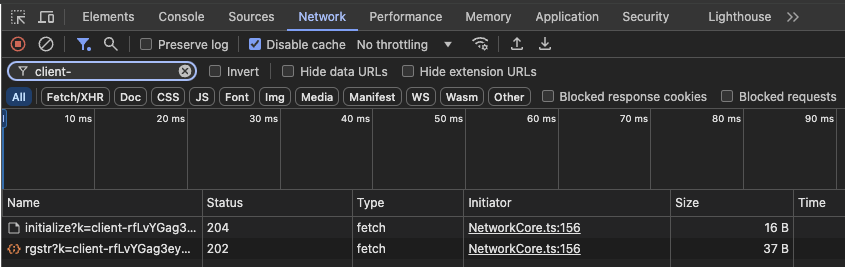
Review network traffic
Filter network requests by client- to see initialization and logging calls.
Check evaluation reasons
const gate = client.getFeatureGate('a_gate');
console.log(gate.details.reason);
Common reasons:
Network|NetworkNotModified: latest values from the API.Cache: loaded from local storage.NoValues: no cached values and network failed.Bootstrap: values provided throughdataAdapter.setData.Prefetch: values fromdataAdapter.prefetchData.
Go to /sdk/debugging for full details.
FAQs
Does the SDK use local storage or cookies
Statsig's web SDK doesn't set cookies. It stores gate/config values and unsent events in localStorage so features keep working when offline.
Can I access the SDK instance globally
window.Statsig.instance().logEvent('test_event');
import { StatsigClient } from '@statsig/js-client';
StatsigClient.instance().logEvent('test_event');
With multiple instances, pass the SDK key: Statsig.instance('client-YOUR_KEY').
How do I handle consent or GDPR flows
Start with logging disabled and storage blocked, then enable them after consent.
const client = new StatsigClient('client-xyz', {}, {
  loggingEnabled: 'disabled',
  disableStorage: true,
});
await client.initializeAsync();

client.updateRuntimeOptions({
  loggingEnabled: 'browser-only',
  disableStorage: false,
});
The SDK buffers up to 500 events in memory and flushes them after logging is re-enabled.
Additional resources
Was this helpful?