For AI agents: a documentation index is available at /llms.txt. Append .md to any page URL for markdown, or send Accept: text/markdown.
Metric Insights and Aggregated Impact
How Statsig calculates the aggregated business impact of an experiment across metrics so you can quantify total launch impact in one summary view.
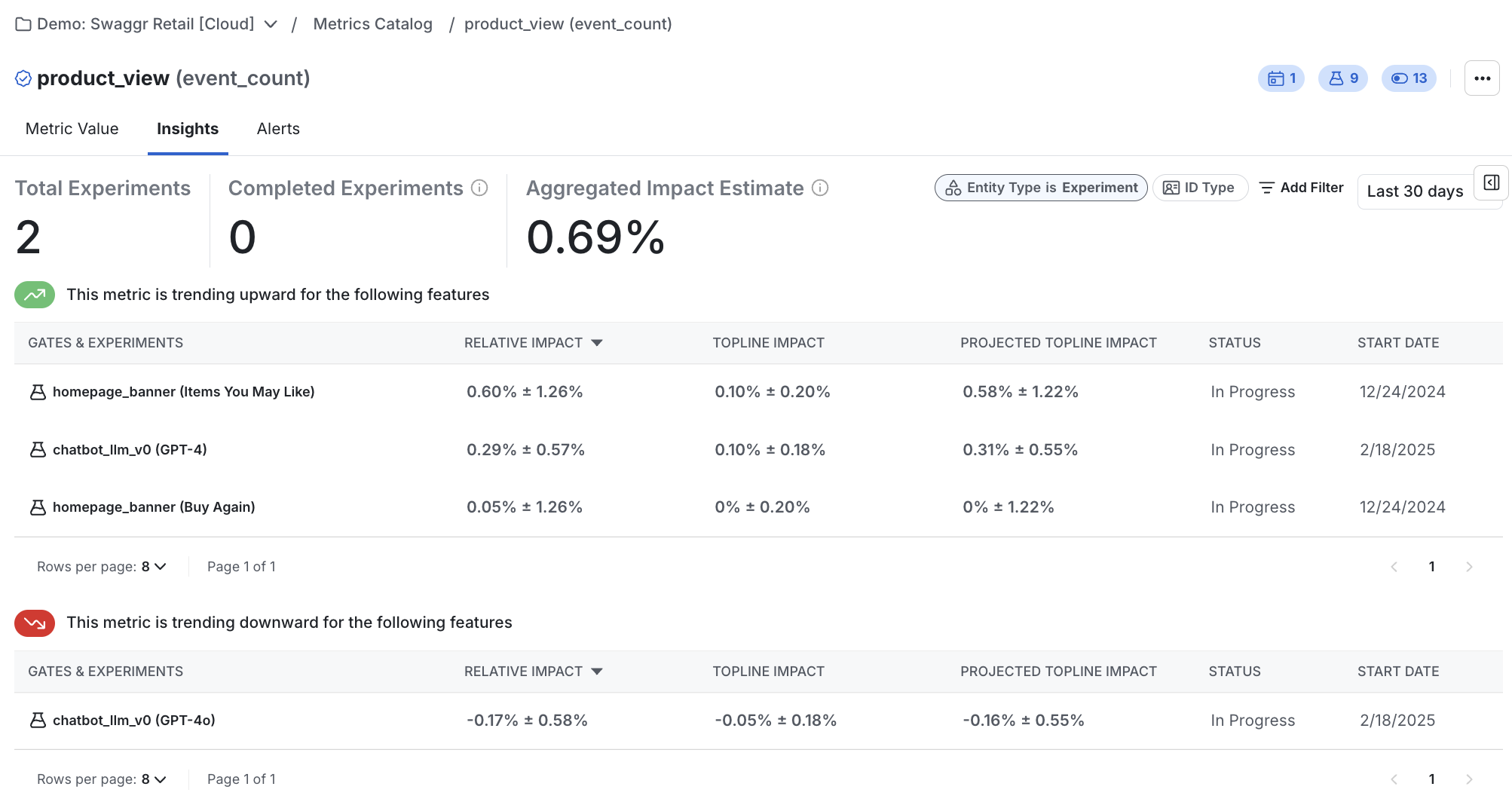
Aggregated Impact is the sum of projected launch impact across every experiment and feature gate that moved one metric, discounted by each result's false positive risk. The Insights page in the Statsig console shows this total alongside the individual tests that moved the metric, so you can quantify how much impact your team has driven on that metric and diagnose unexpected metric changes.
The Insights page is the reverse perspective of Pulse. Use Pulse when you start from one experiment and want to know which metrics it moved. Use the Insights page when you start from one metric and want to know which experiments and gates moved it most, for example to assess your team's impact or to set realistic goals.
How to read the Insights page
- In the Statsig console, go to the Insights page. Insights also appears in the Insights tab for each metric.
- Select a metric from the drop-down at the top of the page.
- Select the ID type, time window, and other filters.
The Insights page then shows the relative impact, topline impact, and projected launch impact for every experiment or gate that includes the metric. Statsig sums the projected launch impacts, adjusts for false positive risk (the "winner's curse"), and displays the result as the Aggregated Impact Estimate.
How the math works
For the topline and projected launch impact calculations, go to Computing projected launch impact.
To estimate false positive risk and calculate Aggregated Impact, Statsig uses the methodology in A/B Testing Intuition Busters: Common Misunderstandings in Online Controlled Experiments (Kohavi, Deng, and Vermeer, KDD 2022):
The projected launch impact estimates the topline impact if you make a decision and launch the test group to all users. Statsig calculates the false positive risk with the following formula:
In this formula, is the significance level for experiment i, is the type II error, and 1 - is the prior success rate based on historical experiment results.
Was this helpful?