For AI agents: a documentation index is available at /llms.txt. Append .md to any page URL for markdown, or send Accept: text/markdown.
Slicing by User Properties
Break down Statsig experiment results by user properties like country, platform, or subscription tier to identify heterogeneous treatment effects.
Slicing by user properties breaks experiment results down by a user attribute, such as home country, subscription status, or engagement level, so you can see whether the treatment effect differs across user groups. In Statsig Cloud, Statsig captures and freezes each user's properties at first exposure, so a slice reflects who the user was when they entered the experiment. Statsig Warehouse Native can also read user properties from a warehouse table (entity properties). To slice by a user property at any time, run a custom Explore query that filters or groups by that property. In Warehouse Native, you can also pre-compute the properties you slice by most often so they load with the Scorecard.

Pre-computed user properties
Statsig Warehouse Native can pre-compute the user properties you frequently use to slice results. On the experiment setup page, under Advanced Settings, configure which properties Statsig pre-computes. You can also configure team-level defaults or set these properties on an experiment template.
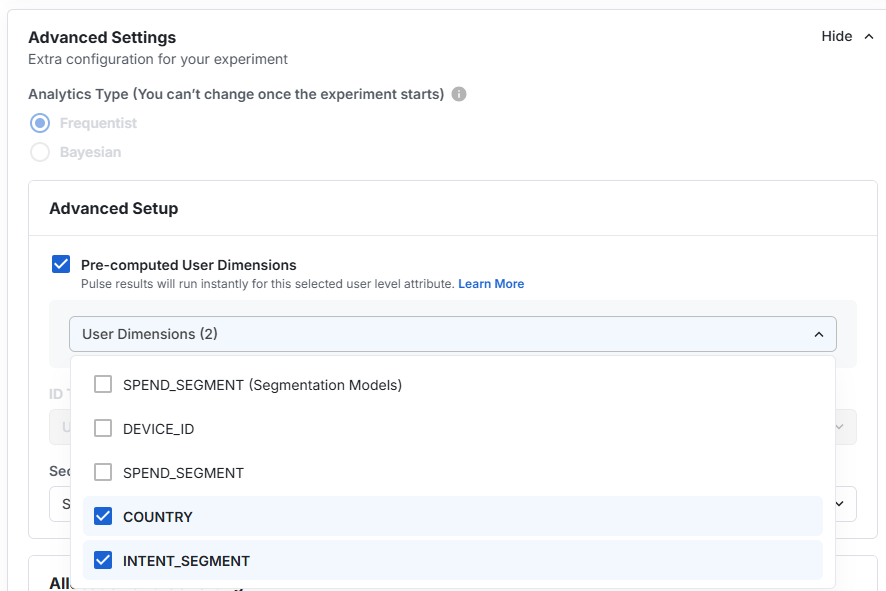
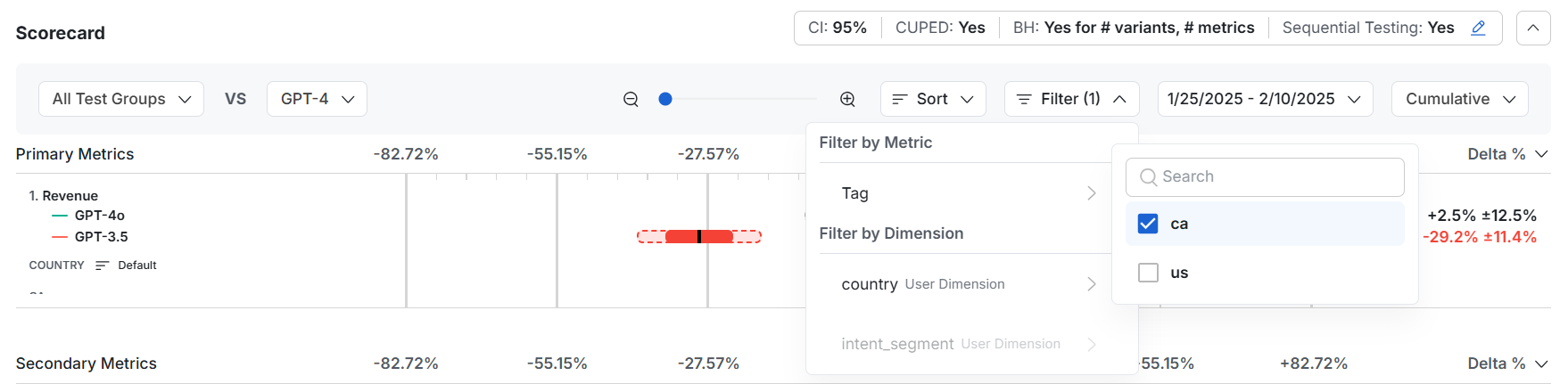
After you configure pre-computed properties, you can filter all metrics on the Results tab by those properties.
Was this helpful?