For AI agents: a documentation index is available at /llms.txt. Append .md to any page URL for markdown, or send Accept: text/markdown.
Adding Rules
Learn how to create rules that define which users are included in a segment
Create a rule for a segment
A rule defines the criteria for which users a segment includes. To add a rule to a segment:
- Log in to the Statsig console at https://console.statsig.com
- On the left-hand navigation panel, select Segments
- Select the segment where you want to add a rule
- Click the Add New Rule button
- Select the criteria to target a set of users. For example, select Email with the Contains any of operator, then enter your company's email domain to target only internal employees.
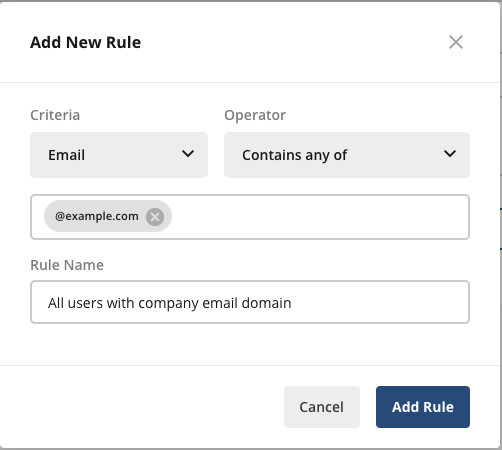
- Click the Add Rule button
- Click the Save Changes button at the top right of the Rules section
Was this helpful?