For AI agents: a documentation index is available at /llms.txt. Append .md to any page URL for markdown, or send Accept: text/markdown.
Manage an Ongoing Release Pipeline
Learn how to control and manage release pipelines in progress using various actions like approve, pause, skip, and abort
Managing release actions
After you trigger a Release Pipeline, you can control its progression using the following actions. These controls let you safely test, pause, fast-track, or halt propagation of feature gate and config changes across pipeline phases.
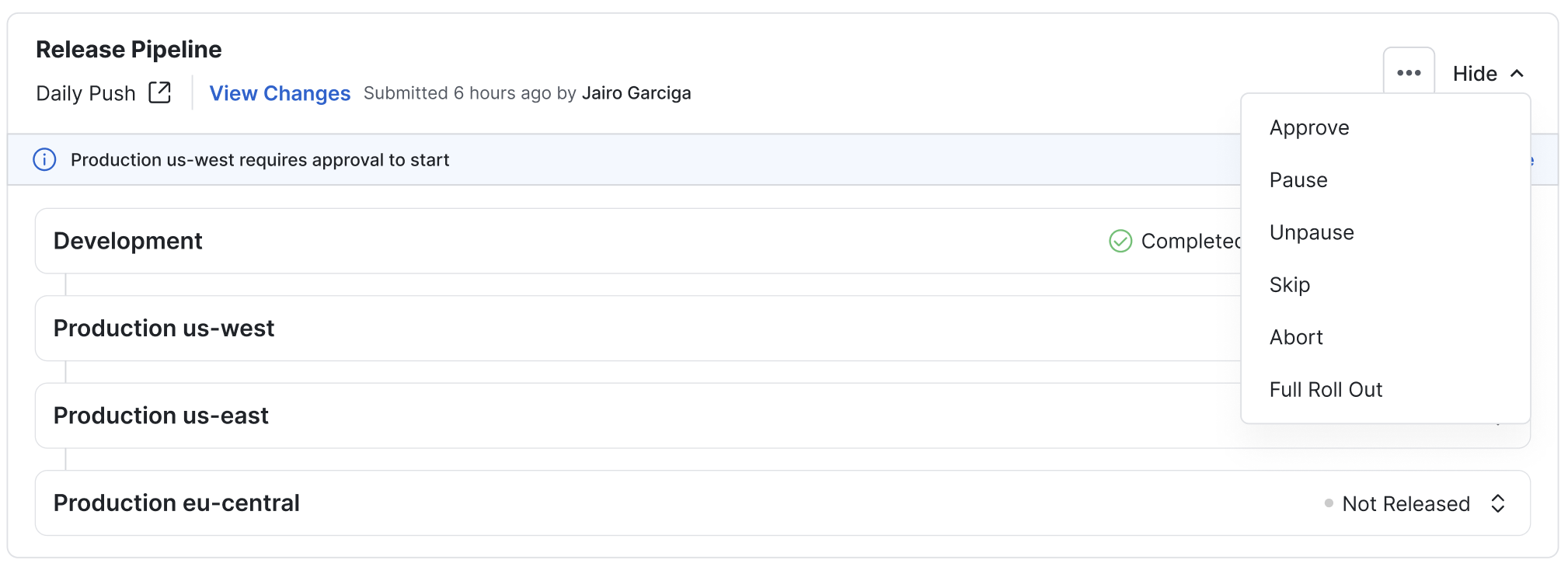
Approve
What it does
Start a phase that requires manual approval before rollout begins. Use this when your workflow requires human verification before changes proceed.
How to use it
- The pipeline automatically pauses at the last completed phase awaiting approval
- You receive a notification prompting you to take action
- Go to the Release Pipeline status page
- Click the ⋯ menu and select 'Approve'
- Confirm the action. The next phase begins rolling out.
Pause
What it does
Stops the bake timer between two phases. Useful if you want to delay rolling out the next phase to investigate the current phase. :::note Pause doesn't stop the current phase. It stops only the timer to move to the next phase. :::
How to use it
- Go to the Release Pipeline status page
- Click the ⋯ menu and select 'Pause'
- Confirm to pause the bake timer
Unpause
What it does
Resumes a previously paused bake timer, allowing the pipeline to move to the next phase after the remaining wait time.
How to use it
- Go to the Release Pipeline status page
- Click the ⋯ menu and select 'Unpause'
- Confirm to resume the bake timer
Skip
What it does
Immediately skips the current phase and moves rollout to the next defined phase. Useful for fast-tracking safe changes.
How to use it
- Go to the Release Pipeline status page
- Click the ⋯ menu and select 'Skip'
- Confirm to resume the bake timer
Abort
What it does
Halts the release process. The feature gate or dynamic config reverts to its pre-release state, and no further changes propagate.
Important: Aborting a release is irreversible. After aborting, you must trigger a new release to restart the process with any modifications.
How to use it
- Go to the Release Pipeline status page
- Click the ⋯ menu and select 'Abort'
- Confirm to resume the bake timer
Full roll out
What it does
Skips all intermediate phases and releases the latest version across all environments and custom attributes once.
How to use it
- Go to the Release Pipeline status page
- Click the ⋯ menu and select 'Full Roll Out'
- Confirm to resume the bake timer
Was this helpful?