For AI agents: a documentation index is available at /llms.txt. Append .md to any page URL for markdown, or send Accept: text/markdown.
LaunchDarkly Migration Guide
Step-by-step guide to migrating feature flags and rollouts from LaunchDarkly to Statsig, including flag mapping, SDK swap, and rule recreation.
Migrate your feature flags and rollouts from LaunchDarkly to Statsig by importing your flags, swapping the SDK, and recreating your targeting rules. Statsig converts LaunchDarkly's boolean flags to Feature Gates and its string, number, and JSON flags to Dynamic Configs. Run both systems in parallel behind a wrapper, then cut over one team at a time to keep the migration low-risk.
How this guide is organized
This guide covers the following topics:
- Conceptual differences between LaunchDarkly and Statsig
- Deciding what to migrate vs. not
- Importing flags into Statsig
- Flipping evaluation from LaunchDarkly to Statsig
- How to run the migration process
Conceptual differences between LaunchDarkly and Statsig
LaunchDarkly and Statsig structure their feature management data models differently in several key ways:
Environment: LaunchDarkly treats environments as a top-level concept where you must duplicate and manage flags and segments separately across environments. Statsig uses a centralized model where flags and configs handle environment-specific logic in their targeting rules.
Flag types: LaunchDarkly uses a mix of boolean, multivariate, and JSON flags. Statsig distinguishes between Feature Gates (boolean) and Dynamic Configs (typed multivariate configs with JSON values).
Targeting: LaunchDarkly relies on Contexts to evaluate flags. Statsig evaluates based on a StatsigUser object.
Side by side comparison
| LaunchDarkly concept | Can you migrate? | Statsig notes |
|---|---|---|
| Project | ✅ Yes | Convert to Project |
| Environment | ✅ Yes | Convert to Environment (mark critical as production in Statsig) |
| Boolean Flags | ✅ Yes | Convert to Feature Gates |
| String, Number, and JSON Flags | ✅ Yes | Convert to Dynamic Configs |
| Segments | ✅ Yes | Convert to Segments (Statsig doesn't import big ID list segments) |
| Targeting Rules | ✅ Yes | Convert to Rules |
| Context kind | ✅ Yes | Convert to Custom Unit ID in Statsig |
| Context attribute | ✅ Yes | Convert to Custom Fields in Statsig |
| Flag owner, tags, teams, and history | ❌ No | Statsig doesn't preserve any metadata or historical versions of a flag during migration |
User context mapping example
LaunchDarkly supports multi-kind, structured user contexts. Statsig requires a user object to represent these contexts. In Statsig, User ID or Custom ID is equivalent to LD's key. Known top-level fields in Statsig include userID, email, ip, userAgent, and custom. All other fields go under the custom object.
Example 1: LD User context to Statsig User object conversion
// 1 - LD User context
{
  "kind": "user",
  "key": "user-key-123abc",
  "name": "Anna",
  "email": "anna@globalhealthexample.com",
  "organization": "Global Health Services",
  "jobFunction": "doctor",
  "device": "iPad"
}

// 1 - Statsig User object
{
  "userID": "user-key-123abc",
  "email": "anna@globalhealthexample.com",
  "custom": {
    "name": "Anna",
    "organization": "Global Health Services",
    "jobFunction": "doctor",
    "device": "iPad"
  }
}
Example 2: LD Multi context kind to Statsig User object conversion
// 2 - LD Multi context kind
{
  "kind": "multi",
  "user": {
    "key": "user_abc",
    "name": "Anna",
    "email": "abc@company.com",
    "region": "us-east"
  },
  "org": {
    "key": "org_xyz",
    "tier": "enterprise"
  }
}

// 2 - Statsig user object
{
  "userID": "user_abc",
  "email": "abc@company.com",
  "customIDs": {
    "org_id": "org_xyz"
  },
  "custom": {
    "user_name": "Anna",
    "user_region": "us-east",
    "org_tier": "enterprise"
  }
}
In Statsig, email is a top-level reserved field on the user object: place it directly as email (not user_email). Statsig expects userID, email, ip, and userAgent at the top level for user targeting and analytics.
Deciding what to migrate vs. not
Before migrating flags from LaunchDarkly to Statsig, audit your existing flags and remove those that are no longer needed. Many organizations accumulate flag debt over time from stale flags, deprecated toggles, and legacy kill switches. Migration is an opportunity to start fresh with only active, valuable flags.
Use filters such as "Lifecycle" and "Type" in LaunchDarkly to identify which flags are worth importing into Statsig.
The following decision framework can help you decide which flags to import. The migration script follows this framework by default, but you can modify the script as needed.
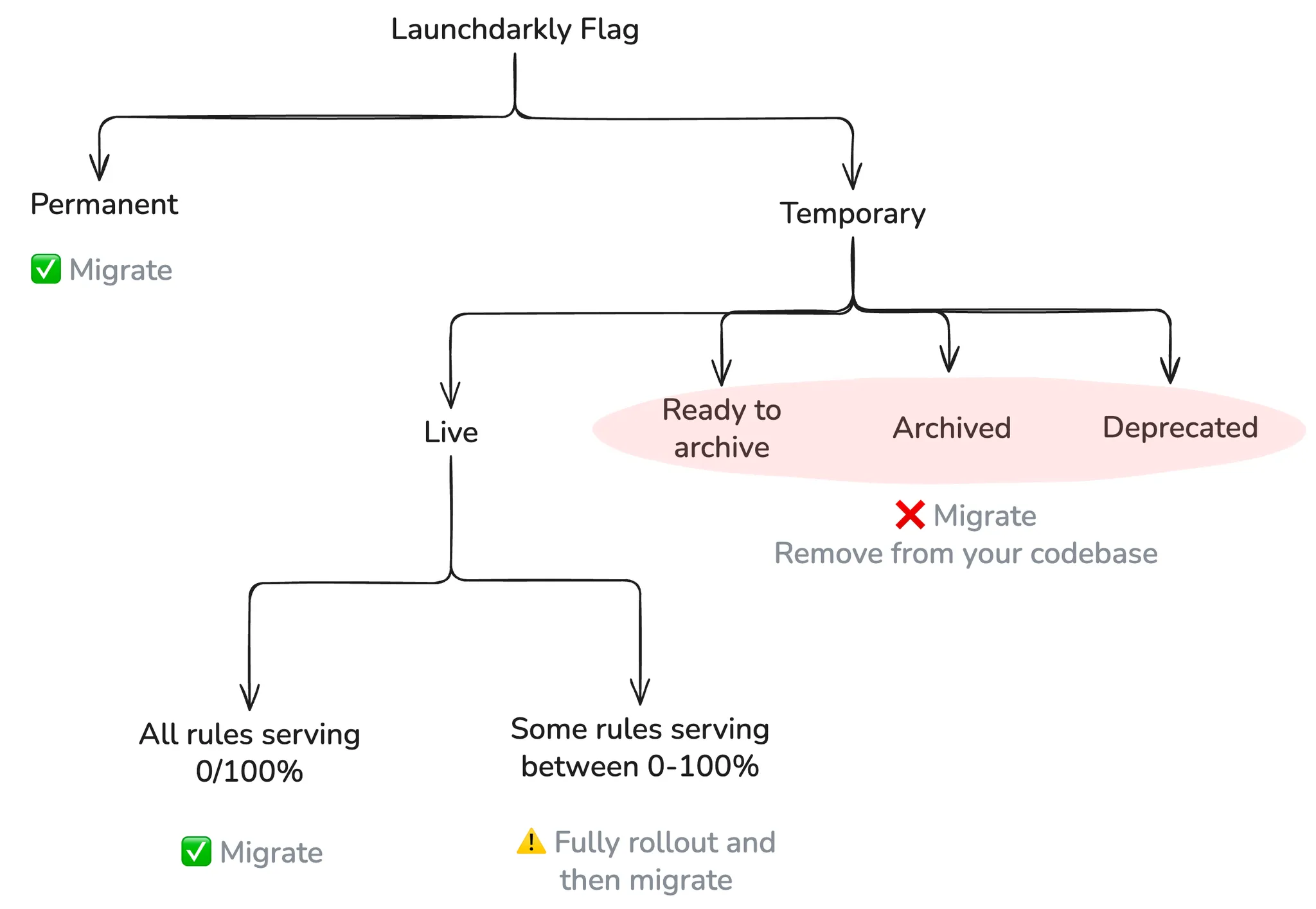
Importing flags into Statsig
Use the official import tool to import feature flags from LaunchDarkly into Statsig. The tool fetches flags from LaunchDarkly, translates them into Statsig's format, creates corresponding feature gates in Statsig, and tracks migration status and details in a CSV file.
You have two options:
Open source script (Recommended): Use this option to customize the integration logic. The script outputs a CSV of all your LaunchDarkly flags with migration status and URLs to the flag in LaunchDarkly and the gate in Statsig. This option imports all environments.
Statsig console: A UI-based wizard for importing LaunchDarkly feature flags and segments into Statsig. The wizard reports which gates and segments it migrated. This option imports only the production environment.
If you're migrating from a different system, recreate flags manually in Statsig. After auditing and removing unneeded flags, you should have a smaller set of flags to migrate. Contact the Statsig team over email or Slack if you need assistance.
Flipping evaluation from LaunchDarkly to Statsig
After you import your flags into Statsig, update the evaluation logic in your application. Rather than replacing every LaunchDarkly evaluation call with a Statsig call at once, introduce a wrapper that supports gradual migration. The wrapper lets you run both systems in parallel, compare outputs, and switch over incrementally with minimal risk.
The wrapper approach provides several key benefits:
- Parallel execution: Run both systems simultaneously to validate behavior
- Gradual rollout: Migrate flags one at a time or by percentage
- Easy rollback: Quickly revert to LaunchDarkly if issues arise
- Consistent interface: Maintain existing application code structure
Implementation guide
1. Before migration: LaunchDarkly Evaluation
Here's what a typical LaunchDarkly setup might look like:
import { LDClient } from 'launchdarkly-js-client-sdk';

const ldClient = LDClient.initialize('client-key', {
  key: 'user_abc',
  custom: { plan: 'pro' }
});

ldClient.on('ready', () => {
  const isNewHomepageEnabled = ldClient.variation('new_homepage_flag', false);
  const buttonColor = ldClient.variation('button_config', 'gray');
});
2. Create the Migration Wrapper
Create a wrapper (featureWrapper.js) that handles both systems. The wrapper should check Statsig first and fall back to LaunchDarkly if Statsig is unavailable:
import { getLDClient } from './launchdarklyService';
import { getStatsigClient } from './statsigService';

export const wrapperFlags = {
  // For boolean flags
  wrapperGetFlag(flagKey, defaultValue = false) {
    const statsigClient = getStatsigClient();
    if (statsigClient) {
      return statsigClient.checkGate(flagKey);
    }

    const ldClient = getLDClient();
    if (ldClient) {
      return ldClient.variation(flagKey, defaultValue);
    }

    return defaultValue;
  },

  // For dynamic configs (string, number, or json flags)
  wrapperGetConfig(user, configKey) {
    const statsigClient = getStatsigClient();
    if (statsigClient) {
      const config = statsigClient.getConfig(user, configKey);
      return {
        get: (paramKey, defaultValue) => config.get(paramKey, defaultValue)
      };
    }

    const ldClient = getLDClient();
    if (ldClient) {
      return {
        get: (paramKey, defaultValue) => {
          const ldKey = `$\{configKey\}.${paramKey}`;
          return ldClient.variation(ldKey, defaultValue);
        }
      };
    }

    return {
      get: (_key, defaultValue) => defaultValue
    };
  }
};
3. Refactor application code to use the wrapper
After the wrapper is in place, route all flag checks through it. The application logic doesn't change: only the mechanism that retrieves flags changes.
import { wrapperFlags } from './featureWrapper';

const user = {
  userID: 'user_abc',
  custom: { plan: 'pro' }
};

// Boolean gate
if (wrapperFlags.wrapperGetFlag('new_homepage_flag', user)) {
  showNewHomepage();
}

// Multivariate config
const buttonConfig = wrapperFlags.wrapperGetConfig('button_config', user);
const buttonColor = buttonConfig.get('color', 'gray');
4. Validate and gradually cut over
After you have validated that Statsig is working as expected and that migrated flags return correct values, begin migrating more flags. Repeat these steps for 2–3 engineering teams to confirm the migration covers different use cases.
After you maintain flags in both systems long enough to confirm stability, phase out LaunchDarkly.
Remove LaunchDarkly fallback from the wrapper. Update the wrapper functions to rely solely on Statsig. Removing the fallback simplifies the logic and ensures your app no longer queries LaunchDarkly in production.
Delete LD initialization logic and SDK imports. You can now safely remove any references to
LDClient.initializeorldClient.variation.
How to run the migration process
Use a phased rollout so each team can adopt Statsig independently. This approach supports gradual migration, scoped validation, and shared learnings across the organization.
| Phase | Description | Who | Duration |
|---|---|---|---|
| 1. Auditing existing flags in LaunchDarkly | Each team reviews their LaunchDarkly flags and identifies which flags are worth migrating | Individual Teams | Ongoing (2-3 days per team) |
| 2. Start creating all new flags in Statsig | Starting immediately, create all new flags in Statsig to avoid using the legacy system out of habit | Org-wide | 1 week |
| 3. Pilot migration with one team | Select one team to migrate a small set of LaunchDarkly flags to Statsig using the wrapper. Validate that migrated flags work as expected | Pilot team | 1–2 weeks |
| 4. Org-Wide migration and cutover | Repeat migration for more teams in waves. Create training docs and guides for org wide adoption. After Statsig is stable and adopted org-wide, remove LaunchDarkly fallback from wrapper | All teams + central guidance | 3–4 weeks (rolling) |
If you need additional assistance or want to discuss your specific case, contact Statsig.
Was this helpful?