For AI agents: a documentation index is available at /llms.txt. Append .md to any page URL for markdown, or send Accept: text/markdown.
CDN Edge Testing for Cached Resources
Run feature gate and experiment evaluations at the CDN edge with Statsig integrations for Cloudflare Workers, Fastly Compute, and Akamai EdgeWorkers.
Background
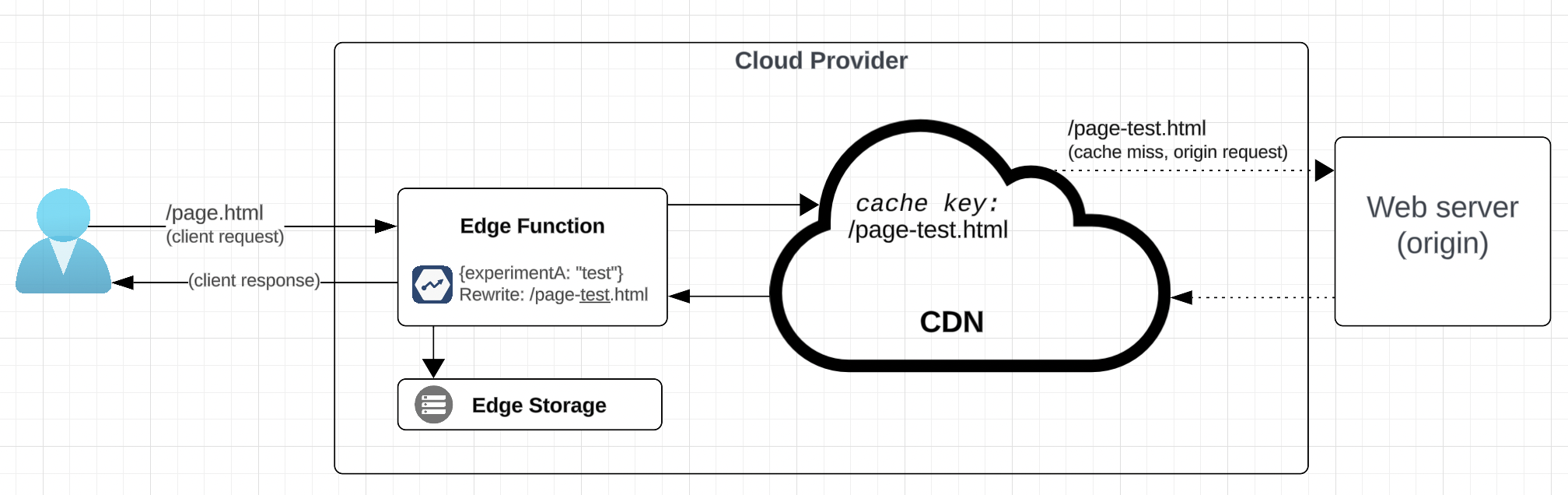
Statsig runs feature gate and experiment evaluations at your CDN edge, so you can assign users to tests and serve the right cached resource with low latency. Most high-traffic sites use a CDN to serve resources from cache and reduce load on their web servers. Historically, caching made testing hard, because calling the SDK on every request isn't practical. Edge compute, available from most CDN providers, solves this problem by running your assignment code at the edge.
This pattern is optimal for testing with cached content without sacrificing cache-hit ratio. When running the Statsig SDK at the edge isn't possible, implement the SDK on the origin server or use a client SDK instead.
Best practices
- Use a provider-specific "Config Sync" integration: Statsig automatically syncs your configuration data to your provider's edge storage.
- Use a provider-specific Data Adapter: This lets the Statsig SDK initialize using configuration stored at the edge near your function. Find links for each provider below.
- Use statsig-node-lite: A reduced version of the Node SDK that includes only the essentials and significantly improves initialization performance for cold-start requests. After initialization, evaluate using Node Lite's sync methods, such as
checkGateSync,getFeatureGateSync,getExperimentSync, andgetLayerSync. - Persist a uuid: You need a user identifier that can consistently assign a user to test buckets. Generate a uuid in your function and store it in a cookie.
- Persist assignments in a cookie: Store assignments in a cookie so your code can skip SDK calls when a user already has a test assignment. Use a session cookie (a cookie that expires when the user closes their browser).
- Persist client instance: This pattern allows the Statsig client instance to persist across requests when the edge function remains warm, which improves performance.
- Use Target Apps: Target apps let you sync a specific subset of experiments and gates to your edge function, reducing the footprint of your project config and improving performance. Target Apps are compatible with all "config sync" integrations.
- Consider disabling automatic exposure logging and logging exposure events only after a user has been exposed to the treatment. Logging earlier pollutes test results with users who didn't see the treatment. In Node Lite, use the explicit exposure-disabled sync methods, such as
getExperimentWithExposureLoggingDisabledSync,checkGateWithExposureLoggingDisabledSync,getFeatureGateWithExposureLoggingDisabledSync,getLayerWithExposureLoggingDisabledSync, orgetConfigWithExposureLoggingDisabledSync. If you use the top-levelStatsigwrapper, log the exposure later withmanuallyLogExperimentExposure,manuallyLogGateExposure,manuallyLogLayerParameterExposure, ormanuallyLogConfigExposure; if you use aStatsigServerinstance directly, uselogExperimentExposure,logGateExposure,logLayerParameterExposure, orlogConfigExposure.- Node Lite doesn't use the Node Core
EvaluationOptionspattern for disabling exposure logging. Refer to the current top-levelStatsigAPI andStatsigServerAPI for the full method lists. - Consider how to manage exposure tracking downstream in your application. All SDKs support manual exposure logging. You can also use the HTTP API for logging exposures.
- If you log exposures from your edge function, use the
context.waitUntilmethod if your edge provider supports it (examples).
- Node Lite doesn't use the Node Core
Cloudflare implementation
Cloudflare lets you start a serverless edge worker that runs before cache lookup and can modify the response to the viewer. The Worker architecture gives you full code control over how to map test assignments to resources served to the user. You can modify both the URL (used as the cache key) and headers used to fetch resources from the CDN. Then pass the modified request to origin on cache-miss.
The Cloudflare Worker runtime supports installing the Statsig Node Lite SDK as a dependency to determine test assignments before fetching a resource.
Statsig offers both an integration with Cloudflare KV and a pre-built KV Data Adapter, so that SDK initialization is fast and doesn't depend on network requests back to Statsig.
{/* Cloudflare promotes a standard pattern for determining test assignment at the edge as described here. */}
Fastly implementation
Fastly Compute supports Functions at the Edge, which lets customers handle assignment at the edge.
KV (fully supported)
Fastly describes Fastly's KV storage solution as highly performant and now recommends it over their legacy ConfigStore.
Statsig offers both a Config-Sync for Fastly KV and a KV DataAdapter, which you can find in the Fastly integration.
ConfigStore (not recommended)
The integration with Fastly's ConfigStore was the original offering. ConfigStore values have an 8-kilobyte limit, which your project reaches quickly as the number of gates and tests grows. Statsig pairs this with the Fastly Config Store Data Adapter, which lets the SDK initialize from ConfigStore rather than making a network request back to Statsig.
Recommended pattern
The Fastly pattern differs from other providers. As described in the Fastly AB Testing guide, it doesn't involve modifying the cache key (resource URL). Instead, it attaches Fastly-ABTest-<TEST ID> headers to tell the origin server how to render the resource. The origin response should include a Vary response header to tell the Fastly CDN what to cache. Refer to the Fastly guide as the authoritative reference for this design pattern.
Fastly VCL implementation
Their legacy Varnish-based platform only supports configuration based caching and minimal scripting at the edge using VCL scripting language.
No Statsig SDK (or any SDK) supports the edge for this reason. In this case, you must implement the Statsig SDK on the origin server and configure cache rules to force a cache-miss and allow assignments on the origin server.
AWS implementation
AWS has a variety of serverless solutions. The sections below detail the recommended pattern and limitations for each.
Lambda@Edge implementation
CloudFront events trigger Lambda@Edge functions. Lambda@Edge implementations carry a few unique challenges:
- AWS doesn't offer a KV store solution compatible with Lambda@Edge. Their KeyValueStore offering is only compatible with CloudFront Functions. As a result, you must either:
- Use the default Statsig SDK initialization, which incurs a hit over the network to Statsig to load configurations
- Bundle your project config statically into the function package. You can consider using the Config-Change Webhook to automate this. You need to download the configuration JSON at the following URL to bundle it into your Lambda package: https://api.statsigcdn.com/v1/download_config_specs/SERVER_SDK_KEY.json
- Store your project config in S3 and use Cloudfront as means to serve it optimally when fetching it from your Lambda@Edge function.
- AWS caps function size at 1MB (for viewer request and viewer response triggers, which this setup requires).
- Lambda model uses four events triggers, calling your function at various stages of the request lifecycle. For this use case, you need two:
Viewer RequestandView Response. AWS provides documentation on handling and manipulating requests.
Viewer Request function
CloudFront calls Viewer Request before cache lookup. The Viewer Request function defines a uuid, generates test assignment, and modifies the request URL through Request.URI. This function type can't modify response headers, so you must pass assignment and uuid information to the Viewer Response function to set cookies.
Viewer Response function
Viewer Response function is responsible only for setting uuid and assignment cookies as needed.
CloudFront Functions implementation
Statsig doesn't support SDKs on CloudFront Functions. CloudFront Functions have a 1ms max runtime and 10KB max function size. Use Lambda@Edge instead, or accept cache misses to perform assignment at origin.
Akamai implementation
Akamai has a documented pattern for using EdgeWorkers and EdgeKV to run A/B tests with cached content, including code samples and an architecture overview. Add the Statsig SDK to the worker function as a dependency and call it for assignment, rather than using the basic random assignment shown in their code examples.
The Akamai Edge integration includes an integration with EdgeKV and a Node package tested and validated within the Akamai edge runtime.
Was this helpful?