For AI agents: a documentation index is available at /llms.txt. Append .md to any page URL for markdown, or send Accept: text/markdown.
Akamai Edge KV
Run Statsig feature gate and experiment evaluations at the edge with Akamai EdgeWorkers for low- latency rules evaluation in your CDN layer.
How the Akamai Edge KV integration works
Statsig’s Akamai Edge KV integration pushes Statsig Configs to Edge KV, providing low latency for gate and experiment evaluations directly in Akamai Edge KV. With the correct prerequisites in place, setup takes approximately 60 minutes.
Prerequisites
- An Akamai account with EdgeWorkers added to your contract and a Statsig account
- The Akamai CLI
Set up Akamai EdgeWorker
- Create an EdgeWorker ID
- Add the EdgeWorker Behavior
- Install the Akamai CLI
- Install the Edgeworkers CLI
- Generate EdgeGrid credentials
Configure integration
First, enable the Akamai integration in the Statsig Console.
Navigate to Project Settings > Integrations at https://console.statsig.com/integrations and select Akamai.
Authentication
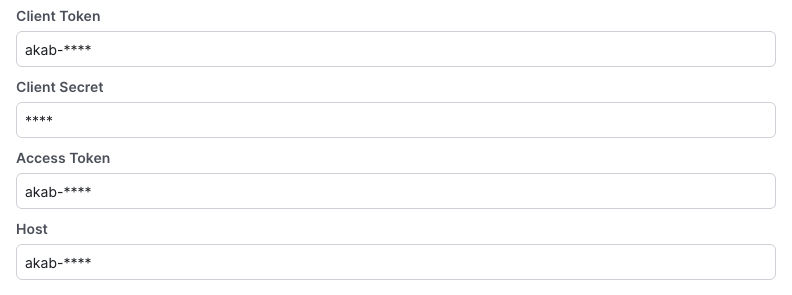
Enter the EdgeGrid credentials you generated during Akamai EdgeWorker setup:
Configuration
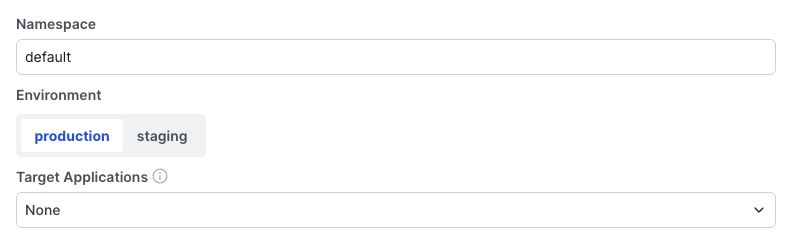
Finalize the configuration by selecting a namespace and environment.
You can also filter the configs synced into your KV namespace by a Target App. Enable this option if your config payload grows. Leave this unchecked for now.
After you complete these fields, click Enable.
Within a minute, the Statsig backend generates a config payload from your project and pushes it into your KV namespace. Navigate to KV Pairs under your KV namespace. You should see an entry with the prefix statsig-. The next segment is your project ID. Copy it; you need it later.
Add Statsig SDK to worker
- Create a Statsig server secret key and configure it on Akamai
- Clone the Statsig Akamai Edge KV repo (or if you already have an Edge KV package, apply these changes to it)
- Follow instructions in the repo
Related resources
Was this helpful?