For AI agents: a documentation index is available at /llms.txt. Append .md to any page URL for markdown, or send Accept: text/markdown.
Cloudflare Workers AI
Integrate Statsig with Cloudflare Workers AI to run experiments on AI workloads at the edge with low-latency feature gate and experiment evaluation.
Statsig Cloudflare Workers AI integration
By integrating Statsig with Cloudflare Workers AI, you can conduct experiments on different prompts and models, and gather real-time analytics on model performance and usage. Statsig provides tools to control variations dynamically, measure success metrics, and gain insights into your AI deployments at the edge.
For general setup of Statsig with Cloudflare Workers (including KV namespace configuration and SDK installation), refer to the Cloudflare Workers Integration documentation.
For setting up Workers AI, refer to the Cloudflare Workers AI documentation.
What this integration enables
When you deploy a Cloudflare Worker running AI code, Statsig can automatically inject lightweight instrumentation to capture inference requests and responses. Statsig tracks key metadata for each request (models, latency, token usage). You can also include additional metadata you find valuable (success rates, user interactions, and so on).
This integration enables:
- Experimentation: Set up experiments (for example, prompt “A” vs. prompt “B”, llama vs. deepseek models) and define success metrics (conversion, quality rating, user retention). Statsig determines which variation each request uses, ensuring statistically valid traffic splits.
- Real-time Analytics: The Statsig SDK sends anonymized event data (model outputs, user interactions, metrics) to Statsig’s servers in real time. Statsig gathers data at the edge with minimal overhead and streams it for analysis.
Use case 1: Prompt and/or model experiments
This use case demonstrates how to use Statsig experiments to test different prompts and AI models within your Cloudflare Worker. The example experiment has 4 groups: a control that uses the default prompt and llama model, plus one group for each variant. Each variant group switches to a different prompt or model, such as deepseek.
Sample experiment setup in Statsig Console
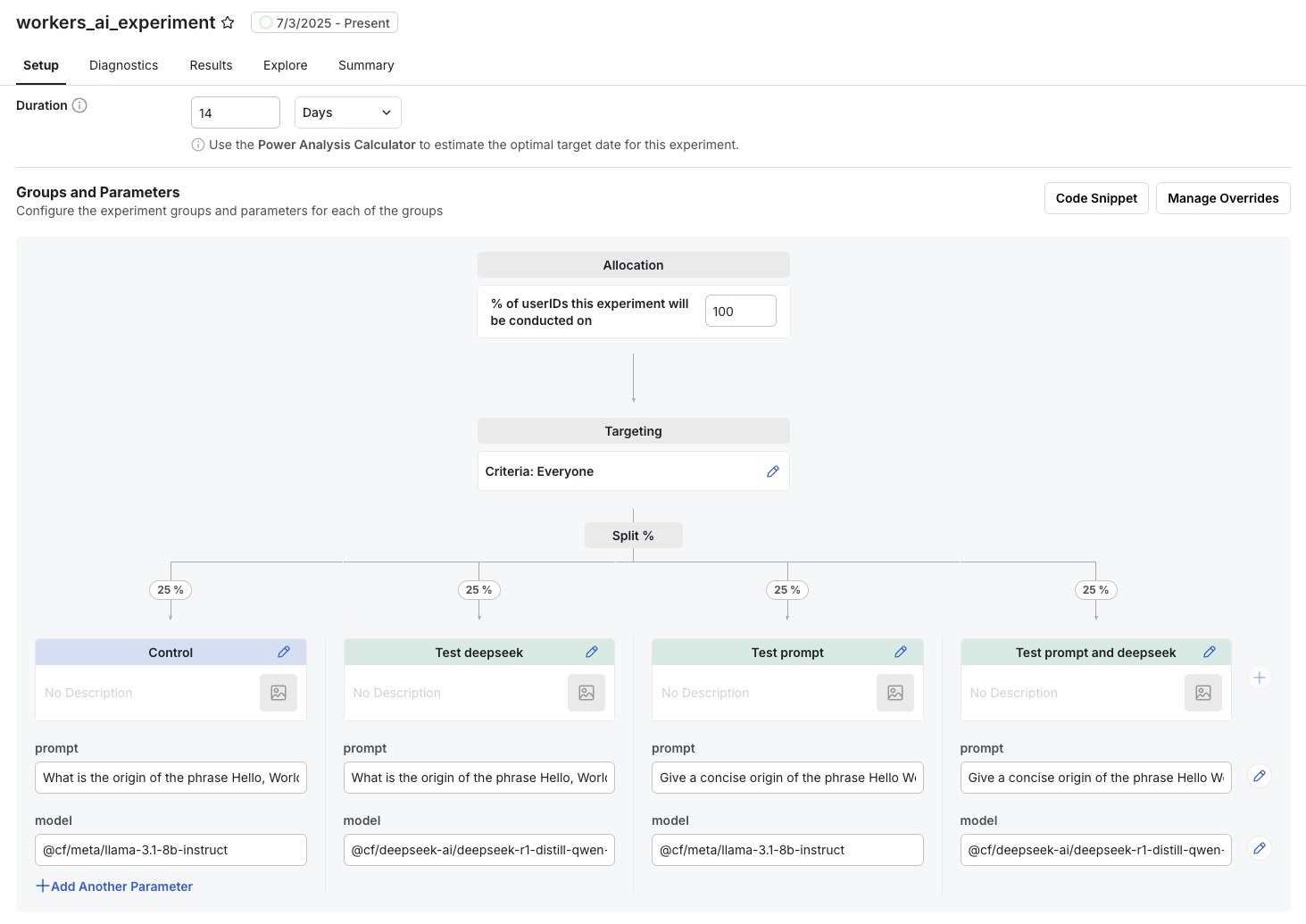
Refer to the sample code below for the experiment implementation in a Cloudflare Worker with AI.
Use case 2: Model analytics
Beyond experiments, the logging mechanism illustrated below provides insights into your AI model's performance and usage patterns. You can keep the default parameters for models and prompts and still get insights from the metadata you log to Statsig.
What to track for model analytics
- Latency (
ai_inference_ms): Crucial for understanding user experience. You can monitor average, P90, P99 latencies in Statsig. - Model Usage (e.g.,
prompt_tokens,completion_tokens): If your AI provider returns token counts, logging these allows you to track cost and efficiency. - Error Rates: Log events when the AI model returns an error or an unexpected response.
- Output Quality (using custom events):
- User Feedback: If your application allows users to rate the AI's response (e.g., thumbs up/down), log these as Statsig events.
- Downstream Metrics: Track how the AI's output influences key business metrics (e.g., conversion rates if the AI is generating product descriptions, or user engagement if it's a chatbot).
View model analytics in Statsig
By logging these metrics, you can create custom dashboards in Statsig to monitor the health and effectiveness of your AI models in real time. These dashboards let you identify performance bottlenecks, cost inefficiencies, and areas for improvement.
Within minutes of adding the logging from the example below to your function, you can see the breakdown of latency per model with a query like this:
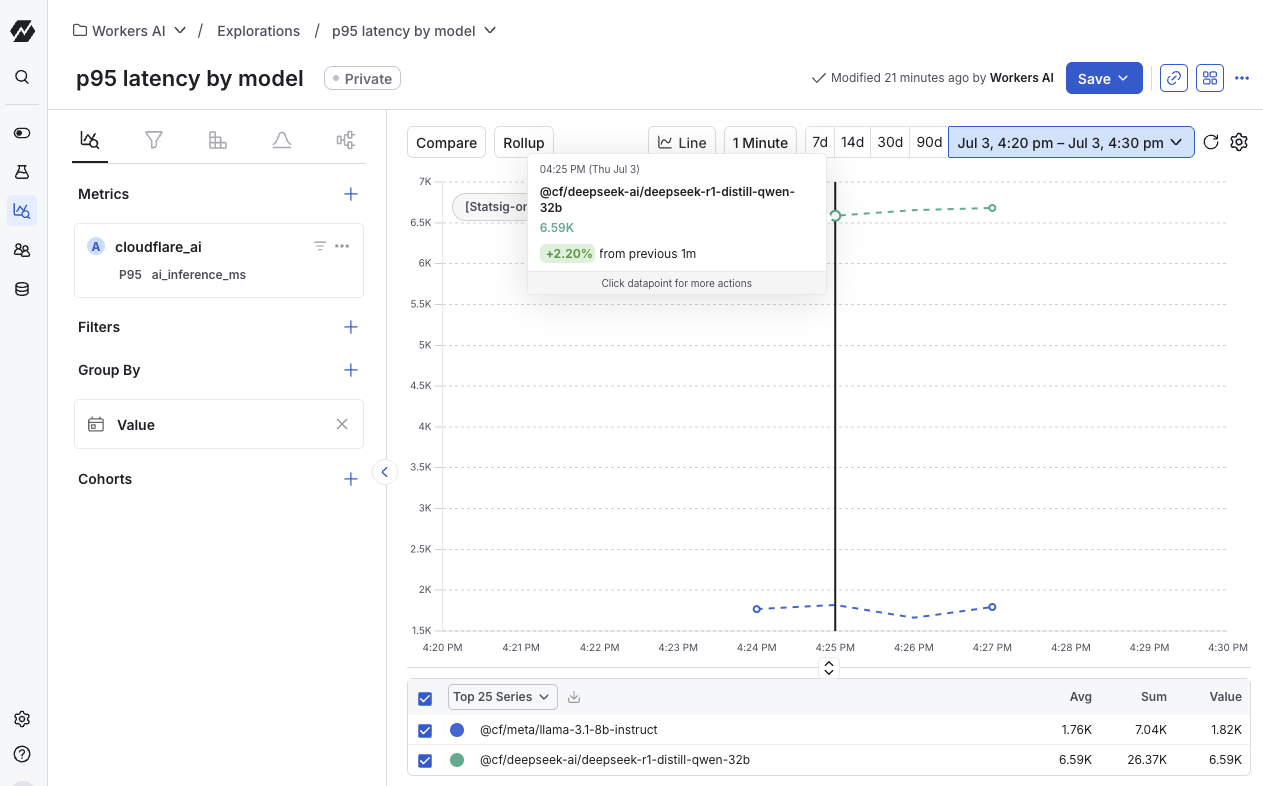
Example worker code for prompt/model experimentation and analytics
import { CloudflareKVDataAdapter } from "statsig-node-cloudflare-kv";
import Statsig from "statsig-node";
import { StatsigUser } from "statsig-node";

export default {
  async fetch(
    request: Request,
    env: Env,
    ctx: ExecutionContext,
  ): Promise<Response> {
    await initStatsig(env);

    // ideally, use a logged in userid.  In this example, I have the RayID from cloudflare
    const rayID = request.headers.get("cf-ray") || "";
    const user = {
      userID: rayID,
    };

    const promptExp = Statsig.getExperimentSync(
      user,
      "workers_ai_experiment", // Name of your experiment in Statsig Console
    );
    // fetch the prompt and model to use for this ray ID
    // providing default values in case of failure to initialize statsig from the kv store
    const prompt = promptExp.get(
      "prompt",
      "What is the origin of the phrase Hello, World",
    );
    const model = promptExp.get("model", "@cf/meta/llama-3.1-8b-instruct");

    const start = performance.now();
    const response = await env.AI.run(model, {
      prompt,
    });
    const end = performance.now();
    const aiInferenceMs = end - start;

    logUsageToStatsig(user, model, response, aiInferenceMs);
    ctx.waitUntil(Statsig.flush(1000));
    return new Response(JSON.stringify(response.response));
  },
} satisfies ExportedHandler<Env>;

/**
 * Logs AI model usage and performance metrics to Statsig.
 * @param user The StatsigUser object.
 * @param model The name of the AI model used.
 * @param response The response object from the AI model (expected to contain a 'usage' field).
 * @param aiInferenceMs The time taken for AI inference in milliseconds.
 */
function logUsageToStatsig(
  user: StatsigUser,
  model: string,
  response: any,
  aiInferenceMs?: number,
) {
  const metadata = {
    ...(response?.usage || {}),
    ai_inference_ms: aiInferenceMs,
  };

  Statsig.logEvent(user, "cloudflare_ai", model, metadata);
}

/**
 * Initializes the Statsig SDK.
 * Make sure you have the right bindings configured for the KV, and a secret for the Statsig API key
 * Refer to /integrations/cloudflare for more details on integrating Statsig with Cloudflare workers
 * @param env The Workers environment variables.
 */
async function initStatsig(env: Env) {
  const dataAdapter = new CloudflareKVDataAdapter(
    env.STATSIG_KV,
    "statsig-YOUR_STATSIG_PROJECT_ID",
  ); // Replace with your actual project ID
  await Statsig.initialize(
    env.STATSIG_SERVER_API_KEY, // Your Statsig secret key
    {
      dataAdapter: dataAdapter,
      postLogsRetryLimit: 0,
      initStrategyForIDLists: "none",
      initStrategyForIP3Country: "none",
      disableIdListsSync: true,
      disableRulesetsSync: true, // Optimizations for fast initialization in Cloudflare Workers
    },
  );
}
Code explanation
initStatsig(env): Initializes the Statsig SDK using theCloudflareKVDataAdapterto fetch configurations from Cloudflare KV, providing low-latency access to your experiment setups. Replace'statsig-YOUR_STATSIG_PROJECT_ID'with your actual Statsig project ID, and configureSTATSIG_SERVER_API_KEYandSTATSIG_KVas environment variables in your Worker.Statsig.getExperimentSync(...): Retrieves the assigned experiment variant for the current user (based onrayID) for theworkers_ai_experimentexperiment. Theget()method retrieves thepromptandmodelparameters defined in your Statsig experiment, falling back to default values if the experiment or parameter isn't found.env.AI.run(model, { prompt }): Executes the AI model provided by Cloudflare Workers AI with the dynamically chosenmodelandprompt.- Latency Measurement:
performance.now()captures the start and end times of the AI inference so you can track theai_inference_msmetric. logUsageToStatsig(...): Logs a custom event (cloudflare_ai) to Statsig. Themodelis included as the event value, and Statsig attaches metadata such asai_inference_msand anyusageinformation (for example, token counts) returned by the AI model.ctx.waitUntil(Statsig.flush(1000)): Ensures all logged events reach Statsig asynchronously before the Worker's execution context ends, without blocking the response.
Other use cases enabled by this integration
- Prompt Tuning: An e-commerce app running on Workers AI tries two different prompt styles for product descriptions. Statsig tracks cart conversion and time on site, revealing which prompt yields higher sales.
- Model Selection: A developer tests GPT-3.5 vs. GPT-4 within Cloudflare Workers AI. Statsig shows which model, combined with specific temperature or frequency penalty values, generates more accurate or user-satisfying results.
- Response Latency vs. Quality: By varying max token length and frequency penalties within an experiment, Statsig helps optimize for speed without sacrificing accuracy, crucial for user-facing chat applications.
- Cost Optimization: Monitor
prompt_tokensandcompletion_tokensby model and prompt variant to identify the most cost-effective AI configurations.
Was this helpful?