For AI agents: a documentation index is available at /llms.txt. Append .md to any page URL for markdown, or send Accept: text/markdown.
Client vs Server SDKs
Compare Statsig client and server SDKs to choose the right SDK for your platform based on security, latency, identity, and supported features.
Statsig offers client and server SDKs to enable experimentation and feature management across different parts of your application. This page outlines when to choose each.
Overview
Client SDKs run in code that executes on end-user devices, such as a website, mobile app, video game, or smart TV app. Server SDKs run on your servers (typically in the cloud), such as a web server or API server.
Many customers deploy both Server and Client SDKs, which lets them gate features on both the client and server side. While this is common, you can get value from Statsig by starting with one SDK type.
Usage
Client and Server SDKs follow a similar setup pattern:
- Initialize: Set up the SDK and download the latest values.
- Check an experiment/gate: Reference those values to assign an experiment or flag a feature.
- Log custom events: Log important app metrics to power your analyses.
After initialization, both Client and Server SDKs evaluate experiments/gates without a network request, and typically in less than 1ms. Statsig designs the checks in its SDKs to be very efficient.
Conceptual differences
- Data Privacy: The Server SDK runs in a secure, multi-user environment, so Server SDKs have access to the full ruleset describing each experiment and gate. Client SDKs fetch only the value for a single user, avoiding exposure of your configuration definitions.
| Server | Client | |
|---|---|---|
| Privacy | Your servers operate in a secure, multi-user environment, so Server SDKs have access to the definition of all configurations in your project | Statsig precomputes all evaluations on its servers and sends results to your client applications. Statsig obfuscates names, but a savvy user might glean information from the raw response |
| Evaluation Performance | The SDK evaluates in real time, without a network request. Very complex configurations can take longer to compute, but in practice, this is rarely an issue. | As Statsig precomputes all evaluation, gate and experiment checks are effectively a dictionary lookup with some computation used for creating and flushing exposure events |
| Initialization Performance | The SDK makes an upfront request for configuration files, then continually polls for any changes to your configurations, updating its internal state when it detects a change | Client SDKs download configurations when you initialize, before which, the SDK may not have usable values. Values don't update mid-session unless you explicitly call updateUser. Statsig provides additional options for performant initialization; refer to Initializing |
| Users | Server SDKs are designed to run against multiple users, and all SDK methods require a user object for evaluation/logging | Client SDKs are designed to run with one user at a time. The SDK loads all evaluations once during initialization, and every event logged uses that user object |
| Infrastructure | Server SDKs require you to host your own backend services | Client SDKs run entirely on the client and use Statsig's servers |
Usage differences
| Server | Client | |
|---|---|---|
| Initializing | Requires only a secret key, downloads the entire ruleset and syncs it in the background | Requires a client key and a user object. Before/during initialization, the SDK attempts to fall back to cached values. |
| Checking an Experiment | Requires a user object, which the SDK evaluates locally (without a network request) against a ruleset in memory | Doesn't require a user object, uses a dictionary lookup for values fetched during initialize() |
| User Identifiers | Pass any and all useful user identifiers | Pass any useful identifiers, the SDK also generates a "StableID", Statsig's anonymous ID you can use to experiment on a user per-device |
| Logging Events | Requires a user object | Doesn't require a user object. There is some risk of adblocking log events on client SDKs, which you can minimize by setting up a Custom Proxy |
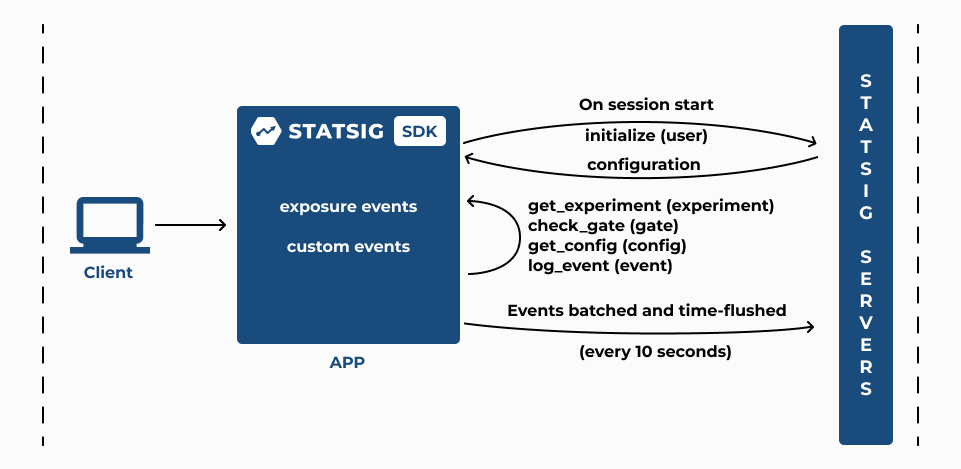
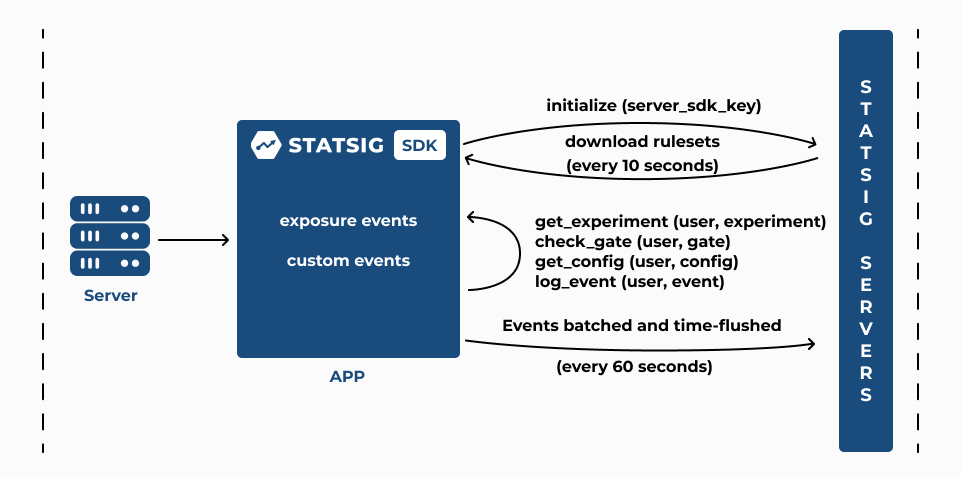
| Flushing Events | The SDK batches and flushes events every 60 seconds | The SDK batches and flushes events every 10 seconds |
| Updating Configurations | Poll Statsig servers for updates every 10 seconds by default (configurable), Streaming possible with some Server SDKs and the Statsig Forward Proxy | Configuration persists until next initialize or updateUser call; call initialize at the start of each user session |
Initialize and update logic
Client SDKs:
- Configuration persists until next
initializeorupdateUsercall - Call
initializeat the start of each user session
Server SDKs:
- Poll Statsig servers for updates every 10 seconds by default (configurable)
- Some SDKs support grpc streaming updates by connecting to the Statsig Forward Proxy
Available SDKs
Client SDKs
Server SDKs
For more information on each SDK, refer to their respective documentation pages.
Got questions? Join the Statsig engineering and product team on the Statsig Slack channel.
Was this helpful?