For AI agents: a documentation index is available at /llms.txt. Append .md to any page URL for markdown, or send Accept: text/markdown.
Project Access Management
Manage project-level access in Statsig by assigning roles to invited users, configuring permissions, and controlling who can edit gates and experiments.
This guide applies only to on-demand customers. If your organization has set up SSO, refer to the SSO Guides for information about managing access permissions through SSO.
In the Basic Settings page you can configure who has access to your project. Each person invited to a project receives a role that specifies their level of access.
Roles
The different Project Roles available are:
| Role | Description |
|---|---|
| Read-Only | Users with this role can only read data on the project. This includes reading gate and dynamic config configurations, experiment data, and metrics. Any actions users with these roles take that attempt to edit the configuration for the project fail. |
| Member | Users with this role can read data for a project and edit configurations within the project. This includes being able to create and modify: Feature Gates, Dynamic Configs, Holdouts, Experiments+, etc. |
| Admin | Users with this role have the same access as Member but can also modify project access settings. This includes inviting new users to the project and changing roles for existing users of the project. |
| Owner | Only the user that created a project receives the Owner role. The Owner has the same access as Admin but can also delete the project and configure automatic invitations for the project. If you need to change the Owner of a project, the current owner can change it by going to Settings > Project Members & Invites, selecting the person, and editing their role to Owner. |
Custom roles
Custom roles are for Enterprise contracts only. Reach out to the support team, your sales contact, or the Slack channel to enable Enterprise features.
Enterprise customers can customize roles used to assign permissions in Statsig. You can create new roles beyond Admin, Member, and Read-Only and choose what permissions these roles have. Common use cases include creating a Metrics Admin role or a Warehouse Admin role (for Statsig Warehouse Native).
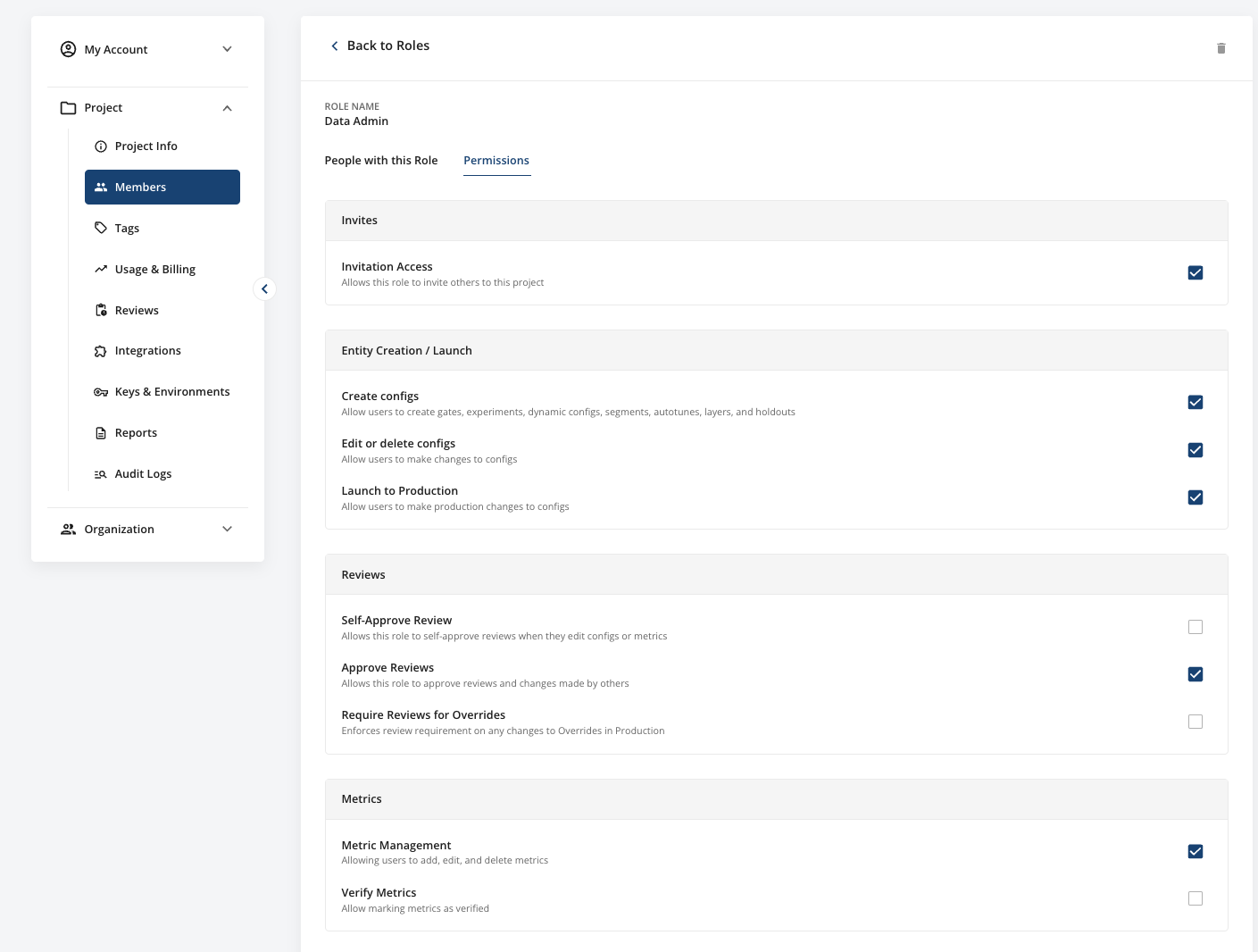
Granular delete permission for configs
Enterprise roles have separate Edit configs and Delete Configs permissions on the Role Permissions page. You can give a role the ability to edit and archive configs without also giving it the ability to permanently delete them.
Delete Configs is all-or-nothing. It grants or withholds permanent deletion for every config type at once, with no per-config-type breakdown. A role without this permission sees a tooltip on blocked delete buttons that reads "Your role is not permitted to permanently delete configs".
Turning off Edit configs for a role also turns off Delete Configs. Turning Edit configs back on doesn't restore Delete Configs, so grant it again if the role needs it.
Granular edit permissions by config type
For Enterprise roles, the Edit configs permission on the Role Permissions page expands into per-config-type rows, so you can grant a role edit access for specific config types instead of all of them. The rows are:
- Gates
- Holdouts
- Dynamic Configs
- Segments
- Experiments
- Layers
- Autotunes
- Parameter Stores
- Prompts
Grant the rows a role needs, and leave the rest unchecked to withhold edit access for those config types. These rows separate config types only. They don't create action-level permissions within a single type, so you can't narrow experiment edit access to allocation changes or gate edit access to toggling. Use required reviews and Teams when you need a narrower boundary.
Automatic project invitations
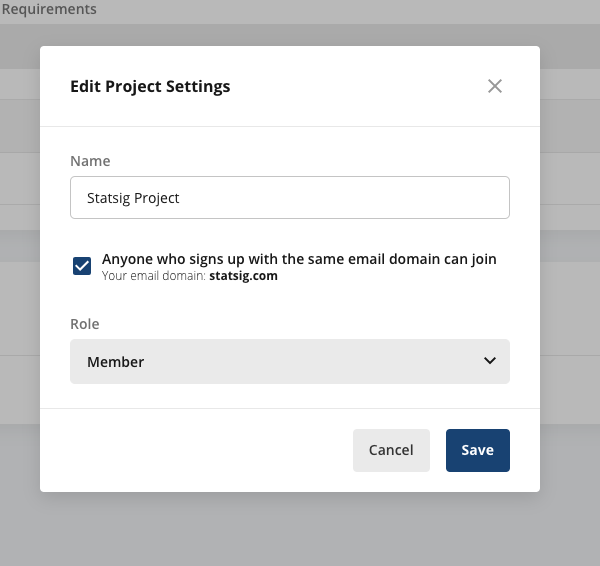
To simplify sending invitations for a project, you can allow users creating a new Statsig account to automatically join your project if their work email domain matches the owner's. For example, a project owner with an @statsig.com email can enable all new users signing up with an @statsig.com email to automatically join their project.
To enable this feature:
- Go to your Project Basic Settings page.
- Click Edit Project Settings.
- Toggle the checkbox labeled
Anyone who signs up with the same email domain can joinand choose the role that users receive.
Was this helpful?