For AI agents: a documentation index is available at /llms.txt. Append .md to any page URL for markdown, or send Accept: text/markdown.
Single Sign-On With Entra ID/Azure AD/Office 365
Configure Single Sign-On for Statsig with Azure AD (Microsoft Entra ID) using OIDC, including app registration, claims, and group-based role assignments.
This page sets up Single Sign-On (SSO) into Statsig with Microsoft Entra ID (formerly Azure AD) as your identity provider (IdP). You register the Statsig OIDC application in Entra ID, create a client secret, then enter the OIDC URL, client ID, and secret in your Statsig Project to connect the two. After setup, your team signs in to Statsig with their Entra ID accounts.
Requirements
- You must be the
Adminof the Statsig Project you intend to add SSO with Azure AD to. - You must be the Administrator of the Azure AD tenant you want to link.
Supported features
You can enable Service Provider (SP)-Initiated Authentication for Single Sign-On (SSO) using OIDC on Statsig to connect your Azure AD account to your Statsig Projects.
Configure SSO with Azure AD
Adding the Statsig OIDC application in Azure AD
- Navigate to App Registrations in the Azure portal.
- Click on the "New Registration" button to register the Statsig App.
- Provide a name (for example, Statsig Console) and finish creation. For the Redirect URI, use https://console.statsig.com/sso/oidc.
- Select Certificates and secrets for this app from the left nav and create a new client secret. Save the value; you can't retrieve this value after creation.
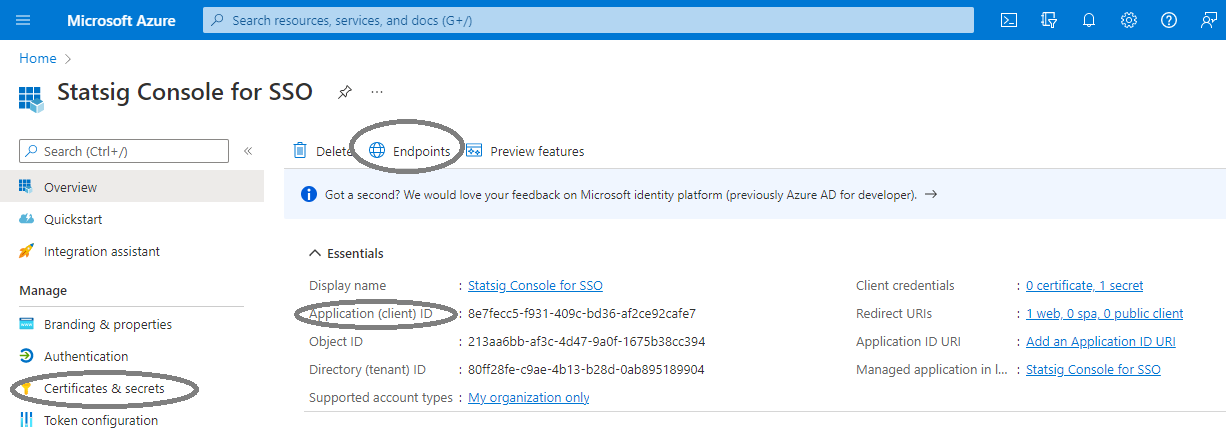
Enter three items in the Statsig SSO configuration:
- Find the Azure AD OIDC URL for this app under Overview -> Endpoints -> OpenID Connect metadata document. Truncate the string to end at "/v2.0".
- Get the client ID for this app from Overview -> Application (client) ID.
- Get the client secret value you saved after creating a new client secret.
After completing these steps, the Azure AD configuration is complete. Navigate to SSO configuration on your Statsig Project to finish setup.
Was this helpful?