For AI agents: a documentation index is available at /llms.txt. Append .md to any page URL for markdown, or send Accept: text/markdown.
SCIM Concepts
Core SCIM concepts in Statsig, including users, groups, role mappings, and how provisioning sync works between your identity provider and Statsig.
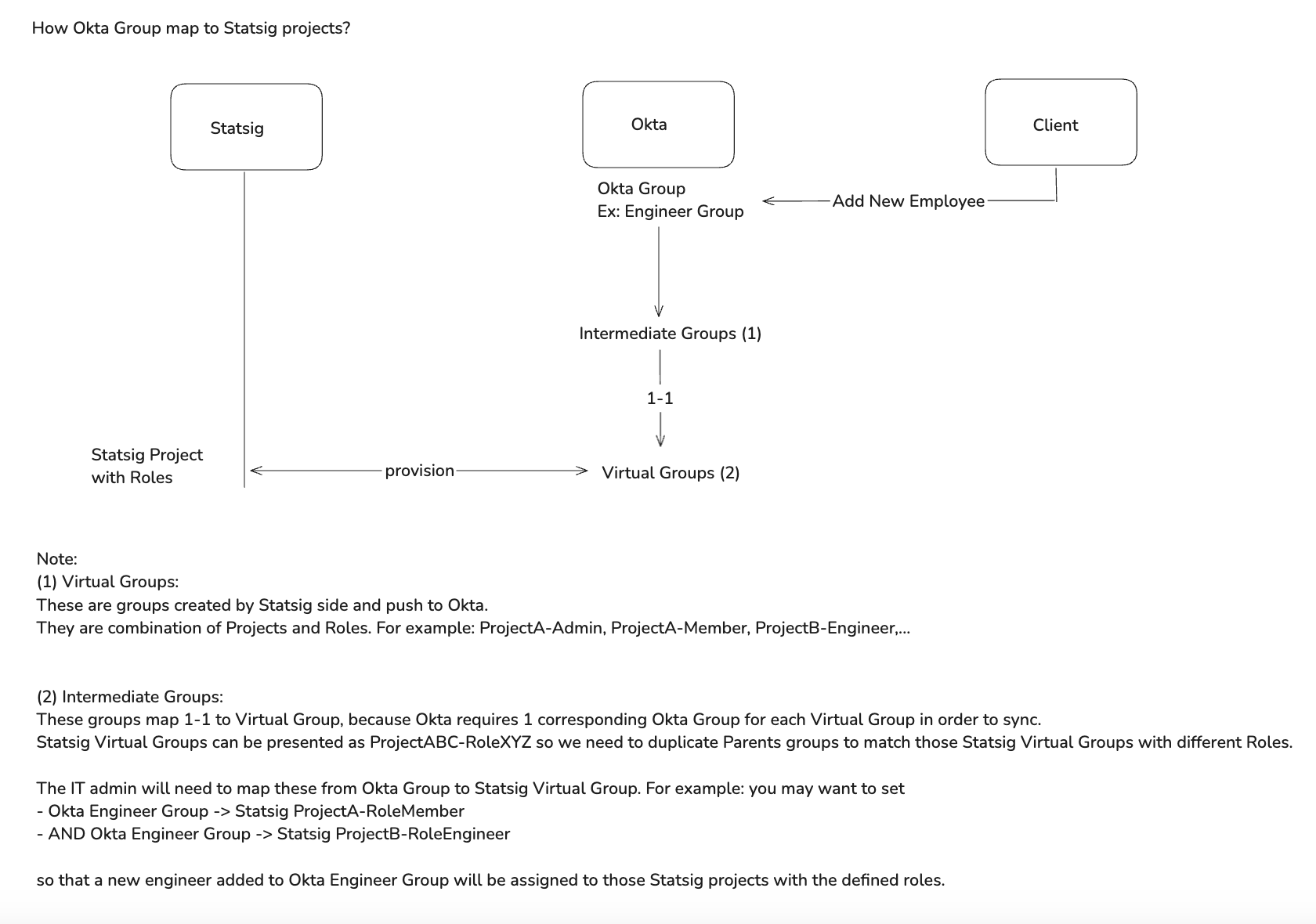
The Statsig SCIM implementation represents Statsig users at both the organization level and project level with their associated roles. There are two major resources in the SCIM implementation: Users and Groups.
Users
Users in SCIM correspond to Statsig users at the organization level. Statsig recognizes users who are part of the Statsig organization and have the organization email domain as SCIM users. Each user has the following attributes:
- First name
- Last name
- Email address (main identifier, must be unique within the IdP)
- Statsig ID (used by the IDP to identify the user in the Statsig SCIM API)
Groups
Groups in SCIM represent Statsig Projects with specific roles. For example, SCIM represents a project named "Project A" with a role of "Admin" as a group. The group name for this example project is Statsig-ProjectA-Admin.
Team x role groups
Team x Role Groups are a special type of group that represent Statsig Teams with specific roles. For example, SCIM represents a team named "Team A" with a role of "Admin" as a group. The group name for this example team is Statsig-ProjectName-TeamA-Admin.
Important notes about groups:
- SCIM doesn't support project-level deletion. SCIM supports team-level deletion.
- SCIM doesn't rename groups directly. To match an IdP group whose name you can't change to the
Statsig-<Project>-<Role>convention, use a group-name alias.
Group-name aliases
By default, SCIM matches an IdP group to a Statsig project and role only when the group name follows the Statsig-<Project>-<Role> convention. Group-name aliases remove that constraint. An alias maps an external group name that you can't change in your IdP, such as AB_STATSIG_PROJ_ADMIN, onto a Statsig project and role target. When SCIM provisions the aliased group, Statsig applies the mapped project and role even though the group name doesn't match the native convention.
Use aliases when your IdP enforces its own naming standard, or when a group name is managed centrally and can't be renamed. Each alias resolves to one target project and one target role, including custom roles.
Org admins manage aliases in the Statsig Console. For the steps, go to SCIM User Provisioning.
Alias changes take effect only after your IdP runs a full sync. IdPs link groups by ID and don't re-match existing groups on their own, so restart provisioning in your IdP (for example, Entra or Okta) after you add, repoint, or delete an alias.
General mapping between SCIM and Statsig
Was this helpful?