For AI agents: a documentation index is available at /llms.txt. Append .md to any page URL for markdown, or send Accept: text/markdown.
Client SDKs
Introduction to Statsig client SDKs for web, mobile, and TV platforms, covering common concepts, initialization, evaluation, and event logging.
Statsig client SDKs enable you to run experiments for user experience improvements in applications running on end-user devices. These applications include web and mobile apps, television and gaming apps, and other consumer electronics apps.
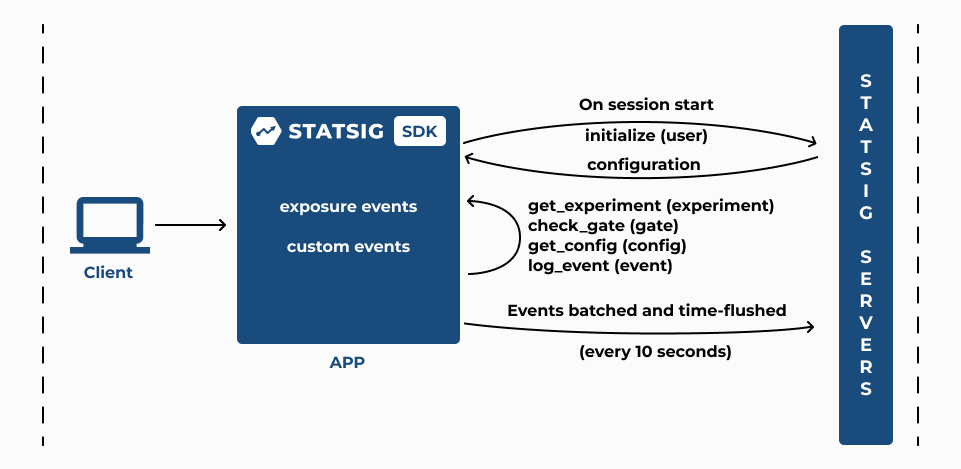
Implementing an experiment using a Statsig client SDK consists of three phases:
- Initialization
- Checking an Experiment
- Logging Custom Events
1. Initialization
The client SDK's
initializecall takes the client SDK key and a StatsigUser object. The SDK checks local storage for cached values from a previous initialization, then makes a network request to Statsig servers. This network call fetches precomputed configuration parameters for the specified user and stores them in local storage on the client device. If the request fails, the SDK uses previously cached values.Statsig's server latency for
initializecalls is generally 10ms (p50). Latency for a given client varies by distance from Statsig's servers. The client SDK has a built-in timeout of 3 seconds, configurable through StatsigOptions when you initialize the SDK.The StatsigUser object you provide in the
initializecall should include the userID field that identifies the end-user. The client SDK also generates a device identifier called stableID to enable experiments for users who aren't signed in and have no userID. You can override this stableID through StatsigOptions using the overrideStableID parameter when you initialize the SDK.
2. Checking an Experiment
After the
initializecall completes, any subsequentgetExperimentcall synchronously returns the variant Statsig assigns to your end-user. You define these parameters when you set up an experiment on the Statsig console. Use the returnedconfigobject togetthe value of the parameters required to implement the experiment variant.If your experiment is part of a Layer, the
getLayercall returns the variant Statsig assigns to your end-user. Use the returnedlayerobject togetthe value of the parameters required to implement the experiment variant.The
checkGatecall returns true if the end-user passes the feature gate rules you configure on the Statsig console, and false otherwise.The
getConfigcall returns the dynamic configuration based on the rules you configure to target your end-users. Use the returnedconfigobject togetthe value of the parameters required to serve a dynamically configured app experience.All of the above (
checkGate,getExperiment,getLayer, andgetConfig) log an exposure at the time of the check, before returning a value to the caller.The client SDK automatically flushes all accumulated exposure checks and events to the Statsig servers every 10 seconds.
You can also force this flush by calling
shutdown, which resets the state of the SDK. Callshutdownwhen the application is about to exit.Verify that Statsig records exposure events by checking the live Exposure Stream in the Statsig console under the Diagnostics tab of your experiment.
Statsig updates the Users and Checks charts in the Diagnostics tab hourly; it updates the Metrics Lift panel in experiment Results daily around 9am PST.
Updating Experiment configuration
- The experiment configuration you receive in response to the
initializecall persists until you make anotherinitializecall or anupdateUsercall. Make anotherinitializecall when the end-user starts a new session, and anupdateUsercall when an end-user attribute changes. Both calls trigger a re-evaluation of all experiment configuration for the end-user.
Using StatsigUser
Learn how to use StatsigUser while using a client SDK.
Setting Default Parameter Values
Statsig recommends including a default value when you make the get call to fetch a parameter value from the returned config object. Including a default value ensures that your application code falls back to that value for a parameter you haven't yet configured in an experiment, layer, or dynamic config in the Statsig console. For convenience, Statsig returns false by default when you check a gate you haven't yet configured.
You can test your experiment in development or staging environments by setting the environment tier in the initialize call. After you set the environment tier, you can verify that your exposure checks work. Switch the toggle to Show non-production logs in the Exposure Stream under the Diagnostics tab for your experiment in the Statsig console. By default, the Exposure Stream shows exposure checks that the SDK logs in production environments.
When you're testing in development or staging environments, you can target specific members of your team to see a specific variant. Add these members to the override list of a rule or variant group using the Manage Overrides option.
Cached values fallback
If the initialize request fails, the SDK falls back to the values it cached for the user. The cache key is important: because session-related values can change on every initialize call, using the full user object as the cache key prevents cache matches.
The SDK defines the cached "user" by the set of all IDs (the userID and all customIDs). If another field in the user object changes, the SDK still loads the cached values as long as the IDs are the same.
If you have fields that uniquely identify a user and aren't in userID or customIDs, you can override the cache key. Go to the documentation for your specific SDK. JavaScript-based SDKs (js, react, react native, expo) and Android/iOS native SDKs offer this option.
3. Logging custom events
The client SDK's
logEventcall takes a custom event to record for analyzing the impact of the experiment on your end-user experience.The client SDK automatically flushes all accumulated logged custom events to the Statsig servers every 10 seconds.
Statsig uses these custom events to compute metrics as part of your experiment Results. Statsig automatically updates the Metrics Lift panel in the experiment Results tab daily around 9am PST.
Third-party plugins can sometimes block custom event logging. To work around this, set up a custom proxy using your domain for log event API calls. For more information, go to Custom Proxy for Statsig API.
To start integrating, go to the technical docs by language:
Have questions? Join the Statsig engineering and product team on the Statsig Slack channel.
Was this helpful?