For AI agents: a documentation index is available at /llms.txt. Append .md to any page URL for markdown, or send Accept: text/markdown.
iOS/tvOS/macOS Repo Migration Guide
Migrate your iOS app from the legacy Statsig iOS repository to the new package, including API changes, package manager updates, and import changes.
Statsig renamed the iOS/macOS/tvOS repo from ios-sdk to statsig-kit.
Motivation
The Statsig Swift SDK repo previously lived at statsig-io/ios-sdk. Because Xcode uses the repository name as the package name, it used ios-sdk. Other packages, such as Spotify's, use the same repo name, which caused a conflict for apps trying to import both SDKs.
Because this issue was blocking some customers from using Statsig, Statsig renamed the repo.
Migration guide
Apps using Xcode
Optional Migration: The existing repo continues working because of GitHub's redirect.
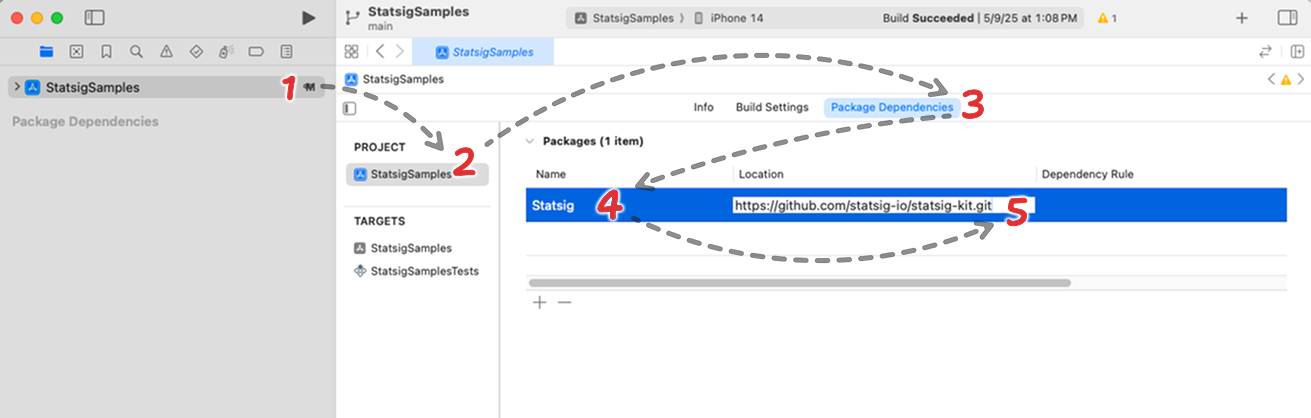
- In Xcode, click on your project on the sidebar. That's usually the item on the root of the tree view.
- Choose your project under the "Project" section of the second sidebar.
- Choose the "Package Dependencies" tab on the top.
- Find Statsig's SDK row.
- On the Location column, replace
https://github.com/statsig-io/ios-sdk.gitwithhttps://github.com/statsig-io/statsig-kit.git.
Packages using Package.swift
Required Migration: GitHub's repo redirect doesn't work for packages using Package.swift
- Open your Package.swift file.
- Replace
https://github.com/statsig-io/ios-sdk.gitwithhttps://github.com/statsig-io/statsig-kit.git. - Replace
ios-sdkwithstatsig-kit. - Build your project. If you get an error, build again at least once.
Was this helpful?