---
title: "React Native On-Device Evaluation"
description: "Statsig's React Native SDK for on-device evaluation with React Native applications."
product: general
lang: en
token_estimate: 4169
---
# React Native On-Device Evaluation
> For AI agents: a documentation index is available at [/llms.txt](/llms.txt). Append `.md` to any page URL for markdown, or send `Accept: text/markdown`.
- **Package:** `@statsig/react-native-bindings-on-device-eval` ([npm](https://www.npmjs.com/package/@statsig/react-native-bindings-on-device-eval))
- **Latest version:** 3.33.5
- **Repository:** [js-client-monorepo](https://github.com/statsig-io/js-client-monorepo)
> **Info:**
>
> **Tip:** Get started quickly with one of the [sample apps](https://github.com/statsig-io/js-client-monorepo/tree/main/samples)!
> **Info:**
>
> Statsig recommends its normal (remote evaluation) SDKs for most client applications. Understand the use case and privacy risks by reading the [On-Device Eval SDK overview](https://docs.statsig.com/client/onDeviceOverview). On-device evaluation SDKs are for Enterprise & Pro Tier only.
These SDKs use a different paradigm than their precomputed counterparts ([JS](https://docs.statsig.com/client/javascript-sdk), [Android](https://docs.statsig.com/client/Android), [iOS](https://docs.statsig.com/client/iosClientSDK)). Rather than requiring a user upfront, you can check gates/configs/experiments for any set of user properties. You can do this because the SDK downloads a complete representation of your project and evaluates checks in real time.
### Pros
- No network request needed when changing user properties: check the gate/config/experiment locally
- Can bring your own CDN or synchronously initialize with a preloaded project definition
- Lower latency to download configs cached at the edge, rather than evaluated for a given user (which can't be cached as much)
### Cons
- The client has access to the entire project definition: your client key exposes the names and configurations of all experiments and feature flags. Refer to [client key with server permission best practices](https://docs.statsig.com/access-management/api-keys#client-keys-with-server-permissions).
- Payload size is strictly larger than what the traditional SDKs require
- Evaluation performance is slightly slower - rather than looking up the value, the SDK must actually evaluate targeting conditions and an allocation decision
- Doesn't support ID list segments with > 1000 IDs
- Doesn't support IP or User Agent based checks (Browser Version/Name, OS Version/Name, IP, Country)
> **Note:**
>
> Since `@statsig/react-native-bindings-on-device-eval` works in conjunction with `@statsig/js-on-device-eval-client`, documentation on the [JavaScript On-Device Evaluation SDK](https://docs.statsig.com/client/jsOnDeviceEvaluationSDK) is also relevant for React Native implementations.
## Set up the SDK
1. **Install the SDK**
## Installation
Statsig uses a multi-package strategy. Install both the Statsig client and the React Native specific bindings.
#### npm
```shell
npm install @statsig/react-native-bindings-on-device-eval
```
#### yarn
```shell
yarn add @statsig/react-native-bindings-on-device-eval
```
### Peer dependencies
The `@statsig/react-native-bindings-on-device-eval` package has peer dependencies which you may also need to install if they aren't already in your project.
#### npm
```shell
npm install @react-native-async-storage/async-storage
```
#### yarn
```shell
yarn add @react-native-async-storage/async-storage
```
2. **Initialize the SDK**
Initialize the SDK with a client SDK key from the ["API Keys" tab on the Statsig console](https://console.statsig.com/api_keys). These keys are safe to embed in a client application.
Along with the key, pass in a [User Object](#statsig-user) with the attributes you'd like to target later on in a gate or experiment.
> **Warning:**
>
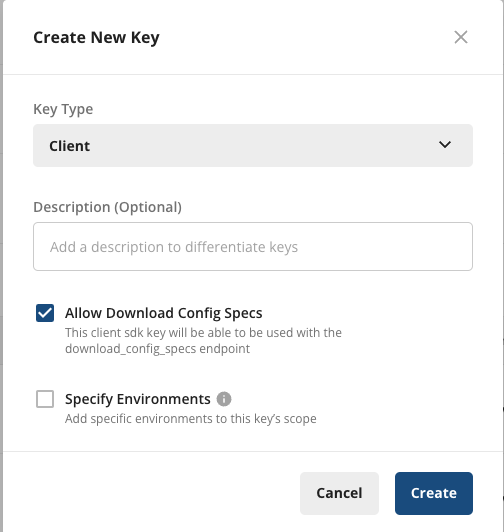
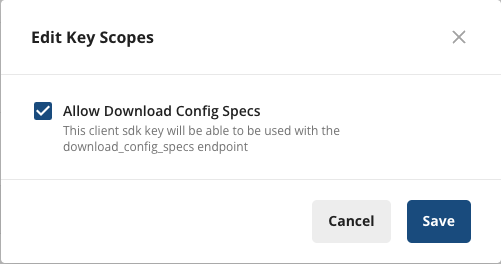
> For On-Device Evaluation, you need to add the **"Allow Download Config Specs"** scope. Client keys can't download the project definition for on-device evaluation by default.
>
> While client keys are safe to include, always keep Server and Console keys private.
#### How to add the scope
#### New SDK Keys
When creating a new client key, select **"Allow Download Config Specs"**
#### Existing SDK Keys
To add the scope to an existing key, under **Project Settings** → **API Keys** → **Client API Keys**, select **Actions** → **Edit Scopes**, and select **"Allow Download Config Specs"**, then **Save**.
## React Native specific setup
To set up Statsig in a React Native component tree, use the RN-specific `StatsigProviderOnDeviceEvalRN`. `StatsigProviderOnDeviceEvalRN` automatically switches the SDK's storage layer, using [AsyncStorage](https://github.com/react-native-async-storage) instead of LocalStorage (which is unavailable in RN environments).
```tsx
import {
StatsigProviderOnDeviceEvalRN,
useFeatureGate,
} from '@statsig/react-native-bindings-on-device-eval';
function Content() {
const gate = useFeatureGate('a_gate');
return Reason: {gate.details.reason}
; // Reason: Network or NetworkNotModified
}
function App() {
return (
...}
>
);
}
```
## Working with the SDK
## Set up a StatsigUser
To interact with the SDK, you need to create a `StatsigUser` object. You can find the full definition of this object in the [StatsigUser reference](#statsig-user).
```typescript
const myUser = {
userID: "a-user",
email: "user@statsig.com"
};
```
## React hooks
### useGateValue or useFeatureGate
```typescript
import { useGateValue } from '@statsig/react-native-bindings-on-device-eval';
const gateValue = useGateValue('a_gate', { userID: "a-user" }); // <-- Returns the boolean value
if (gateValue) {
//
}
```
```typescript
import { useFeatureGate } from '@statsig/react-native-bindings-on-device-eval';
const gate = useFeatureGate('a_gate', { userID: "a-user" }); // <-- Returns the FeatureGate object
if (gate.value) {
//
}
```
### useDynamicConfig
```typescript
import { useDynamicConfig } from '@statsig/react-native-bindings-on-device-eval';
function MyComponent() {
const config = useDynamicConfig('a_config', { userID: 'a-user' }); // <-- Returns the DynamicConfig object
const bgColor = config.value['bg_color'] as string;
return ;
}
```
### useExperiment
```typescript
import { useExperiment } from '@statsig/react-native-bindings-on-device-eval';
function MyComponent() {
const experiment = useExperiment('an_experiment', { userID: 'a-user' }); // <-- Returns the Experiment object
const bgColor = experiment.value['bg_color'] as string;
return ;
}
```
### useLayer
```typescript
import { useLayer } from '@statsig/react-native-bindings-on-device-eval';
function MyComponent() {
const layer = useLayer('a_layer', { userID: 'a-user' }); // <-- Returns the Layer object
const bgColor = layer.getValue('bg_color') as string;
return ;
}
```
### Code examples
The repository includes working sample apps:
- [React Native Examples](https://github.com/statsig-io/js-client-monorepo/tree/main/samples)
### Logging custom events
### Logging an event
After setting up a Feature Gate or Experiment, you may want to track custom events to see how new features or different experiment groups affect those events. Call the Log Event API for the event. You can also provide a value and metadata object to log with the event:
```typescript
import type { StatsigEvent } from '@statsig/client-core';
// log a simple event
myStatsigClient.logEvent('my_simple_event');
// or, include more information by using a StatsigEvent object
const myEvent: StatsigEvent = {
eventName: 'add_to_cart',
value: 'SKU_12345',
metadata: {
price: '9.99',
item_name: 'diet_coke_48_pack',
},
};
myStatsigClient.logEvent(myEvent);
```
### Flushing logged events
`flush()` sends queued events immediately. Use `shutdown()` when your app is exiting.
```typescript
await myStatsigClient.flush();
```
## Statsig User
You need to provide a StatsigUser object to check/get your configurations. Pass as much information as possible to take advantage of advanced gate and config conditions.
Most of the time, you need the `userID` field to provide a consistent experience for a given user (refer to [logged-out experiments](https://docs.statsig.com/guides/first-device-level-experiment) to understand how to correctly run experiments for logged-out users).
Besides `userID`, Statsig also supports `email`, `ip`, `userAgent`, `country`, `locale` and `appVersion` as top-level fields on StatsigUser. In addition, you can pass any key-value pairs in an object/dictionary to the `custom` field and create targeting based on them.
After the user logs in or their attributes change, call `updateUser` with the updated `userID` and any other updated user attributes:
> **Note:**
>
> For the React Native On-Device Evaluation SDK, you pass the `StatsigUser` object directly into each evaluation method (`checkGate`, `getConfig`, etc.) rather than during initialization.
> **Note:**
>
> Unlike precomputed evaluation SDKs, the on-device evaluation SDK doesn't have an `updateUser` method since it evaluates gates/configs/experiments in real-time for any user object you pass in.
## Client event emitter
You can subscribe to StatsigClientEvents (not to be confused with [StatsigEvent](#logging-an-event)). These events occur at various stages while using the Statsig client. Subscribe to specific events by specifying the StatsigClientEvent name, or subscribe to all events by using the wildcard token `'*'`.
```typescript
import type {
AnyStatsigClientEvent,
StatsigClientEvent,
StatsigClientEventCallback,
} from '@statsig/client-core';
const onAnyClientEvent = (event: AnyStatsigClientEvent) => {
console.log("Any Client Event", event);
};
const onLogsFlushed = (event: StatsigClientEvent<'logs_flushed'>) => {
console.log("Logs", event.events);
};
// subscribe to an individual StatsigClientEvent
myStatsigClient.on('logs_flushed', onLogsFlushed);
// or, subscribe to all StatsigClientEvents
myStatsigClient.on('*', onAnyClientEvent);
// then later, unsubscribe from the events
myStatsigClient.off('logs_flushed', onLogsFlushed);
myStatsigClient.off('*', onAnyClientEvent);
```
You can find the [full list of events and descriptions](https://github.com/statsig-io/js-client-monorepo/blob/main/packages/client-core/src/StatsigClientEventEmitter.ts).
## Statsig Options
You can configure SDK behavior by passing a `StatsigOptions` object during initialization.
| Name | Type | Required | Default | Description |
| --- | --- | --- | --- | --- |
| api | string | No | — | The API to use for all SDK network requests. You shouldn't need to override this unless you have another API that implements the Statsig API endpoints. |
| Name | Type | Required | Default | Description |
| --- | --- | --- | --- | --- |
| logEventUrl | string | No | — | The URL used to flush queued events through a POST request. Takes precedence over `StatsigOptions.api`. |
| Name | Type | Required | Default | Description |
| --- | --- | --- | --- | --- |
| logEventBeaconUrl | string | No | — | The URL used to flush queued events through `window.navigator.sendBeacon` (web only). Takes precedence over `StatsigOptions.api`. |
| Name | Type | Required | Default | Description |
| --- | --- | --- | --- | --- |
| downloadConfigSpecsUrl | string | No | — | The URL used to fetch your latest Statsig specifications. Takes precedence over `StatsigOptions.api`. |
| Name | Type | Required | Default | Description |
| --- | --- | --- | --- | --- |
| environment | StatsigEnvironment | No | — | An object you can use to set environment variables that apply to all of your users in the same session. |
| Name | Type | Required | Default | Description |
| --- | --- | --- | --- | --- |
| overrideStableID | string | No | — | Overrides the auto-generated stableID that Statsig sets for the device. |
| Name | Type | Required | Default | Description |
| --- | --- | --- | --- | --- |
| logLevel | LogLevel | No | — | How much information the SDK prints to the console. |
| Name | Type | Required | Default | Description |
| --- | --- | --- | --- | --- |
| dataAdapter | SpecsDataAdapter | No | — | Implementing this type allows customization of the initialization. Refer to [Using SpecsDataAdapter](https://docs.statsig.com/client/javascript-mono/UsingEvaluationsDataAdapter) for details. |
| Name | Type | Required | Default | Description |
| --- | --- | --- | --- | --- |
| networkTimeoutMs | number | No | — | The maximum amount of time (in milliseconds) that any network request can take before timing out. |
| Name | Type | Required | Default | Description |
| --- | --- | --- | --- | --- |
| loggingBufferMaxSize | number | No | — | The maximum number of events to batch before flushing logs to Statsig. |
| Name | Type | Required | Default | Description |
| --- | --- | --- | --- | --- |
| loggingIntervalMs | number | No | — | How often (in milliseconds) to flush logs to Statsig. |
| Name | Type | Required | Default | Description |
| --- | --- | --- | --- | --- |
| overrideAdapter | OverrideAdapter | No | — | An implementor of `OverrideAdapter` that alters evaluations before returning them to the caller of a check api (checkGate/getExperiment etc). |
## Manual exposures
> **Warning:**
>
> Manual logging is error-prone and can often introduce issues like uneven exposures, which compromise experiment results.
You can query your gates/experiments without triggering an exposure, and manually log the exposures later:
### Gates
```typescript
// Check gate with exposure disabled
const result = myStatsigClient.checkGate('a_gate_name', { user, disableExposureLog: true });
// Manually log the exposure
myStatsigClient.checkGate('a_gate_name', { user });
```
### Configs
```typescript
// Get config with exposure disabled
const config = myStatsigClient.getConfig('a_dynamic_config_name', { user, disableExposureLog: true });
// Manually log the exposure
myStatsigClient.getConfig('a_dynamic_config_name', { user });
```
### Experiments
```typescript
// Get experiment with exposure disabled
const experiment = myStatsigClient.getExperiment('an_experiment_name', { user, disableExposureLog: true });
// Manually log the exposure
myStatsigClient.getExperiment('an_experiment_name', { user });
```
### Layers
```typescript
// Get layer with exposure disabled
const layer = myStatsigClient.getLayer('a_layer_name', { user, disableExposureLog: true });
const paramValue = layer.get('a_param_name', 'fallback_value');
// Manually log the exposure
const layer = myStatsigClient.getLayer('a_layer_name', { user });
const paramValue = layer.get('a_param_name', 'fallback_value');
```
## Lifecycle & advanced usage
## Shutting Statsig down
The SDK keeps event logs in the client cache and flushes them periodically to save data and battery usage. Because the SDK flushes only periodically, it may not have flushed some events when your app shuts down.
To ensure the SDK flushes or saves all logged events locally, shut down Statsig when your app is closing:
```typescript
await myStatsigClient.shutdown();
```
## Data adapter
The `EvaluationsDataAdapter` type defines how the `StatsigClient` fetches and caches data during initialize and update operations. By default, the `StatsigClient` uses `StatsigEvaluationsDataAdapter`, which fetches data synchronously from local storage and asynchronously from Statsig's servers. Refer to [Using EvaluationsDataAdapter](https://docs.statsig.com/client/javascript-mono/UsingEvaluationsDataAdapter) for details and example usage.
## Additional resources
- [On-Device Evaluation SDK Overview](https://docs.statsig.com/client/onDeviceOverview)
- [JavaScript On-Device Evaluation SDK](https://docs.statsig.com/client/jsOnDeviceEvaluationSDK)
- [Client Keys with Server Permissions](https://docs.statsig.com/access-management/api-keys#client-keys-with-server-permissions)
- [Using EvaluationsDataAdapter](https://docs.statsig.com/client/javascript-mono/UsingEvaluationsDataAdapter)
- [Debugging SDK Evaluations](https://docs.statsig.com/sdks/debugging)